Mailchimp looks cheap until your list starts to grow.
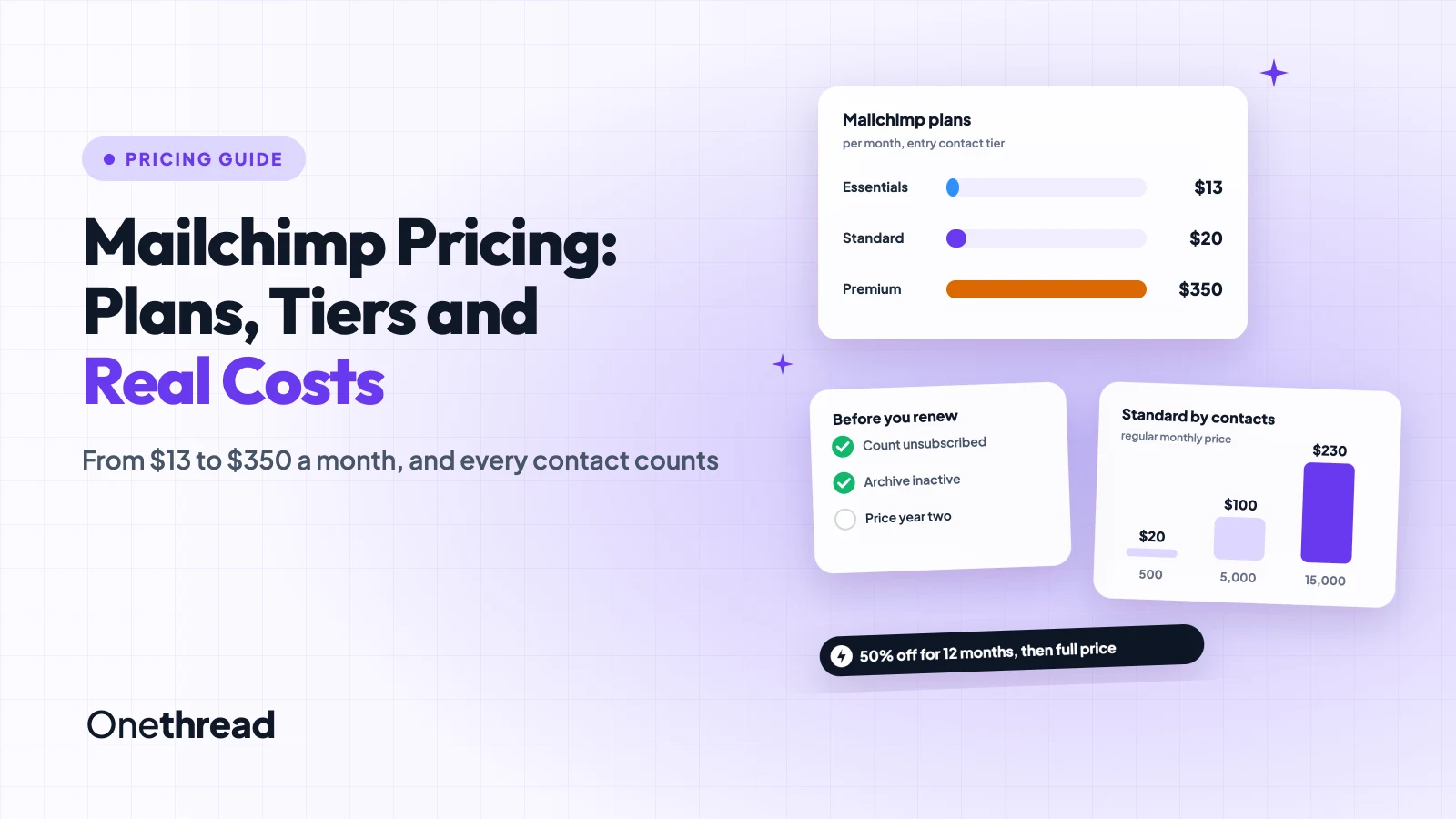
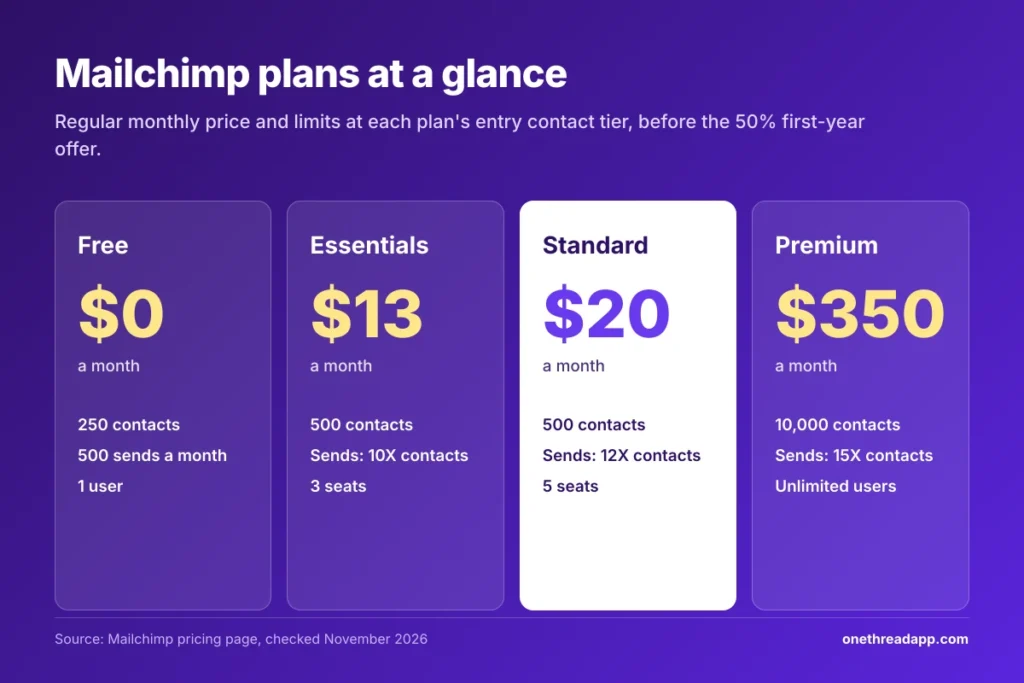
Mailchimp pricing starts at $13 a month for Essentials, $20 for Standard and $350 for Premium at the entry contact tier. New customers pay half for the first 12 months. The Free plan covers 250 contacts, and every paid price climbs with your contact count.
The catch: unsubscribed contacts count too, so you can pay for people you can’t email.
We checked Mailchimp’s pricing page at all 20 contact tiers, five help center articles and seven top-ranking pricing guides.
Here’s what each plan costs you, where the bill jumps, and how to keep it down.
Key Points
- Mailchimp costs $13 (Essentials), $20 (Standard) or $350 (Premium) a month at the entry tier, before the 50% first-year offer. The Free plan covers 250 contacts and 500 sends a month.
- Your contact count sets the price. Standard costs $20 for up to 500 contacts, $100 for 5,000 and $230 for 15,000, and unsubscribed contacts count toward that total.
- Archive the contacts you no longer email. Archived and cleaned contacts don’t count, and Mailchimp bills on your highest contact count in each billing period.
- Plan for year two. The 50% offer ends after 12 months, so 5,000 contacts on Standard go from $50 to $100 a month.
How Much Does Mailchimp Cost per Month?
Mailchimp costs $0 to $1,600 a month on its published plans. The price depends on the plan and your contact count. Above 200,000 contacts, Premium moves to a custom quote from sales.
Each paid plan has a set price for each contact tier. We stepped through all 20 tiers on Mailchimp’s pricing page in US dollars. These are the regular monthly prices, before the first-year offer.
| Contacts | Essentials | Standard | Premium |
|---|---|---|---|
| Up to 500 | $13 | $20 | $350 |
| 501 to 1,500 | $26.50 | $45 | $350 |
| 1,501 to 2,500 | $45 | $60 | $350 |
| 2,501 to 5,000 | $75 | $100 | $350 |
| 5,001 to 10,000 | $110 | $135 | $350 |
| 10,001 to 15,000 | $180 | $230 | $465 |
| 15,001 to 20,000 | $230 | $285 | $535 |
| 20,001 to 25,000 | $270 | $310 | $620 |
| 25,001 to 30,000 | $300 | $340 | $685 |
| 30,001 to 40,000 | $340 | $410 | $750 |
| 40,001 to 50,000 | $385 | $450 | $815 |
| 50,001 to 75,000 | Not offered | $630 | $900 |
| 75,001 to 100,000 | Not offered | $800 | $1,025 |
| 100,001 to 130,000 | Not offered | Not offered | $1,150 |
| 130,001 to 150,000 | Not offered | Not offered | $1,325 |
| 150,001 to 200,000 | Not offered | Not offered | $1,600 |
Premium starts at the 10,000-contact tier, so a small list pays $350 either way. Essentials stops at 50,000 contacts, and Standard stops at 100,000.
Example: A list that grows from 500 to 501 contacts moves Standard from $20 to $45 a month. That one extra contact adds $25 a month, or $300 a year.
Prices leave out sales tax. Mailchimp takes major credit cards, PayPal and, in some countries, direct debit.
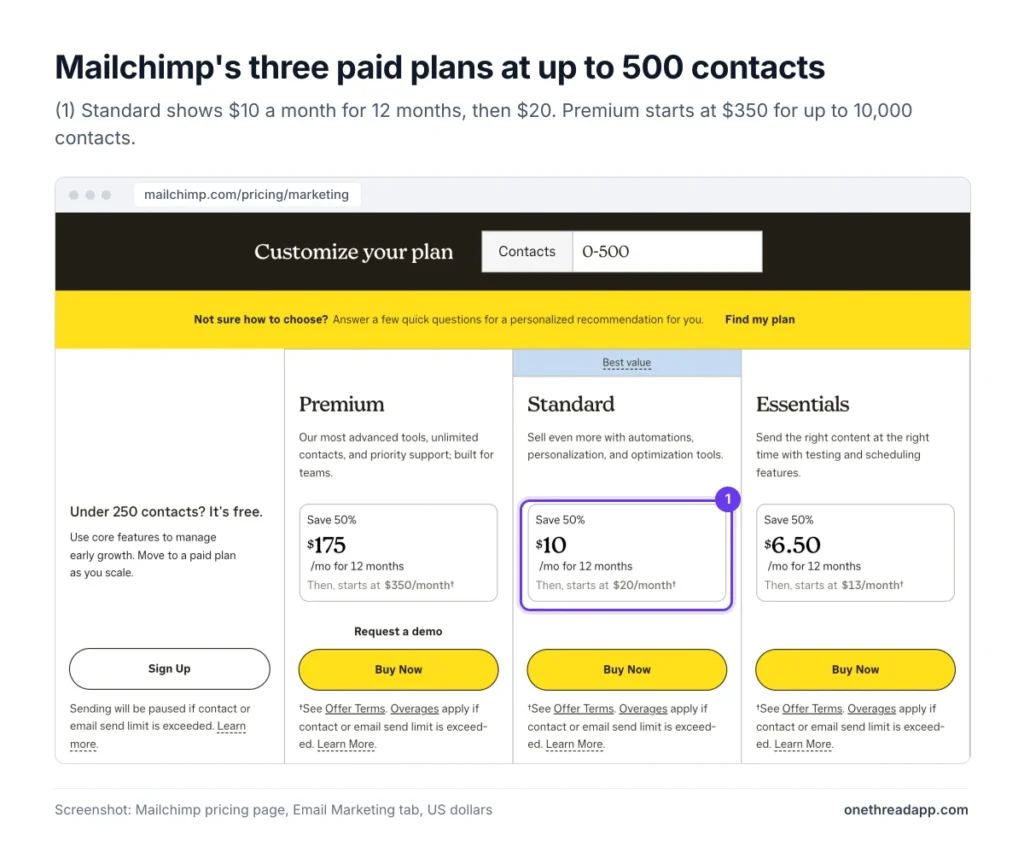
Sources: Mailchimp pricing page, Mailchimp help center on pricing plans.
What Does the Mailchimp Free Plan Include?
The Mailchimp Free plan costs $0 for up to 250 contacts. It allows 500 email sends a month, with no more than 250 in one day.
You get 1 user, 1 audience, popup forms and a limited set of pre-built templates. Support is email only, and only for your first 30 days.
The gaps show up fast. Free has no email scheduling, no A/B testing and no generative AI. Mailchimp branding also stays on every email you send.
The limits are hard stops. If you pass 250 contacts or 500 sends, Mailchimp pauses sending until you upgrade or remove contacts. You can still edit emails and collect new contacts while sending is paused.
So treat Free as a test run for a brand-new list. Use it to learn the builder and avoid the common email marketing mistakes new senders make. Our free newsletter generator can draft your first issues while the list is still small.
Pricing: $0 for up to 250 contacts, with no time limit.
Best For
- New senders with a small list who email a few times a month.
Pros
- No cost and no time limit.
- Popup forms to grow your list.
- Pre-built templates, though only a limited set.
Cons
- Only 250 contacts and 500 sends a month.
- Mailchimp branding stays on every email.
- No scheduling, A/B testing or generative AI.
What Does the Mailchimp Essentials Plan Include?
The Mailchimp Essentials plan starts at $13 a month for up to 500 contacts. It goes up to 50,000 contacts, where it costs $385 a month.
Essentials lets you send 10 times your contact limit each month. It includes 3 user seats, 3 audiences, email scheduling and popup forms. It also removes Mailchimp branding from your emails.
Support is 24/7 by email and chat. You also get a 14-day free trial before the first charge.
The limits sit in automation and design. Automation flows stop at 4 steps, and there’s no generative AI. Branded templates, custom reports and dynamic content are missing too. You can build custom-coded templates, but you must upgrade to send them.
Example: A shop with 2,000 contacts pays $45 a month on Essentials. That buys up to 20,000 sends a month, enough for a weekly email to the whole list.
Pricing: From $13 a month for up to 500 contacts, rising to $385 at 50,000 contacts.
Best For
- Small businesses that send a regular newsletter and don’t need advanced automations.
Pros
- Lowest paid price at every contact tier.
- Scheduling and branding removal included.
- 24/7 email and chat support.
Cons
- Automation flows capped at 4 steps.
- No generative AI, custom reports or dynamic content.
- Can’t add transactional email.
What Does the Mailchimp Standard Plan Include?
The Mailchimp Standard plan starts at $20 a month for up to 500 contacts. Mailchimp labels it the “Best value” plan, and it scales up to 100,000 contacts.
Standard lets you send 12 times your contact limit each month. It includes 5 user seats, 5 audiences and 4 user roles. You get up to 200 automation flows, predictive segments, custom reports and dynamic content.
Generative AI comes at no extra cost on Standard. So do branded templates and sending custom-coded templates. New and upgraded accounts also get 1 personalized onboarding session in their first 90 days.
This is the plan for teams that run automated emails, such as welcome series or abandoned cart reminders. If you’re planning your first flows, our guide to a marketing automation workflow covers the setup.
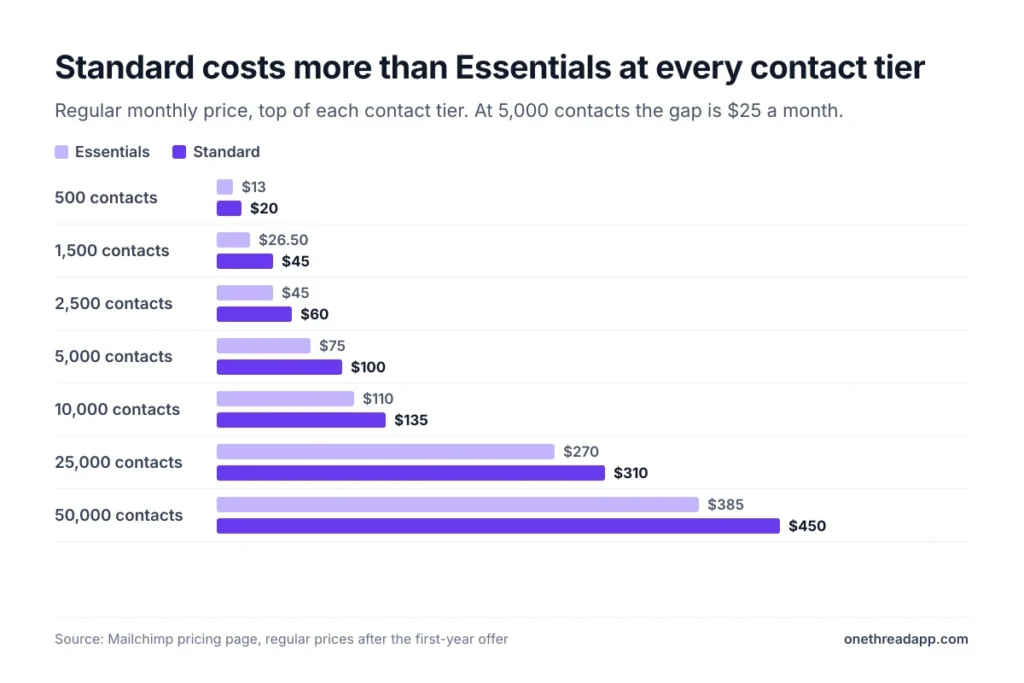
Example: At 5,000 contacts, Standard costs $100 a month and Essentials costs $75. The $25 gap adds up to $300 a year for the extra automations and AI.
Pricing: From $20 a month for up to 500 contacts, rising to $800 at 100,000 contacts.
Best For
- Growing teams that rely on automated email flows and want AI help with copy.
Pros
- Up to 200 automation flows.
- Generative AI at no extra cost.
- Can add transactional email.
Cons
- Costs $45 at 501 to 1,500 contacts, against $26.50 on Essentials.
- Only 5 user seats.
- No phone support or Enterprise SSO.
What Does the Mailchimp Premium Plan Include?
The Mailchimp Premium plan starts at $350 a month for up to 10,000 contacts. It climbs to $1,600 a month at 200,000 contacts, and larger lists get a custom quote.
Premium lets you send 15 times your contact limit each month. Users and audiences are unlimited, with 5 user roles. It adds Enterprise SSO, multivariate testing, and phone and priority support.
Onboarding is the other big extra. Premium includes 4 personalized onboarding sessions and a dedicated onboarding specialist. New Premium customers can also ask sales about migration services and a 1-month free trial.
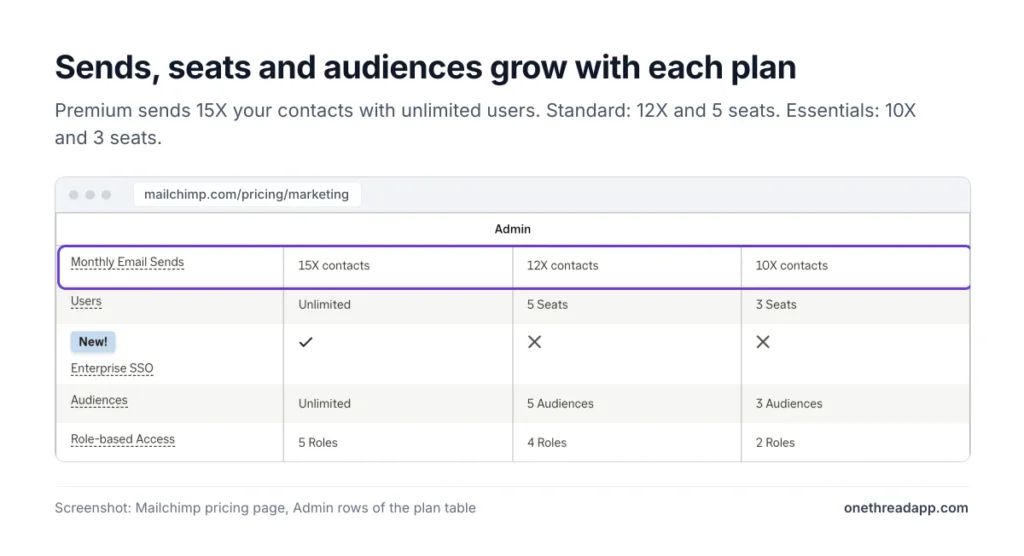
The price gap is large. Most of what a small team uses day to day already sits in Standard.
Example: At 10,000 contacts, Premium costs $350 a month and Standard costs $135. Premium adds $215 a month, or $2,580 a year.
Pricing: From $350 a month for up to 10,000 contacts, rising to $1,600 at 200,000 contacts.
Best For
- Large marketing teams that need many seats, SSO and phone support.
Pros
- Unlimited users and audiences.
- Highest send limit at 15 times your contacts.
- Phone support and 4 onboarding sessions.
Cons
- Costs $350 even for a list of 500 people.
- Price climbs fast past 10,000 contacts.
- Most features small teams need are already in Standard.
How Does Mailchimp Count Contacts and Sends?
Mailchimp counts every subscribed, unsubscribed and non-subscribed contact toward your plan. Archived, cleaned and deleted contacts don’t count, so they don’t change your price.
Sends work on a simpler rule. Each email you send to one contact counts as one send. Test emails and transactional emails count toward the monthly sending limit too.
Mailchimp keeps unsubscribed contacts in your audience, so they keep counting until you archive or delete them.
Your send limit is a multiple of your contact tier. Essentials allows 10 times, Standard 12 times and Premium 15 times.
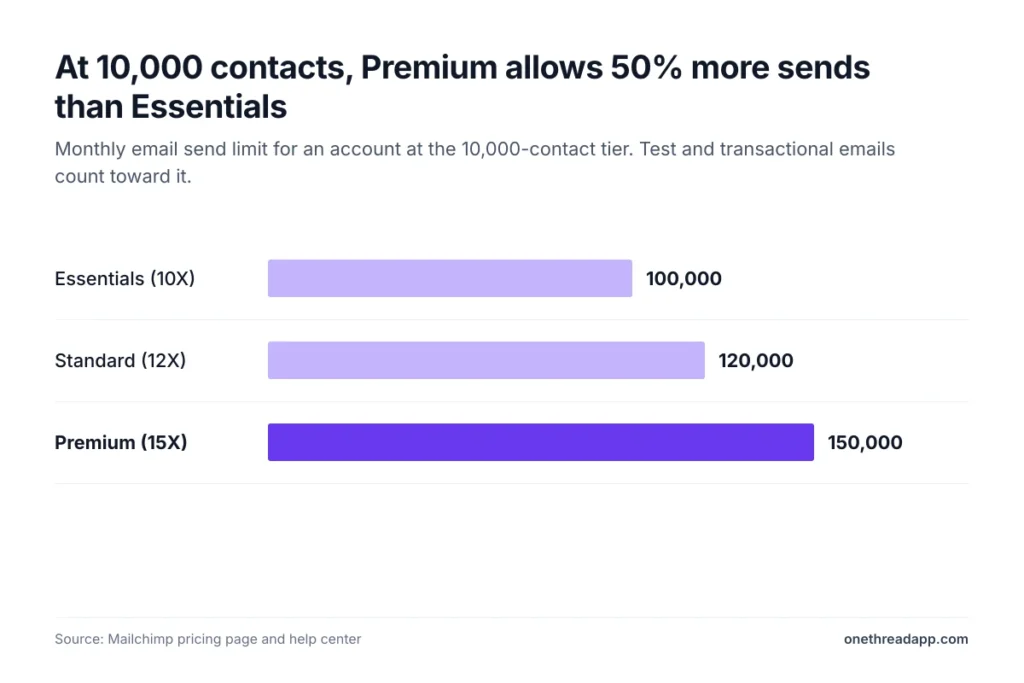
Example: Say you have 2,400 subscribed contacts and 200 who unsubscribed. Mailchimp counts 2,600, which moves Standard from the $60 tier to the $100 tier. Archive those 200 contacts and you drop back to $60, saving $480 a year.
Example: On Standard with 5,000 contacts, you can send 60,000 emails a month. That’s 12 emails to every contact, or about 3 a week.
So list cleanup is a pricing task, not just a deliverability task. Mailchimp’s help center suggests using segments to find inactive contacts, then archiving them. Archived contacts keep their history, and you can bring them back later. We’d review unsubscribed and inactive contacts before every billing date.
What Happens When You Go Over Your Mailchimp Limit?
On a paid plan, Mailchimp doesn’t stop your emails when you go over. It adds a charge to your next bill instead.
That charge comes in add-on contact blocks. Each block adds extra contacts and sends. If you go over by more than one block’s worth, you pay for several blocks.
Mailchimp doesn’t publish block prices. Its help center says the cost and size depend on your plan and tier. On Standard, a block of 1,000 contacts adds 12,000 sends, since sends follow the same 12 times rule.
Billing uses your highest contact count during the billing period. So deleting contacts late in the month won’t lower that month’s bill.
During a free trial, Mailchimp may move you to a cheaper tier if your list grows. On the Free plan, there are no overages. Sending simply pauses at the limit.
If the growth is permanent, move up a tier. If it’s short term, archive inactive contacts and send to smaller segments instead of the whole audience.
Top Tip: Check the Account Overview page a few days before your billing date. It shows how close you are to your contact and send limits, so you can archive contacts before Mailchimp counts them.
How Much Do Mailchimp Add-Ons Cost?
Three Mailchimp extras sit outside the plan price: transactional email, SMS credits and Pay As You Go credits. Mailchimp’s offer terms leave all three out of the 50% first-year deal. So budget for each one at its full price from day one.
Transactional Email (Mandrill)
Mailchimp sells transactional email, such as receipts and password resets, in blocks of 25,000 emails. The block price falls as you send more.
You pay $20 a block for 1 to 20 blocks, which covers up to 500,000 emails a month. The price drops to $18 a block up to 1 million emails and $16 up to 2 million. It falls to $14 up to 3 million, $12 up to 4 million and $10 above that. A dedicated IP adds $29.95 a month.
Transactional email works only with Standard or Premium. Essentials isn’t eligible. New users can get up to 500 free sends to try it.
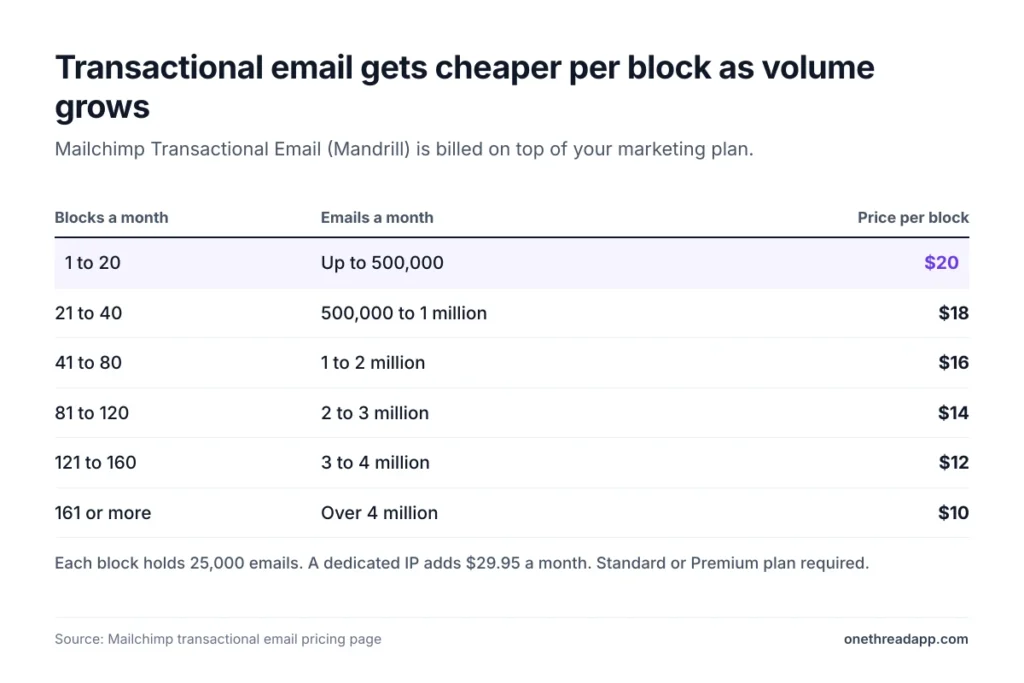
Example: A store that sends 100,000 order emails a month needs 4 blocks. That’s 4 × $20 = $80 a month on top of its Standard plan.
SMS Marketing Credits
Mailchimp SMS is an add-on for paid plans in select countries. You must apply and accept its terms before you can buy credits.
Credits renew each month with your marketing plan. Unused credits expire and don’t roll over. The credits a message needs depend on the country and message type, and long texts split into several messages.
Mailchimp doesn’t list SMS prices on its pricing page. Email Vendor Selection and Retainful both list 1,000 credits for $20 a month as the smallest block. MMS works only on Standard and Premium, for contacts in the US and Canada.
Pay As You Go Credits
Pay As You Go swaps the monthly fee for email credits. Each email to one contact uses one credit, and credit blocks start at 5,000.
Credits expire after 12 months. Test emails, automations and bounced emails all use credits. The plan includes the same features as Essentials.
Mailchimp shows Pay As You Go prices only inside your account. Third-party guides don’t agree on them. Email Vendor Selection lists 5,000 credits for $150 and 15,000 for $300, while Emailtooltester lists 5,000 for $200.
Example: A charity emails 3,000 contacts 4 times a year, which is 12,000 sends. A 15,000-credit block at $300 covers it. Essentials at the 2,501 to 5,000 tier costs $75 × 12 = $900 a year.
Sources: Mailchimp transactional email pricing, Mailchimp help center on Pay As You Go, Email Vendor Selection’s Mailchimp pricing guide, Emailtooltester’s Mailchimp pricing review.
How Does the 50% First-Year Discount Change Mailchimp Pricing?
The 50% offer cuts your plan price in half for the first 12 months. After that, you pay the full list price for your contacts and sends.
The offer covers Essentials, Standard and Premium bought with the “Buy Now” button. It’s open to new customers and to Free plan users within 90 days of creating their account. The discount also applies to add-on contact blocks.
If you change plans during the year, you keep 50% off until the original 12 months end. Pausing your account doesn’t pause the clock.
The offer has limits too. It skips transactional email, SMS and Pay As You Go credits, and each account gets one offer. Cancel during the promo and you lose it. Downgrades take effect at the end of the billing period, with no refund for past charges.
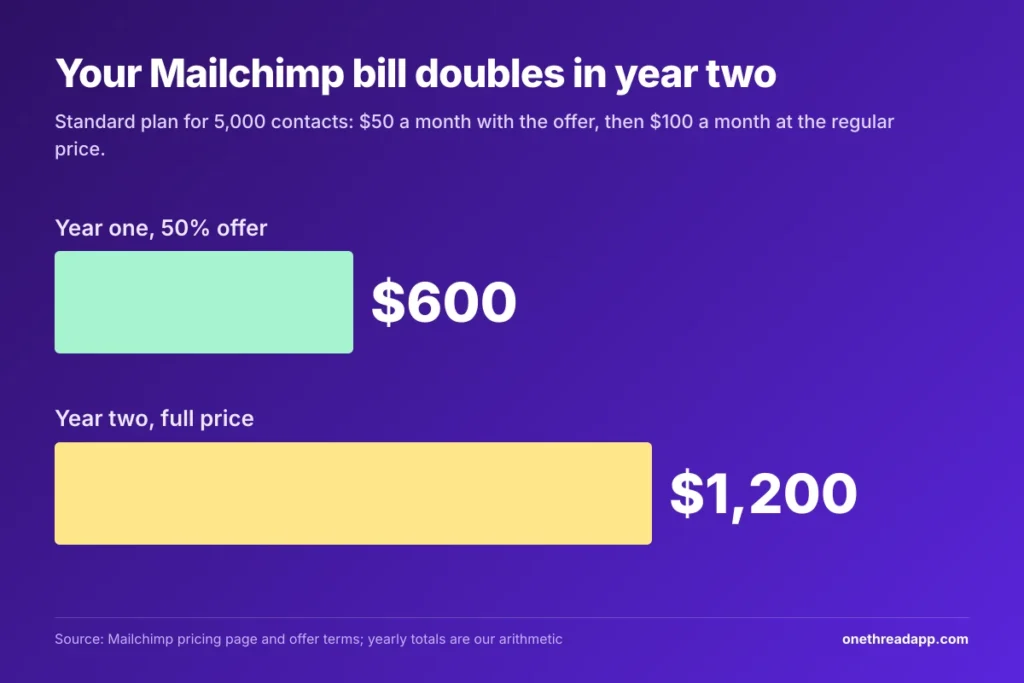
Example: Standard for 5,000 contacts costs $50 a month in year one, or $600. In year two it costs $100 a month, or $1,200. Your bill doubles on the renewal date.
Two other discounts exist. Nonprofits and charities get 15% off once they contact Mailchimp’s billing team. Standard and Premium accounts with 10,000 or more contacts can also ask sales about annual plans.
Source: Mailchimp promotional offer terms.
How Has Mailchimp Pricing Changed Over Time?
Mailchimp pricing has gone up, and the Free plan has shrunk. Paid plans cost more at the same contact tier than they did a few years ago.
GroupMail tracked the change at the 500-contact tier. Essentials rose from $9.99 to $13, and Standard rose from $14.99 to $20, between 2022 and late 2023. Retainful’s pricing history adds that Premium went from $299 to $350 in 2022.
The Free plan tells the same story. Mailchimp’s legacy Free plan allowed 2,000 contacts and 12,000 sends a month. Today’s Free plan allows 250 contacts and 500 sends. GroupMail dates that last cut to January 2026.
Accounts on legacy plans, which means paid accounts opened before May 15, 2019, face their own rise. GroupMail reports an 11% to 13% increase for those users from April 13, 2026.
Mailchimp has also folded its old product pages into one. Its websites pricing page now opens the email marketing plans page.
What does this mean for you? Expect the price at your tier to move again. Check the pricing page before each renewal, and don’t build your budget on an old screenshot.
Sources: GroupMail’s Mailchimp pricing history, Retainful’s Mailchimp pricing guide, Mailchimp help center on legacy plans.
Which Mailchimp Plan Should You Choose?
Choose the cheapest Mailchimp plan that covers your contact count and the one feature you can’t work without. For most small teams, that’s Essentials or Standard.
| If you… | Pick |
|---|---|
| Have under 250 contacts and send a few emails a month | Free |
| Send a regular newsletter with 1 to 3 people | Essentials |
| Need automation flows, AI help or order emails | Standard |
| Need SSO, phone support or more than 5 seats | Premium |
| Email a large list only a few times a year | Pay As You Go |
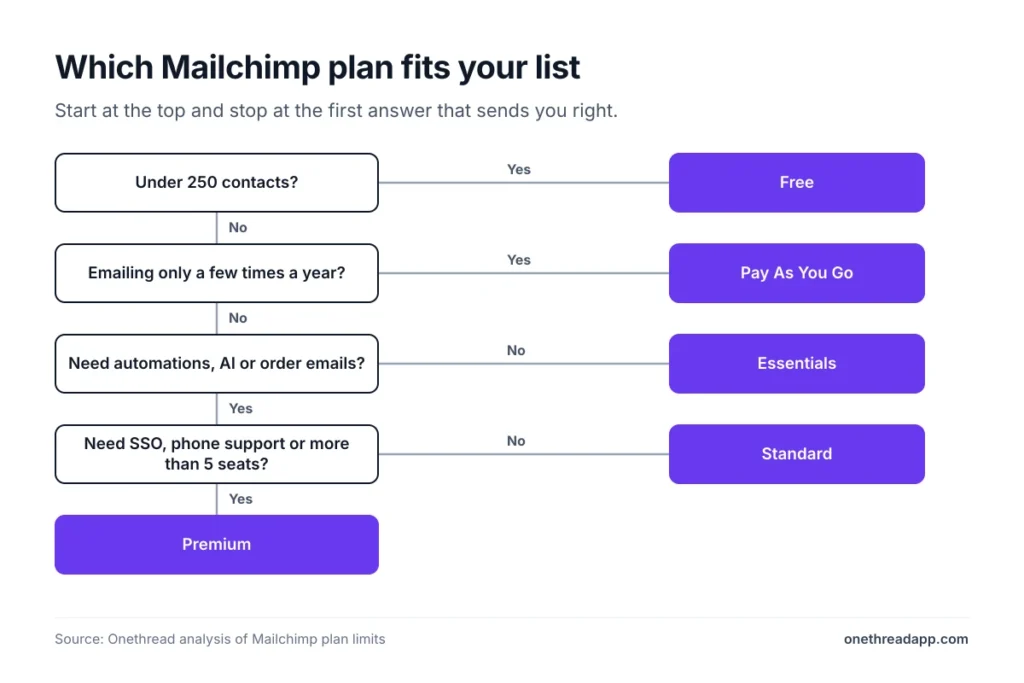
Then check two numbers before you buy: your full contact count, and your price in year two.
Email is rarely the only tool on the bill. If you also plan campaigns in marketing project management software, price both together. Our Metricool pricing guide covers social tools, and our business management software roundup covers the rest. For a larger social suite, see our Hootsuite pricing guide.
What Should You Do Next With Mailchimp?
Mailchimp bills you for your list, not for how often you email it. Your contact count picks the tier, and the 50% offer hides the real price for a year. Once you see both numbers, the right plan is usually obvious.
This week, export your audience and count every subscribed, unsubscribed and non-subscribed contact. Archive the ones you no longer email, then find your tier in the price table. Price that tier at the full rate for year two. If the total looks high, check Pay As You Go before you commit.
FAQs
Is Mailchimp Still Free?
Yes, but only for small lists. The Free plan covers up to 250 contacts and 500 sends a month, with a daily cap of 250. It keeps Mailchimp branding and has no scheduling. Sending pauses once you pass either limit, so most growing lists move to a paid plan quickly.
Does Mailchimp Charge for Unsubscribed Contacts?
Yes. Mailchimp pricing counts subscribed, unsubscribed and non-subscribed contacts toward your plan. Only archived, cleaned and deleted contacts drop out of the count. Archiving people who unsubscribed is the fastest way to move down a tier without losing their history.
Is It Worth Paying for Mailchimp?
Yes, if you use the automations and reports on Standard. Mailchimp pricing starts at $20 a month there, with 200 automation flows and AI at no extra cost. If you only send a monthly newsletter, Essentials or Pay As You Go may cost less.
What Is a Cheaper Alternative to Mailchimp?
The cheapest option depends on how you send. Tools that charge by emails sent, not by contacts, often cost less for a big list that you email rarely. Mailchimp’s own Pay As You Go plan works the same way, so price it before you switch.
Can You Pay for Mailchimp Yearly?
Only on some plans. Mailchimp offers annual plans for Standard and Premium accounts with 10,000 or more contacts, through its sales team. Everyone else pays month to month. You can switch or pause a monthly plan at any time from the billing page.