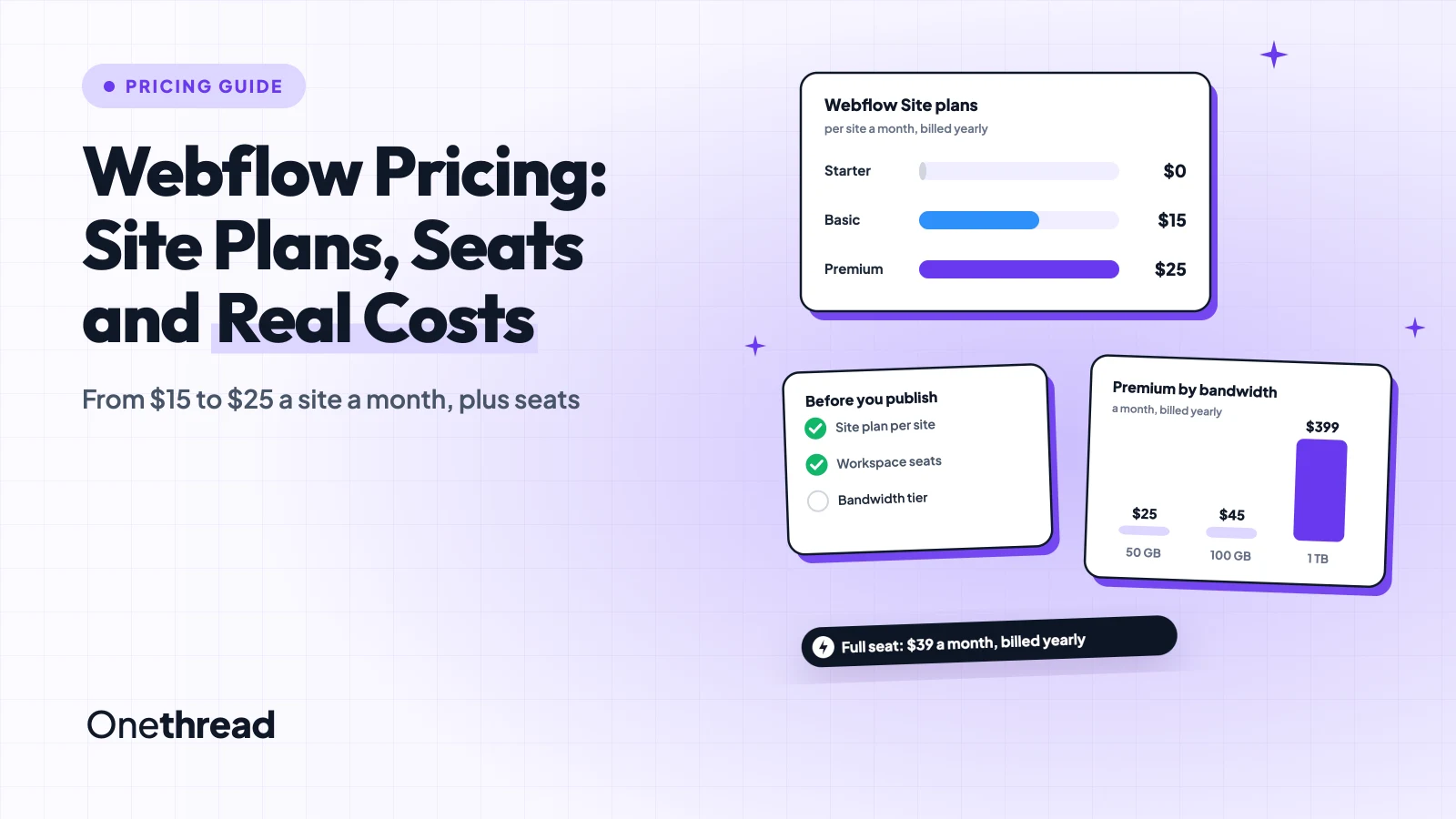
Webflow sends you two bills, and most people only budget for one.
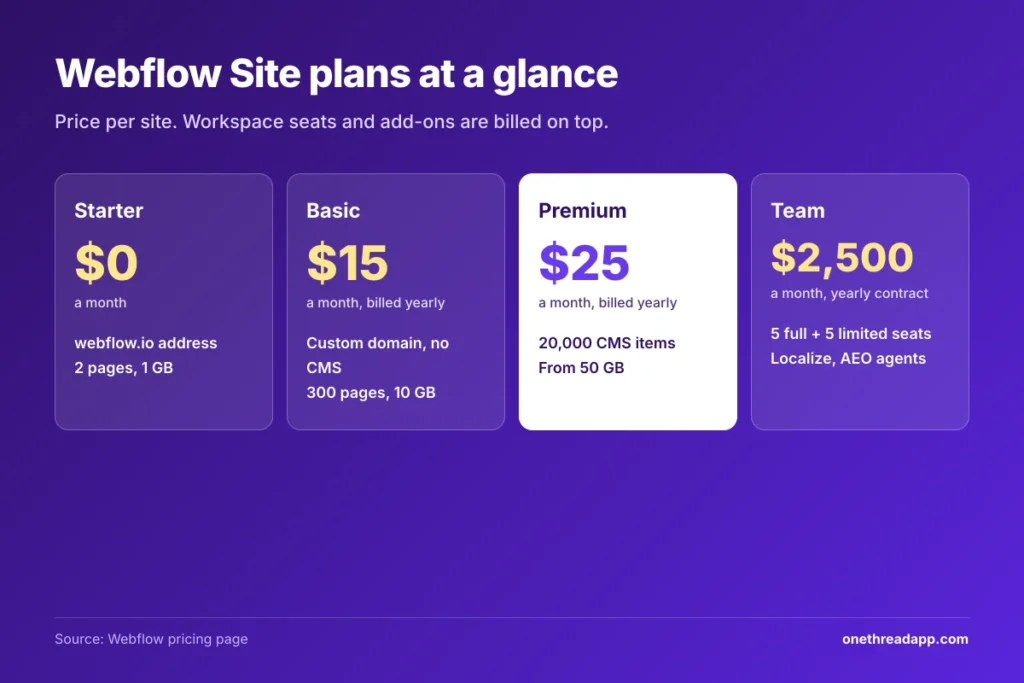
Webflow pricing starts with a free Starter plan. Paid Site plans cost $15 a month for Basic and $25 for Premium, billed yearly, or $25 and $39 billed monthly. Ecommerce runs $29 to $212, Team costs $2,500 a month, and Workspace seats come on top.
That second bill is where the surprises live. Seats, bandwidth and add-ons all charge separately.
We checked Webflow’s pricing page, its help center and eight top-ranking guides, then priced real setups.
You’ll see what each plan includes, what it leaves out, and what a small team pays in a year.
Key Points
- Webflow costs $0 on Starter, $15 a month on Basic and $25 on Premium per site, billed yearly, or $25 and $39 monthly. Team is $2,500 a month.
- Budget for two bills: a Site plan for the website, and a Workspace plan plus seats for the people. A full seat adds $39 a month.
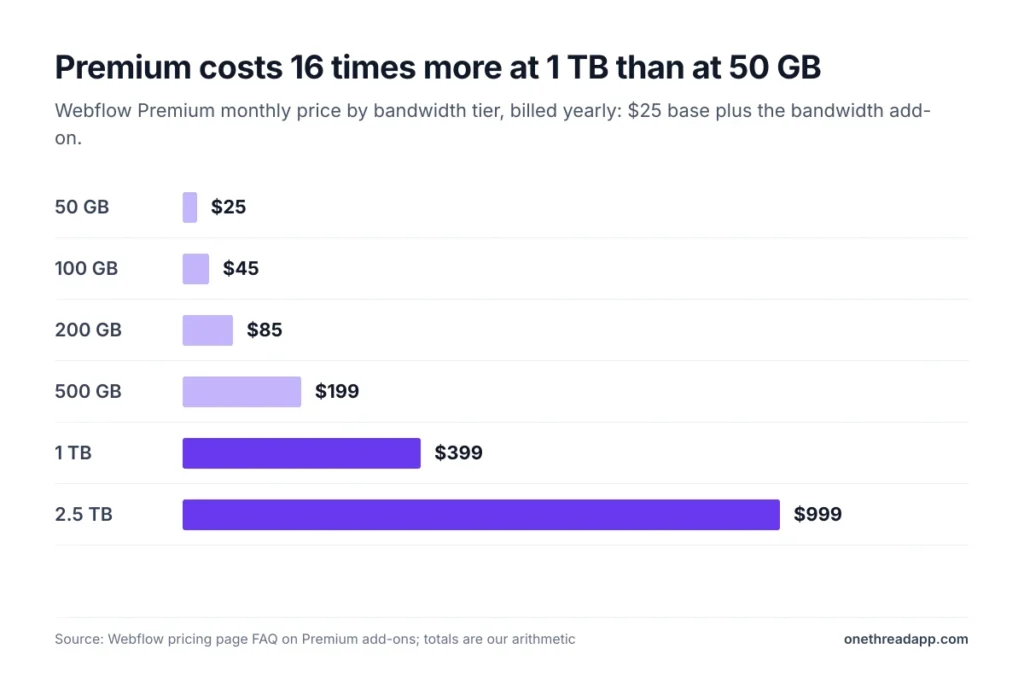
- Price Premium by traffic. It includes 50 GB of bandwidth, then 100 GB costs $45 a month and 1 TB costs $399, billed yearly.
- Pay yearly to save: it cuts Basic by 40% and Premium by about 36%.
How Much Does Webflow Cost per Month?
Webflow costs between $0 and $39 a month for one standard website, depending on the plan and how you pay. Every price is per site, in US dollars.
| Plan | Billed yearly | Billed monthly | Built for |
|---|---|---|---|
| Starter | $0 | $0 | Testing on a webflow.io address |
| Basic | $15 a month | $25 a month | Simple sites with no CMS |
| Premium | $25 a month | $39 a month | Blogs and content sites |
| Team | $2,500 a month | Yearly contract only | Growing marketing teams |
| Enterprise | Custom quote | Custom quote | Large companies |
Sources: Webflow pricing page, US prices per site.
Here’s the thing: that table only covers the website. The people who build it sit on a separate Workspace plan.
How Does Webflow Pricing Work With Site and Workspace Plans?
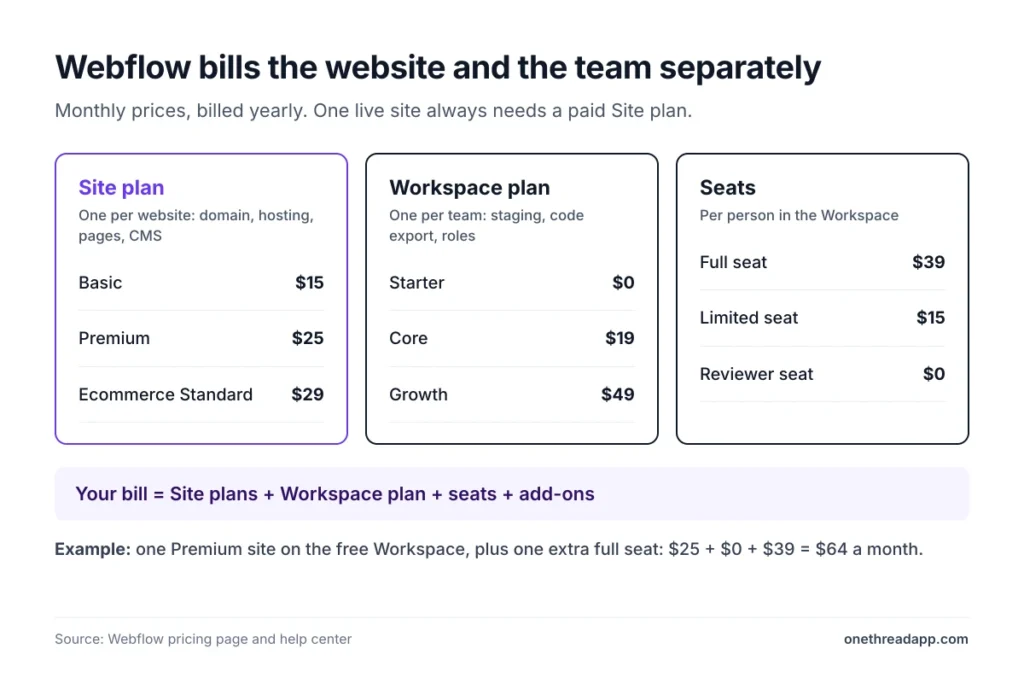
Webflow pricing splits into Site plans and Workspace plans. A Site plan covers one website. That means the custom domain, hosting, pages and CMS.
A Workspace plan covers everything around your sites: staging, seats and team tools. Its features apply to every site in that Workspace.
The Webflow help center states that a custom domain needs a paid Site plan for that site. So one live site always means at least one Site plan.
You don’t always need a paid Workspace plan, though. The free Starter Workspace holds unlimited paid sites and one full seat. Teams upgrade for more staging sites, code export or team tools.
Three checks tell you which bills apply:
- One person, one site: a Site plan and the free Workspace are enough.
- More than one editor: add seats. A full seat costs $39 a month and a limited seat $15, billed yearly.
- Several client sites in progress: a paid Workspace adds staging room before each client pays for hosting.
Seats always bill per Workspace, not per site.
Example: a freelancer with one client site on Premium and the free Workspace pays $25 a month, billed yearly. Add a full seat for a partner, and it’s $64.
What Does the Free Webflow Starter Plan Include?
The Starter plan is free with no time limit, and it lets you build a site on a webflow.io address. It’s a sandbox, not a launch plan.
You get 2 static pages, a limited CMS with 50 items, 1 GB of bandwidth and 50 form submissions. Webflow AI, the MCP server and Webflow Cloud app hosting come with it too.
Say you want to test a portfolio layout before paying anything. Starter lets you build it, share the webflow.io link and collect feedback. The moment you want your own domain, you pay.
One catch: some AI tools for SEO and copy only work on a Starter site if the Workspace is paid. Free has its fine print too. Paid Workspace plans also lift the staging limit from 2 sites to 10 or more. For keyword research and rank tracking outside Webflow, our Ahrefs pricing guide lists what each plan costs.
Pricing: Free, with a free Starter Workspace.
Best For
- Learning Webflow and testing a layout before you buy a Site plan.
Pros
- No time limit, so you can learn at your own pace.
- Includes Webflow AI and a small CMS for practice.
- Lets you share a live webflow.io link for feedback.
Cons
- No custom domain, so it can’t host a real business site.
- Only 2 pages and 50 CMS items.
- Shows the “Made in Webflow” badge on the published site.
What Does the Webflow Basic Plan Include?
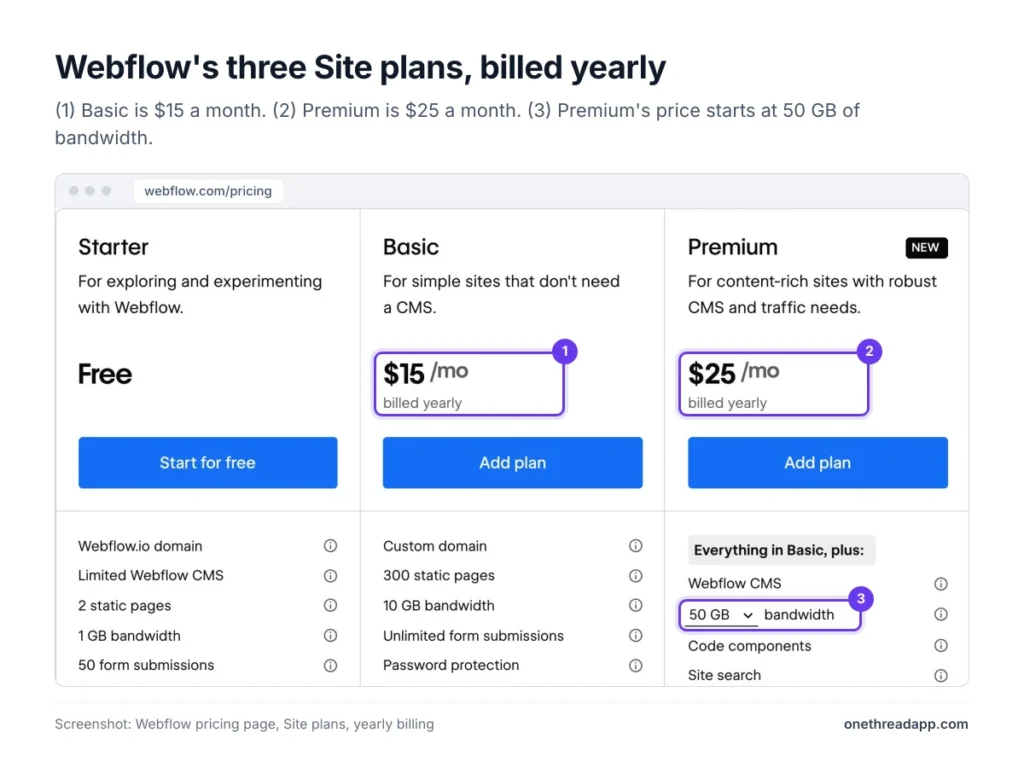
The Basic plan costs $15 a month billed yearly or $25 billed monthly. It’s the cheapest way to put a Webflow site on your own domain.
Basic includes 300 static pages, 10 GB of bandwidth, unlimited form submissions and password protection. It doesn’t include the CMS. So no blog, no case study collection and no dynamic pages.
Think of a five-page site for a consultant: home, services, about, contact and booking. Basic covers that for $180 a year. If the consultant later wants a blog, the site moves to Premium. Monthly billing suits only short projects, since it costs $120 more over a year.
Webflow’s latest update raised Basic from $14 to $15 a month on yearly billing. The page limit doubled from 150 to 300, as NoCode.tech reported.
Pricing: $15 a month billed yearly, or $25 billed monthly.
Best For
- Landing pages, portfolios and small business sites that never need a blog.
Pros
- Custom domain and no Webflow badge at the lowest paid price.
- 300 pages, plenty for most brochure sites.
- Unlimited form submissions.
Cons
- No CMS, so adding a blog later means an upgrade.
- 10 GB of bandwidth fills up fast on media-heavy pages.
- Monthly billing costs $10 more a month than yearly.
What Does the Webflow Premium Plan Include?
The Premium plan costs $25 a month billed yearly or $39 billed monthly. It replaced the old CMS and Business plans.
Premium adds the full Webflow CMS with 20,000 CMS items and 40 Collections. It also adds code components, site search, form file uploads and scheduled publishing. Bandwidth starts at 50 GB a month and scales to 2.5 TB.
Here’s the problem. That bandwidth scale is where bills grow, because each extra tier is an add-on.
Example: a site that needs 100 GB pays $25 plus a $20 add-on, so $45 a month billed yearly. At 1 TB, it’s $25 plus $374, so $399 a month.
One Reddit user quoted by NoCode.tech said a 400 GB site went from $476 a year to over $2,000.
Pricing: $25 a month billed yearly, or $39 billed monthly, plus any bandwidth add-on.
Best For
- Blogs, resource libraries and marketing sites that publish through the CMS.
Pros
- 20,000 CMS items and 40 Collections, enough for most content sites.
- Site search and scheduled publishing built in.
- Bandwidth grows without a plan change.
Cons
- Bandwidth add-ons raise the price fast past 100 GB.
- Two straight months over the limit trigger an automatic upgrade.
- Monthly billing costs $14 more a month than yearly.
What Does the Webflow Team Plan Include?
The Team plan costs $2,500 a month on an annual contract, or $30,000 a year. It’s a Platform plan, so it bundles a site, a Workspace and several add-ons in one deal.
Team includes Webflow Localize with 2 locales, AEO (answer engine optimization) agents and publishing workflows. It also adds 5 full seats, 5 limited seats, up to 100 free seats and 100,000 AI credits a year.
It suits a marketing team that publishes every week and needs review steps before anything goes live. Branch staging and an activity log let several people work at once. Content API limits also rise to 600 requests a minute.
Florian Bodelot, co-founder of the Webflow agency Digidop, called the update “a premium and modular pricing strategy” in his breakdown. Team shows it best.
Pricing: $2,500 a month, sold through Webflow sales. Extra seats and locales cost more.
Best For
- In-house marketing teams with 5 to 10 builders who publish often.
Pros
- Seats, localization and AI credits in one price.
- Publishing workflows add review steps before changes go live.
- 24/7 priority support and guided onboarding for new teams.
Cons
- $30,000 a year is a big jump from self-serve plans.
- No monthly billing option at all.
- Hosting uptime is 99.00%, below Enterprise’s 99.99%.
What Does Webflow Enterprise Include?
Webflow Enterprise is a custom-quoted plan for large companies. Webflow publishes no price, so you’ll talk to sales and negotiate.
Enterprise adds everything in Team plus granular permissions, custom roles, design approvals and audit logs. Security gets single sign-on (SSO) and SCIM user syncing. Hosting uptime rises to 99.99%, with a one-hour response on major support incidents.
But most companies buy it for procurement. Enterprise includes custom billing, signed service agreements (MSAs and SLAs) and help with security questionnaires. If your legal team needs an MSA before signing, this is the only plan that offers one.
Expect custom limits too. CMS items, bandwidth, seats and Webflow Cloud usage are all set in the contract, not on the pricing page. Webflow can also set up custom hosting clusters for heavy traffic.
Pricing: Not published. Ask Webflow sales for a quote.
Best For
- Companies that need SSO, custom roles and a signed service agreement.
Pros
- 99.99% hosting uptime and one-hour response on major incidents.
- Custom limits for CMS items, bandwidth and seats.
- Pay by invoice instead of credit card, on custom billing terms.
Cons
- No public price, so comparing quotes takes extra time.
- Overkill for teams without strict security or legal rules.
- Sales-led setup slows a quick launch.
How Much Do Webflow Ecommerce Plans Cost?
Webflow ecommerce plans cost $29, $74 or $212 a month billed yearly. They replace a standard Site plan for stores.
| Plan | Billed yearly | Billed monthly | Products | Webflow fee on sales |
|---|---|---|---|---|
| Standard | $29 a month | $42 a month | 500 | 2% |
| Plus | $74 a month | $84 a month | 5,000 | 0% |
| Advanced | $212 a month | $235 a month | 15,000 | 0% |
Stripe or PayPal processing fees apply on every plan.
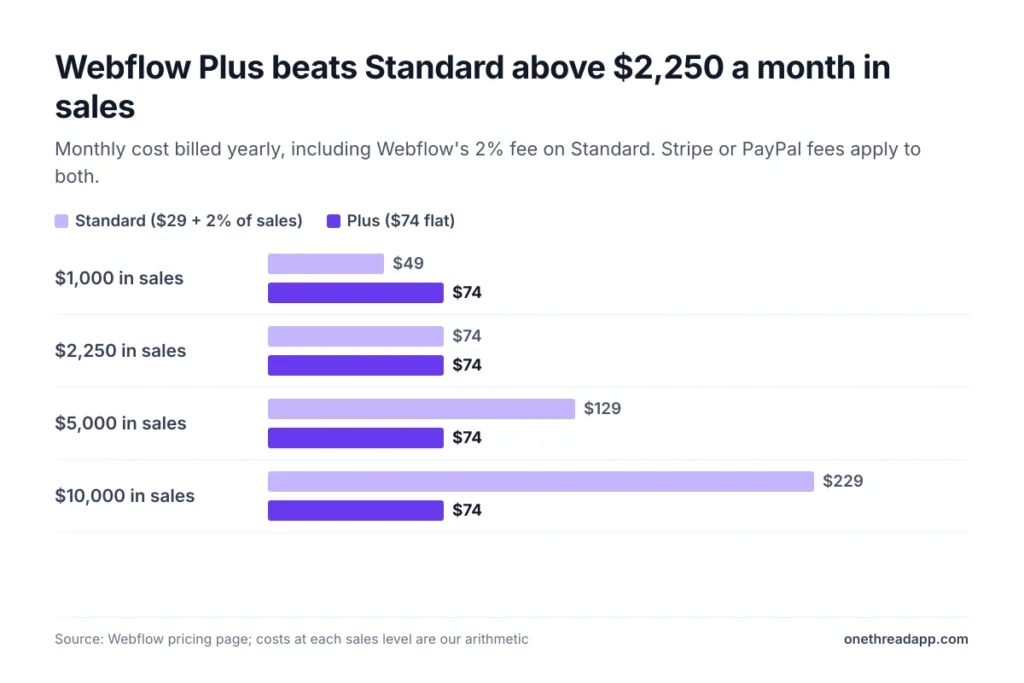
The transaction fee decides the plan for most stores.
Example: at $5,000 in monthly sales, Standard costs $29 plus $100 in fees, so $129. Plus costs a flat $74. The two break even at $2,250 a month in sales.
How Much Do Webflow Workspace Plans and Seats Cost?
Webflow Workspace plans cost $0 to $49 a month billed yearly, and seats cost extra. One family serves in-house teams, the other freelancers and agencies.
| Workspace plan | Billed yearly | Billed monthly | Staging sites | AI credits a month |
|---|---|---|---|---|
| Starter | $0 | $0 | 2 | 200 |
| Core | $19 | $28 | 10 | 300 |
| Growth | $49 | $60 | Unlimited | 400 |
| Freelancer | $16 | $24 | 10 | 300 |
| Agency | $35 | $42 | Unlimited | 400 |
A full seat costs $39 a month yearly or $45 monthly. A limited seat for content editing costs $15 yearly or $19 monthly, and reviewer seats are free.
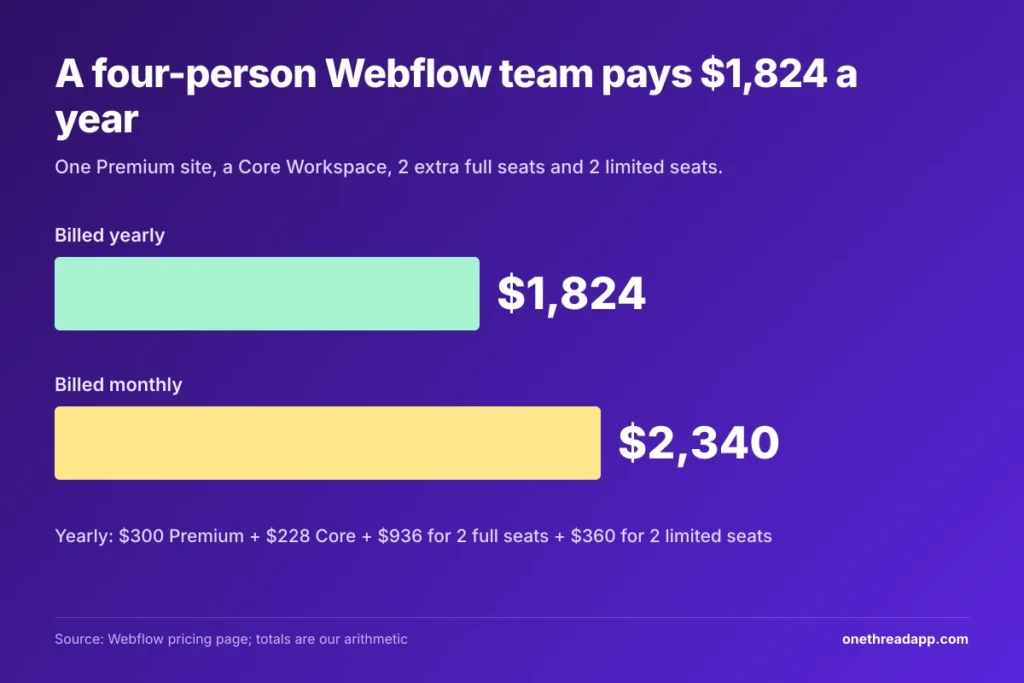
Example: one Premium site, a Core Workspace, 2 extra full seats and 2 limited seats cost $300 + $228 + $936 + $360. That’s $1,824 a year billed yearly, or $2,340 billed monthly.
Agencies get client seats instead: 1 free per site on Freelancer, 3 per site on Agency. Running several client builds? Our guide to agency project management software covers the work around them.
Designers often pay for Figma too. Our Figma pricing breakdown prices those seats the same way.
Which Webflow Add-Ons Raise the Bill?
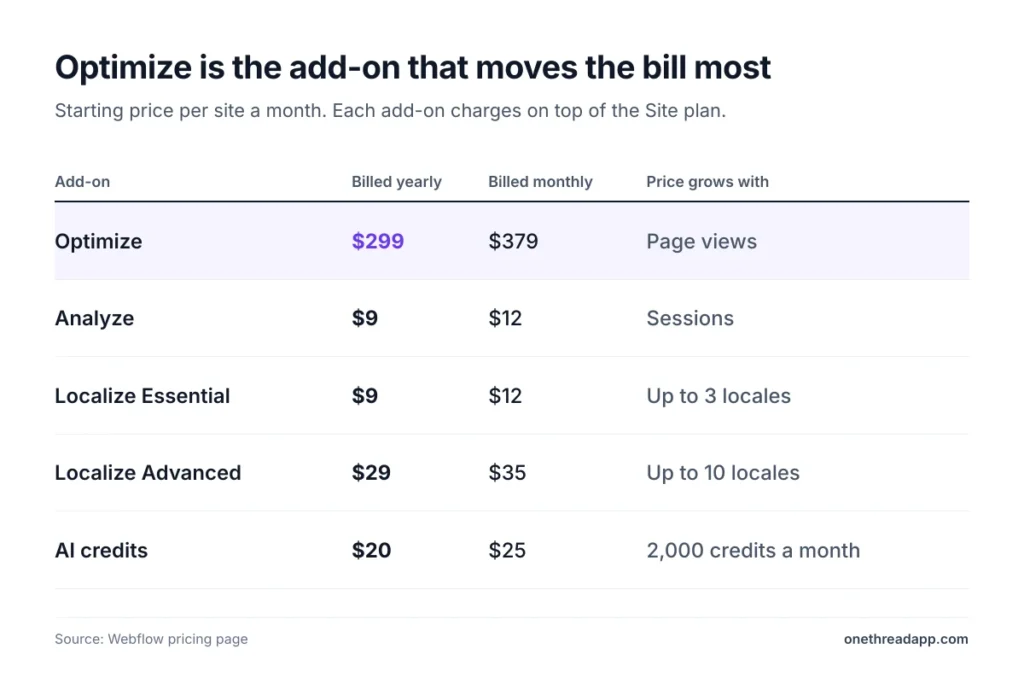
Webflow add-ons charge per site on top of the Site plan, and each one scales with usage.
| Add-on | Starts at, billed yearly | Billed monthly | Scales by |
|---|---|---|---|
| Optimize | $299 a month | $379 a month | Page views |
| Analyze | $9 a month | $12 a month | Sessions |
| Localize Essential | $9 a month | $12 a month | Locales, up to 3 |
| Localize Advanced | $29 a month | $35 a month | Locales, up to 10 |
| AI credits | $20 a month | $25 a month | 2,000 credits a month |
Optimize runs A/B tests and personalization, so it pays off only on busy pages. Localize handles AI translation for multi-language sites, and our list of website translation tools compares other options.
Webflow Cloud apps also charge $2 per million requests past the free allowance.
Top Tip: Before you add Optimize, run Analyze for a month. At $9, it shows whether a $299 testing tool has the traffic it needs.
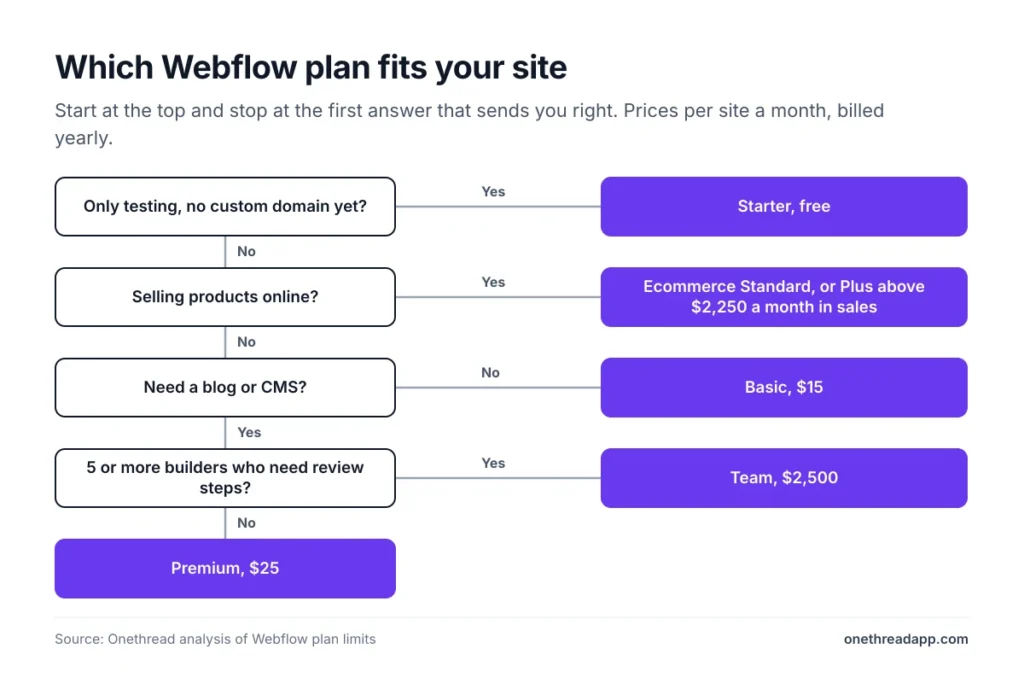
Which Webflow Pricing Plan Fits Your Site?
The right Webflow pricing plan depends on three things: whether you need a CMS, whether you sell, and how many people edit.
| If you… | Pick |
|---|---|
| Are learning or testing a design | Starter |
| Need a few pages and no blog | Basic |
| Publish a blog or resource library | Premium |
| Sell under $2,250 a month | Ecommerce Standard |
| Sell more than $2,250 a month | Ecommerce Plus |
| Need review workflows and 5 or more builders | Team |
| Need SSO and a signed service agreement | Enterprise |
These picks are ours, from the plan limits above. Arso Stojović, writing for BCMS, called the new model “great for the cap table, less great for solo builders” in his cost review.
Building for clients? Our agency pricing calculator folds Webflow costs into your quote. If the build needs scoping first, see how to plan a custom website project.
Top Tip: Write down your expected monthly bandwidth before choosing Premium. A site near 100 GB already pays $45 a month, not $25.
What Should You Do Next With Webflow?
Webflow’s sticker price is only the Site plan. The real bill adds seats, bandwidth and add-ons, and for a small team those can cost more than the site itself. Once you count all three, the plans get easy to compare. Yearly billing and the right plan do most of the saving.
This week, list every person who will edit your site and estimate its monthly traffic. Then price one Site plan, the seats and any bandwidth tier, and compare yearly against monthly billing before you buy. Run the same sums for your second choice too.
FAQs
Is Webflow Free to Use?
Yes, Webflow pricing starts at $0 on the Starter plan, with no time limit. You can build a site on a webflow.io address and share it. The free plan stops at 2 pages and 50 CMS items, and a custom domain needs Basic at $15 a month.
Is Webflow Worth the Money?
Webflow is worth it when you need design control, a real CMS and hosting in one place without hiring a developer. It’s harder to justify for a small site with several editors, because each full seat adds $39 a month. Price the whole team first, not just the site.
Can You Upgrade or Cancel a Webflow Plan Later?
Yes, you can upgrade a Site plan at any time. You can also cancel, but Webflow still charges the rest of the term you signed up for, so a yearly plan is paid in full. Webflow pricing also moves you up a plan after two straight months over your bandwidth limit.
Do Webflow Prices Include Sales Tax?
No, Webflow prices don’t include sales tax. Every plan shows US dollars, and Webflow adds sales tax or VAT at checkout where it applies. Site plan prices are also per site. So three sites mean three Site plans, plus tax on each.
Can You Host a Webflow Site Somewhere Else?
Yes, but only with a paid Workspace plan, which lets you export the HTML and CSS with no attribution. CMS content exports one Collection at a time, and forms stop working off Webflow. Once exported, the site no longer needs a paid Site plan. You can’t import the code back into Webflow later.