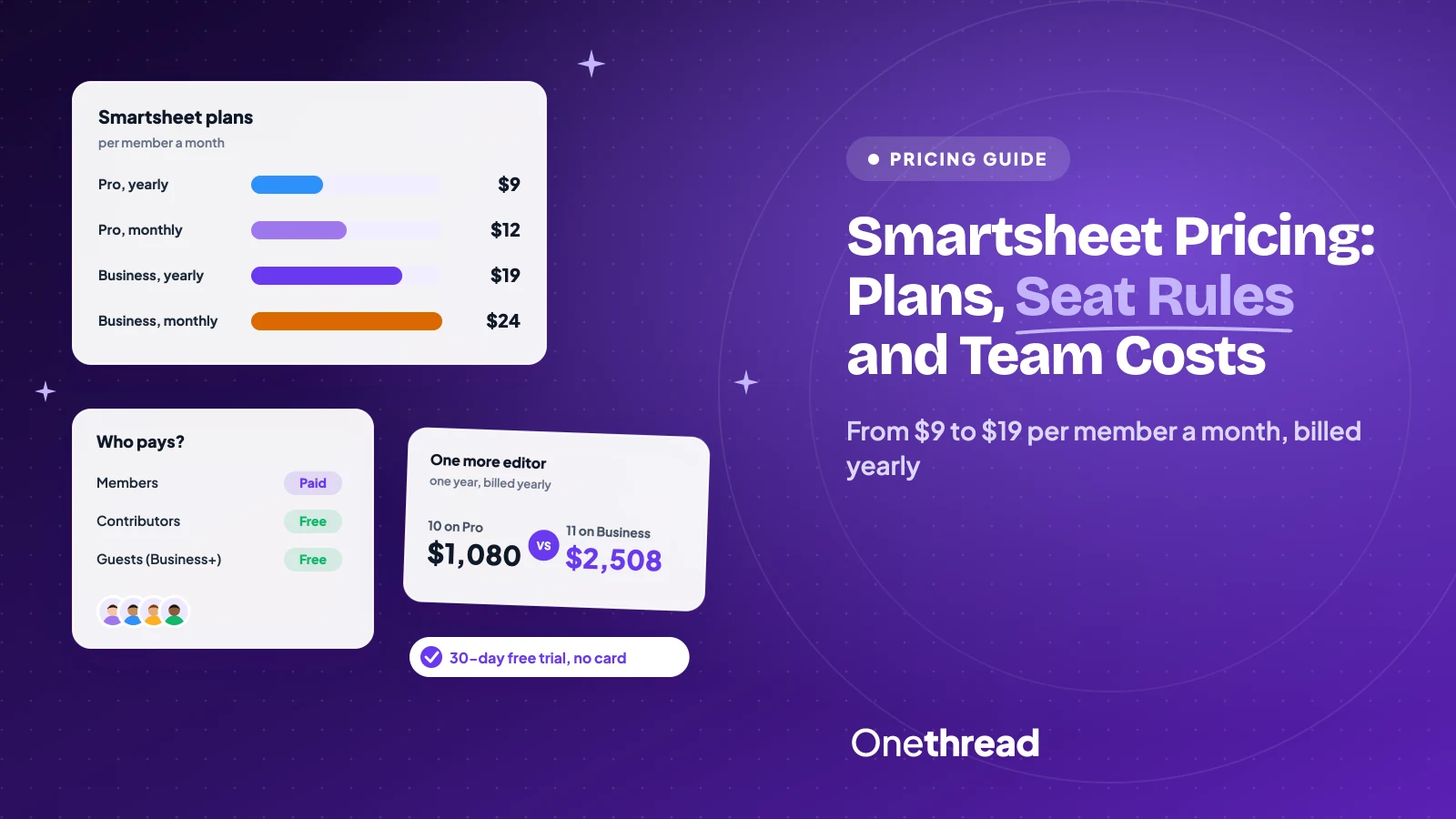
Smartsheet looks cheap on the pricing page. Then the renewal quote counts every editor.
Smartsheet pricing starts at $9 per member a month for Pro and $19 for Business, billed yearly. Month to month, those become $12 and $24. Enterprise and Advanced Work Management are custom quotes. There’s no free plan, only a 30-day free trial.
Here’s the part people miss. You pay for Members, not for everyone who opens a sheet.
We checked the Smartsheet pricing page, its user model help articles and eight top-ranking pricing guides. You’ll get each plan’s limits, the seat rules, the add-on prices and real yearly totals for your team.
Key Points
- Smartsheet pricing in one line: Pro costs $9 per member a month billed yearly, or $12 monthly, for 1 to 10 Members. Business costs $19 billed yearly, or $24 monthly, with a 3-Member minimum. Enterprise needs 10+ Members and a custom quote.
- Only Members are paid seats: Contributors are free on every plan and Guests are free on Business and up. Anyone who edits or builds can become a Provisional Member, and later a paid Member.
- Pro stops at 10 Members: the 11th person forces Business. For 11 people that’s $2,508 a year instead of $1,080 for 10 on Pro.
- Add-ons can double the bill: Data Shuttle starts at $100 a month and Dynamic View at $125. Ten Business Members plus both come to $4,980 a year, against $2,280 for the seats alone.
How Much Does Smartsheet Cost Per Month?
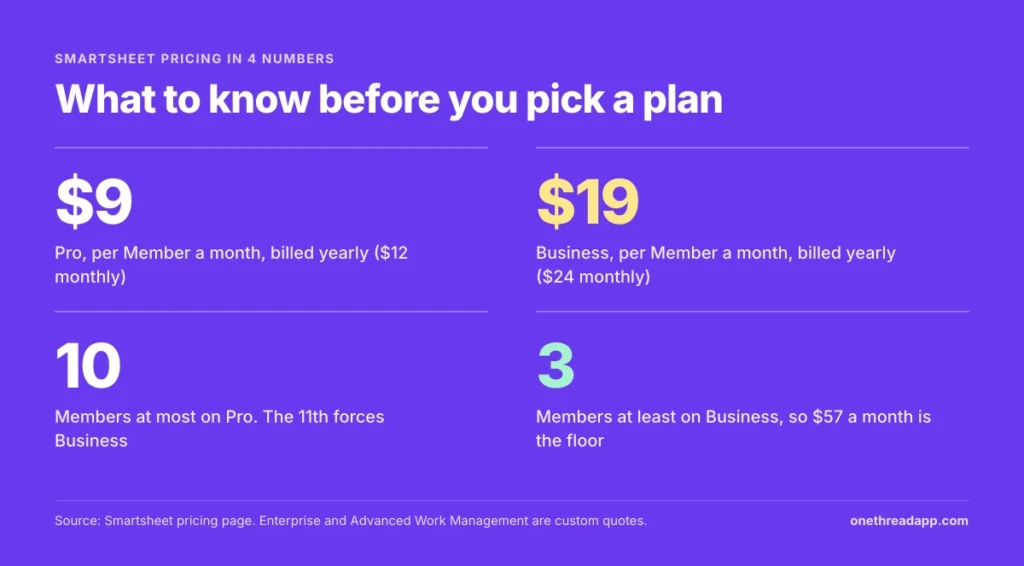
Smartsheet costs $9 per member a month on Pro and $19 on Business, billed yearly. Monthly billing costs $12 and $24. Enterprise and Advanced Work Management have no public price. Paying yearly saves 25% on Pro and about 21% on Business.
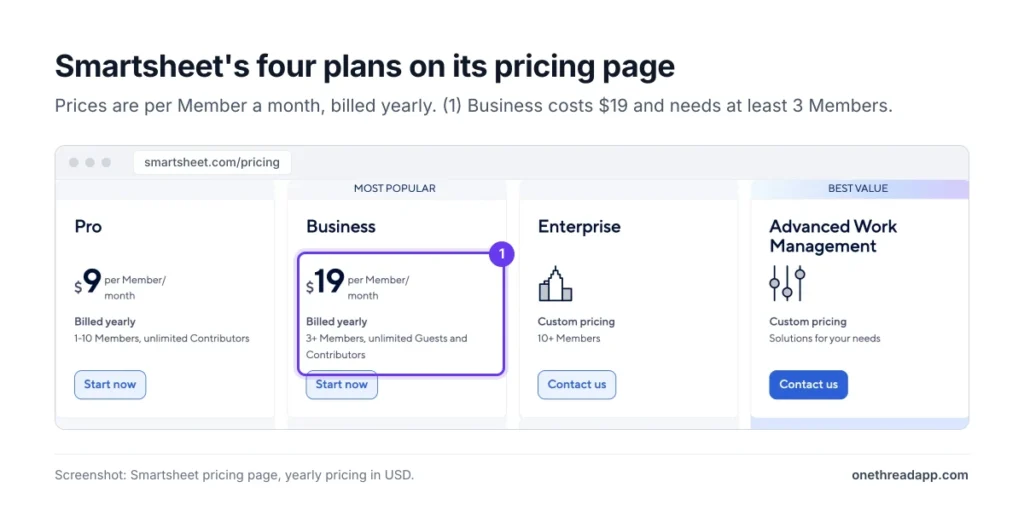
Here’s how the four plans line up on the Smartsheet pricing page:
| Plan | Billed yearly, per member a month | Billed monthly, per member a month | Members | Automations | Storage |
|---|---|---|---|---|---|
| Pro | $9 | $12 | 1 to 10 | 250 a month | 20 GB |
| Business | $19 | $24 | 3 or more | Unlimited | 1 TB |
| Enterprise | Custom quote | Custom quote | 10 or more | Unlimited | Unlimited |
| Advanced Work Management | Custom quote | Custom quote | Custom | Unlimited | Unlimited |
Example: one Pro Member costs $9 x 12 = $108 a year billed yearly, or $12 x 12 = $144 billed monthly. One Business Member costs $228 a year, or $288 month to month. That’s $36 or $60 back per person, just for committing.
The plan names hide one more rule. Business has a floor of 3 Members. So the smallest Business bill is $57 a month, or $684 a year, even for two people.
Who Counts as a Paid Seat in Smartsheet?
In Smartsheet, only Members are paid seats. Contributors, Guests and Provisional Members are free, at least for a while. New plans moved to this user subscription model in June 2024. Older plans switched at their first renewal in 2025, per the user subscription announcement.
Four seat types decide your bill:
- Member: a paid user who can create, edit, comment on and view sheets, workspaces and reports.
- Provisional Member: a new user with full Member rights for at least 30 days, unpaid. A review then decides if they become paid.
- Contributor: a free user on every plan who can view, comment, upload files and submit forms.
- Guest: a free user outside your company’s email domain who can edit and comment, on Business and higher only.
Here’s the problem. A Contributor who’s shared as an Editor and then edits a cell becomes a Provisional Member. Smartsheet reviews those users quarterly on yearly plans and monthly on monthly plans, right before the bill. If your plan is set to upgrade, they convert to paid Members and land on the next invoice.
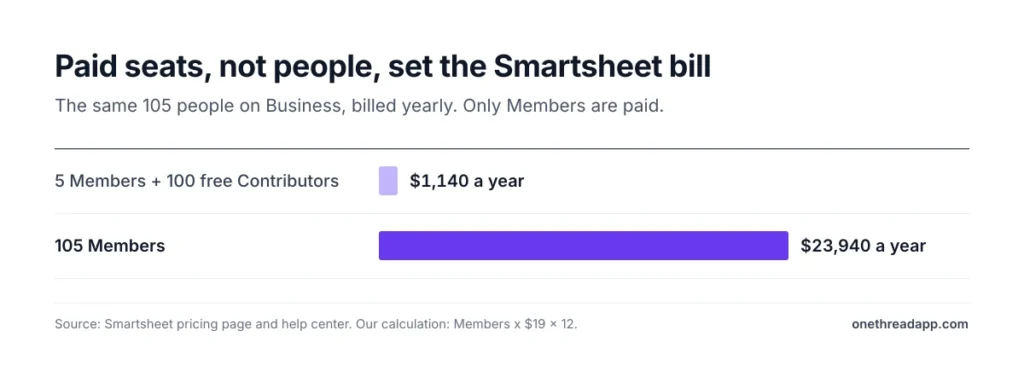
Example: 5 project managers build the sheets and 100 people only update rows. On Business, you pay for 5 Members: 5 x $19 x 12 = $1,140 a year. If all 105 end up as Members, it costs 105 x $19 x 12 = $23,940 a year. A Smartsheet Community member asked about exactly this scenario.
That’s not a rare edge case. In another Community thread, a consultant shared a renewal quote for a plan with 15 paid licenses. It added about 180 free collaborators as paid users.
Top Tip: Before your first review period, open the Admin Center and set Provisional Members to downgrade by default. Then upgrade people one by one, only when they truly need to build or edit.
What Does the Smartsheet Pro Plan Include?
The Smartsheet Pro plan covers people and small teams who want sheets, Gantt charts and boards without admin overhead. It includes Gantt, table, board and calendar views, unlimited sheets, forms, reports and dashboards, plus the conversational AI features. Contributors are free and unlimited.
The limits are tight, though. Pro allows 250 automations a month and 20 GB of storage. Files cap at 30 MB, dashboards at 10 widgets, and each report pulls from one sheet. Timeline view, workload tracking, baselines, the activity log and API calls all sit on Business.
Say you run a five-person agency team with one client portfolio. Pro covers you for $540 a year on yearly billing. But the moment a sixth or eleventh person needs to edit, check the Member count before you share.
Pricing: $9 per member a month billed yearly, or $12 billed monthly, for 1 to 10 Members.
Best For
- Freelancers and small teams of up to 10 editors who live in one or two sheets.
- Teams testing Smartsheet before a bigger rollout.
Pros
- Lowest entry price, with monthly billing available at $12.
- Unlimited free Contributors for viewers, commenters and form fillers.
- Gantt, board, calendar and table views on the cheapest plan.
Cons
- Hard cap of 10 Members, with no way to add an 11th.
- 250 automations a month, which a busy team can burn through fast.
- No Guests, so outside editors need a paid seat or Business.
- No Standard Support package, even as an add-on.
What Does the Smartsheet Business Plan Include?
The Smartsheet Business plan adds what a growing team needs. That means unlimited automations, free Guests, timeline view, workload tracking and admin tools. Storage jumps to 1 TB, and single files can reach 250 MB.
Business also adds the smaller features people notice later. Baselines, the activity log, proofing, published dashboards and API calls all start here. So do links to ChatGPT, Microsoft Copilot, Power BI and Tableau.
Picture a 12-person operations team with outside vendors who update shared schedules. Pro can’t hold 12 Members, and the vendors would need seats. On Business, the vendors join as free Guests and the 12 Members cost $2,736 a year.
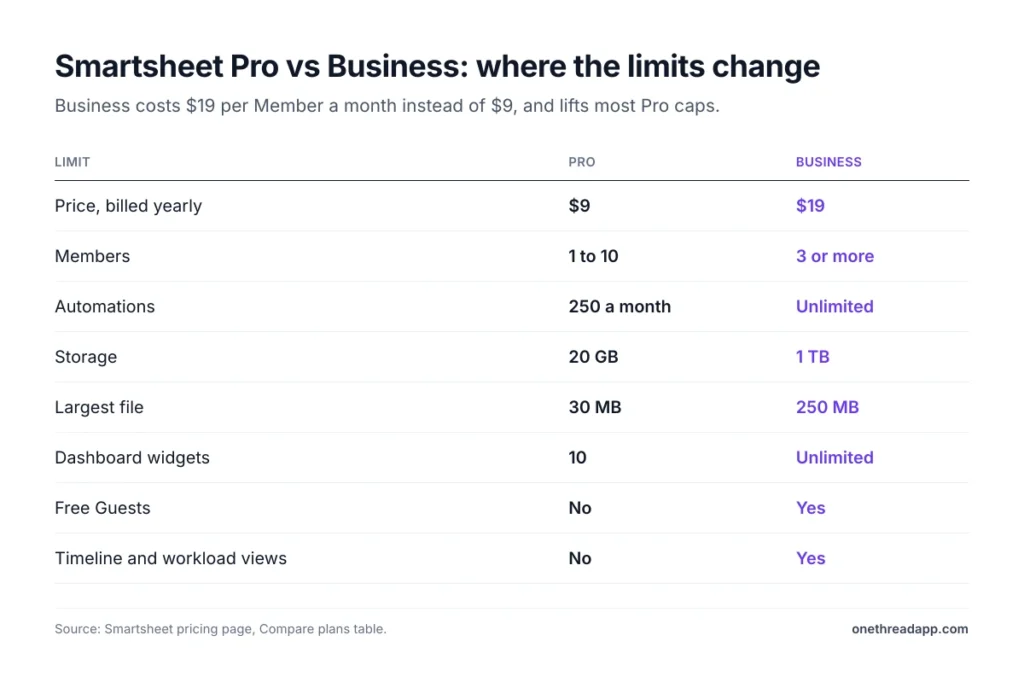
Pricing: $19 per member a month billed yearly, or $24 billed monthly, with a minimum of 3 Members.
Best For
- Teams of 3 or more that need automations, timelines or workload views.
- Teams that share sheets with clients, vendors or freelancers as Guests.
Pros
- Unlimited automations and 1 TB of storage.
- Free Guests for people outside your domain who edit and comment.
- Opens API calls, add-ons such as Data Shuttle and Resource Management, and paid support.
Cons
- Costs more than double Pro per Member: $228 versus $108 a year.
- 3-Member minimum, so a two-person team still pays for three.
- SAML-based single sign-on and portfolios stay on Enterprise.
- Standard Support with 24×7 phone help is an add-on, not included.
What Does Smartsheet Enterprise Cost?
Smartsheet Enterprise has no public price. You need at least 10 Members and a quote from sales. The plan targets organizations that need company-wide security controls and portfolio views.
Enterprise adds Scenario Planning, Portfolios, SAML-based single sign-on, directory integrations, the Enterprise Plan Manager and unlimited storage. It also includes the Standard Support package and a service level agreement for uptime, per Smartsheet’s own FAQ. Data retention controls and customer managed encryption keys stay as paid add-ons even here.
Market data gives a rough sense of what Enterprise buyers pay. Vendr’s Smartsheet buyer data lists a median deal of about $22,500 a year. Its contracts run from $3,106 to $125,171. Treat that as a range, not a quote for your team.
Pricing: Custom quote, 10 or more Members.
Best For
- Companies that need SSO, directory sync and central control over many Smartsheet plans.
- Teams running portfolios of projects with standard intake and reporting.
Pros
- Standard Support and an uptime service level agreement are included.
- Portfolios, Scenario Planning and Work Insights for leadership views.
- Unlimited storage and enterprise access controls.
Cons
- No public price, so you can’t compare costs without a sales call.
- 10-Member minimum.
- Premium Support and security extras such as data egress controls cost more.
What Is Smartsheet Advanced Work Management?
Smartsheet Advanced Work Management (AWM) is the top plan, sold as a bundle. It includes everything in Enterprise. It also bundles premium apps that other plans buy one by one. The list: Advanced Portfolios, Dynamic View, Data Shuttle, Connectors, DataMesh, Calendar App, Pivot App and Premium Support.
AWM makes sense when you’d otherwise buy three or four add-ons. Dynamic View alone starts at $125 a month and Data Shuttle at $100 a month on Business or Enterprise. Bridge, the low-code workflow builder, and DataTable for large data sets also come with AWM.
Say a project office syncs Smartsheet with Jira, imports finance data nightly and shares forms with 40 requesters. That’s Connectors, Data Shuttle and Dynamic View. At that point, AWM is the price to ask for first.
Pricing: Custom quote. Smartsheet sells it through sales only.
Best For
- Project offices and large teams that connect Smartsheet to other business systems.
- Organizations that would buy three or more premium apps anyway.
Pros
- One contract covers Dynamic View, Data Shuttle, Connectors and DataMesh.
- Premium Support and Smartsheet University training are included.
- DataTable is only available here, and Bridge comes included instead of as an add-on.
Cons
- No public price, and no monthly option.
- Overkill for teams that only need sheets and a few dashboards.
- Professional services and technical account managers still cost extra.
Which Smartsheet Add-Ons Cost Extra?
Smartsheet add-ons are where a $19 seat turns into a bigger bill. The pricing page lists two published prices and several quote-only apps. Most add-ons need Business or Enterprise.
| Add-on | Price | Plans |
|---|---|---|
| Dynamic View | From $125 a month | Business, Enterprise |
| Data Shuttle | From $100 a month | Business, Enterprise |
| Resource Management | Quote only | Business, Enterprise |
| Connectors, DataMesh, Calendar App, Pivot App | Quote only | Business, Enterprise |
| Brandfolder | Quote only | All plans |
| Standard Support package | Quote only | Business |
| Premium Support package | Quote only | Business, Enterprise |
| Smartsheet University training | Quote only | All plans |
Example: 10 Business Members cost 10 x $19 x 12 = $2,280 a year. Add Data Shuttle at $100 x 12 = $1,200 and Dynamic View at $125 x 12 = $1,500. The total is $4,980 a year, more than double the seats.
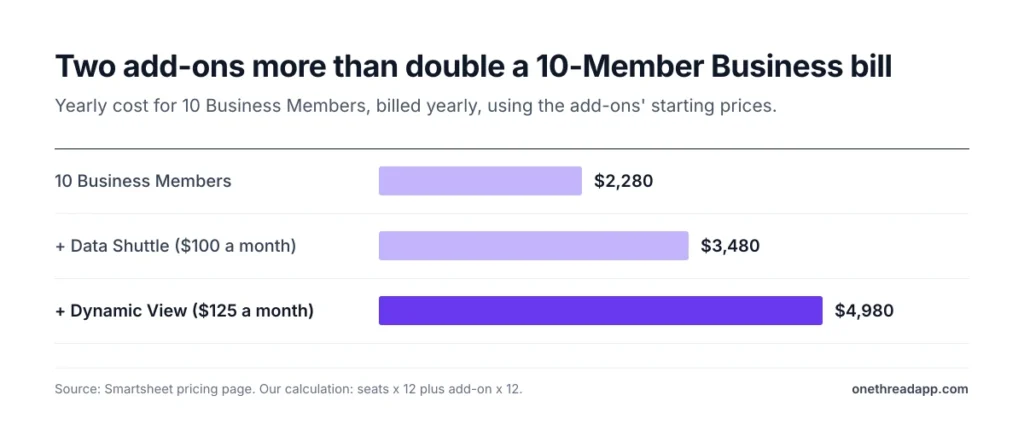
One caveat worth being honest about: “from” prices are floors. Smartsheet doesn’t publish how they scale. Ask sales for the price at your user count first.
How Much Does Smartsheet Cost for a Team in a Year?
A Smartsheet team pays between $540 and $7,200 a year at common sizes, depending on plan and billing. This table uses only published Pro and Business prices. Treat it as a floor before add-ons.
| Team size | Plan | Billed yearly | Billed monthly |
|---|---|---|---|
| 3 Members | Business | $684 | $864 |
| 5 Members | Pro | $540 | $720 |
| 10 Members | Pro | $1,080 | $1,440 |
| 10 Members | Business | $2,280 | $2,880 |
| 25 Members | Business | $5,700 | $7,200 |
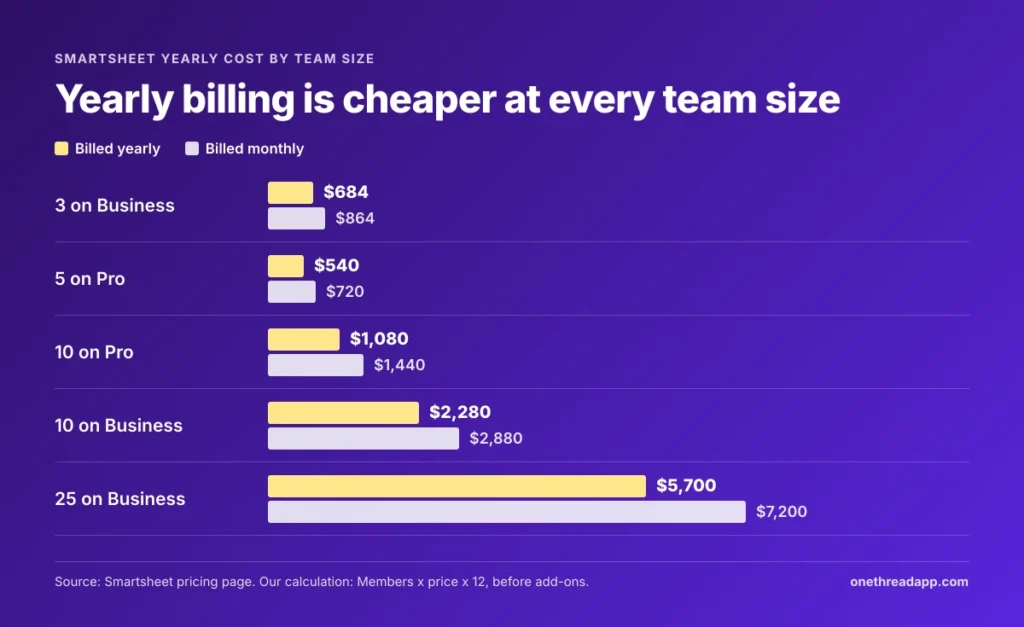
Example: 10 Members on Pro cost 10 x $9 x 12 = $1,080 a year. Add an 11th Member and Pro no longer fits. All 11 move to Business: 11 x $19 x 12 = $2,508. One extra editor costs you $1,428 a year.
Count Members, not headcount. If 25 people use Smartsheet but only 8 build sheets, the 17 others can stay Contributors at no cost.
What Free Plan and Discounts Does Smartsheet Offer?
Smartsheet offers no free plan anymore. The pricing page lists a 30-day free trial with no credit card instead. Tech.co’s Smartsheet pricing review reports that the limited free plan ended in 2025.
Discounts exist, but Smartsheet publishes no fixed percentage. Three are worth asking about:
- Yearly billing: the only published discount, 25% on Pro and about 21% on Business.
- Nonprofits: organizations with 501(c)(3) status or the local equivalent may qualify for a discount on yearly plans, per Tech.co. Schools, government bodies and financial institutions are excluded.
- Students: students at accredited colleges may qualify for free licenses, per the same review.
Use those 30 days with your real sheets, automations and editors, not a demo project. The trial only tells you something if real people use it.
One caveat worth knowing: a trial shows features, not your future bill. The bill comes from your Member count, so track who edits during those 30 days. Anyone who builds or edits during the trial will likely need a paid seat later.
Free Contributors are the quiet discount. Smartsheet holds a 4.5 out of 5 rating from 3,579 reviews on Capterra’s Smartsheet pricing page. Reviewers there praise sharing with non-licensed users at no extra cost.
How Does Smartsheet Pricing Compare With Alternatives?
Smartsheet Pro sits mid-market at $9 per member a month. monday.com Basic matches it. Asana Starter costs more, and Onethread’s paid plan costs less. The table compares each tool’s first paid plan for 10 users on yearly billing.
| Tool | First paid plan, per user a month | 10 users, one year | Best for |
|---|---|---|---|
| Smartsheet | $9 | $1,080 | Spreadsheet-style project plans |
| monday.com | $9 | $1,080 | Visual boards, 3-seat minimum |
| Asana | $10.99 | $1,318.80 | Task-heavy teams |
| Onethread | $3 | $360 | Small teams on a tight budget |
Best for labels are our own short fit notes. Prices come from each vendor’s pricing page, billed yearly, so check them before you buy.
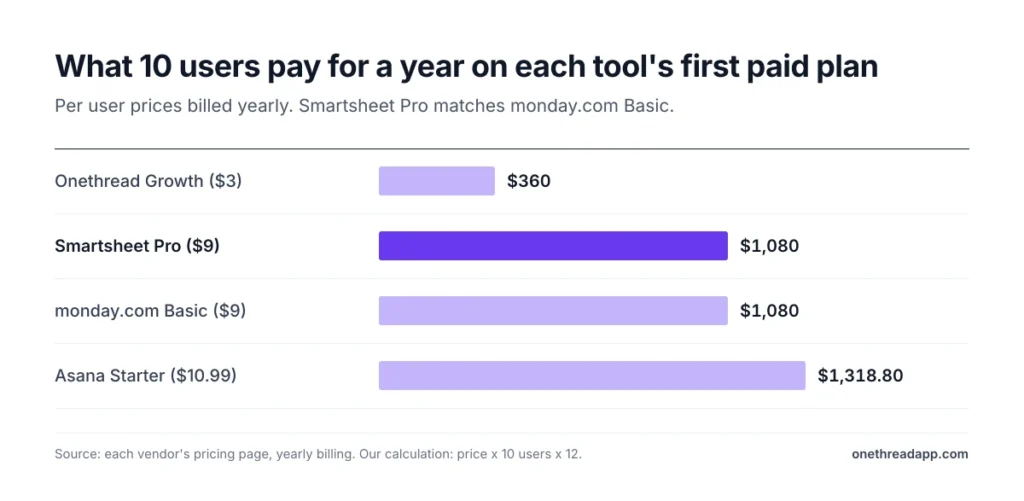
The gap widens once you need Smartsheet Business at $19. Teams that mostly assign tasks should read our Asana vs Smartsheet breakdown or the Trello vs Smartsheet comparison. Software teams should read the Jira vs Smartsheet comparison first, and all-in-one fans can check ClickUp vs Smartsheet.
For the full seat math on Asana, see our Asana pricing guide. Onethread’s Basic plan is free for your first ten users. Paid Onethread plans start at $3 per user a month. Its limits are real too: custom workflows, milestones and advanced reports sit on Scale at $5.
Which Smartsheet Pricing Plan Fits Your Team?
The right Smartsheet plan depends on three numbers: editors, outside editors and automations. Match your situation to the signal below.
| Signal | Plan |
|---|---|
| 1 to 10 editors, no outside editors, light automation | Pro |
| 11 or more editors, or clients and vendors who edit | Business |
| Over 250 automations a month or you need timelines and workload views | Business |
| You need SAML-based single sign-on, portfolios or an uptime guarantee | Enterprise |
| You’d buy three or more premium apps such as Data Shuttle and Dynamic View | Advanced Work Management |
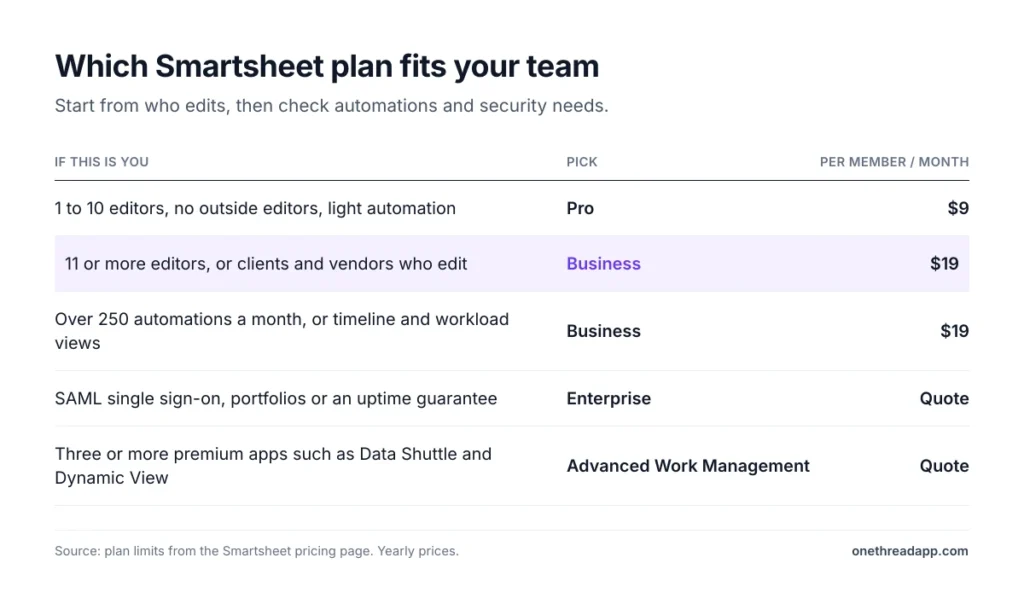
Three checks keep you from overbuying:
- Editors: list who actually builds or edits sheets. Everyone else can stay a free Contributor.
- Outsiders: count clients and vendors who must edit. If any exist, Business with free Guests often beats paying for their seats.
- Automations: check last month’s automation runs. Pro caps you at 250.
Top Tip: Run the 30-day trial with your real editors only. Watch how many people become Provisional Members. That number is your true seat count.
Still weighing tools? Our best project management software roundup compares the wider field.
What Should You Do Next With Smartsheet?
Smartsheet pricing isn’t hard once you split Members from everyone else. The seat price matters less than three things. Count who edits, mind the Pro cap at 10 and watch the premium apps you stack on top. Get those three numbers right and the renewal stops surprising you.
This week, export your user list from the Admin Center. Mark each person as builder, editor or viewer, and price only the builders and editors. Then run that count through the team cost table in this guide and see which plan survives.
FAQs
Is Smartsheet Free With Office 365?
No, Smartsheet isn’t free with Office 365. It’s a separate subscription priced per Member. Every plan includes the Microsoft 365 integration with Teams, Outlook and OneDrive. But you still pay Smartsheet pricing for each Member, from $9 a month on Pro.
Can I Change or Cancel My Smartsheet Plan?
Yes. Smartsheet says you can upgrade, add or remove users, buy more licenses or cancel at any time. Its user agreement sets the terms. Upgrading from Pro to Business is the common move once a team passes 10 Members or needs Guests.
What Payment Methods Does Smartsheet Accept?
Smartsheet accepts major credit cards, including Visa, Mastercard and American Express, plus ACH direct debit. Enterprise subscriptions above a minimum fee can pay by invoice through credit card, check, ACH or wire. Prices are available in 13 currencies, including USD, EUR and GBP, and payment options can vary by billing country.
Can You Negotiate Smartsheet Pricing?
Yes, on Enterprise and Advanced Work Management deals, which are quoted by sales. Vendr reports average savings of about 20% across the Smartsheet deals it handles. Self-serve Smartsheet pricing on Pro and Business is fixed, so negotiation starts once you need a custom quote.
Is There a Smartsheet Version for Government Agencies?
Yes, Smartsheet Gov is the version for government agencies, sold through Smartsheet’s sales team. Gov customers who buy through a sales representative stay on the legacy collaborator model. Those who buy online and accept the standard terms move to the new user subscription model.
Sources: Smartsheet pricing, Smartsheet User Subscription Model overview, Smartsheet Pro plan.