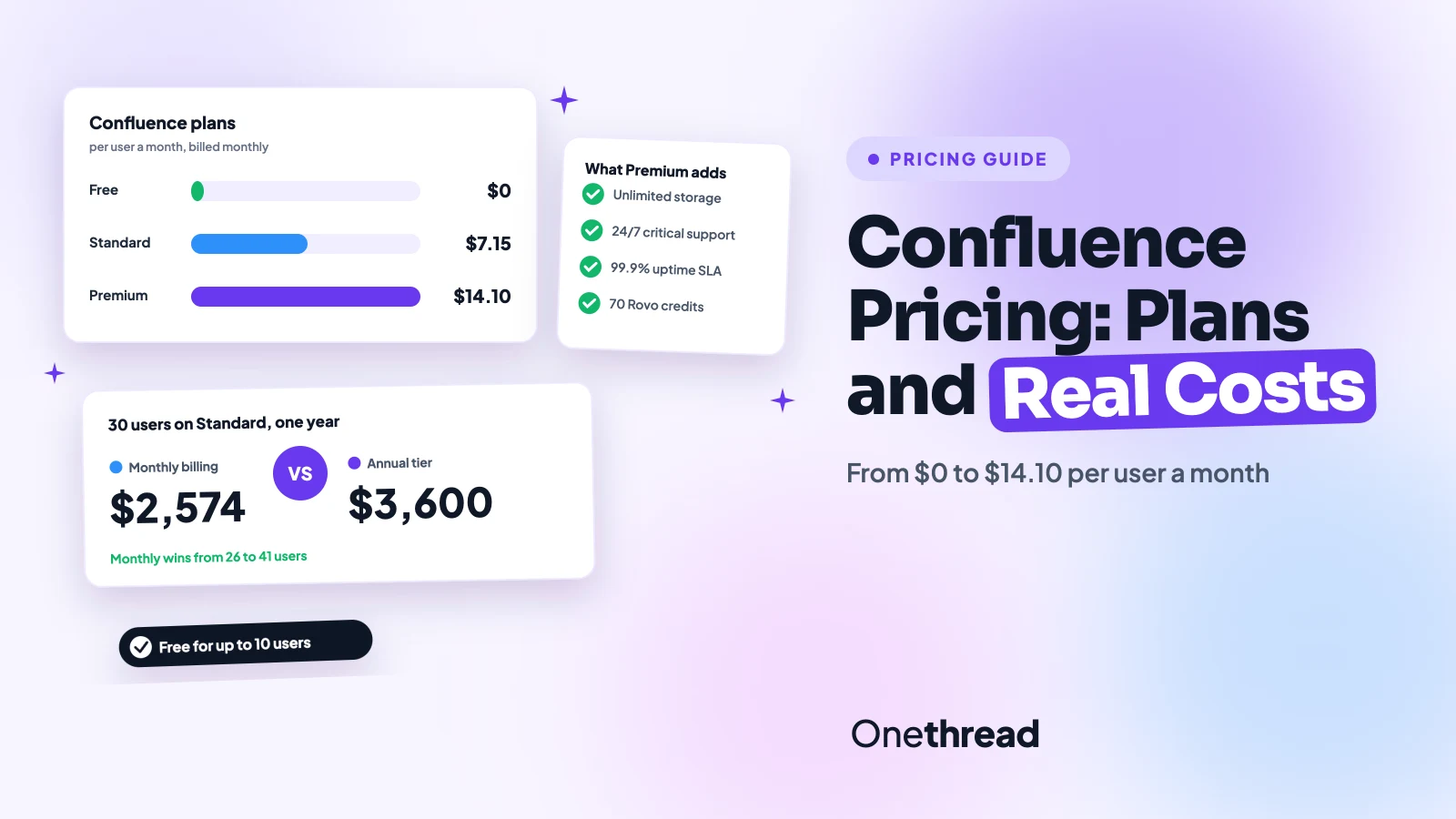
Confluence looks cheap right up until your eleventh teammate joins.
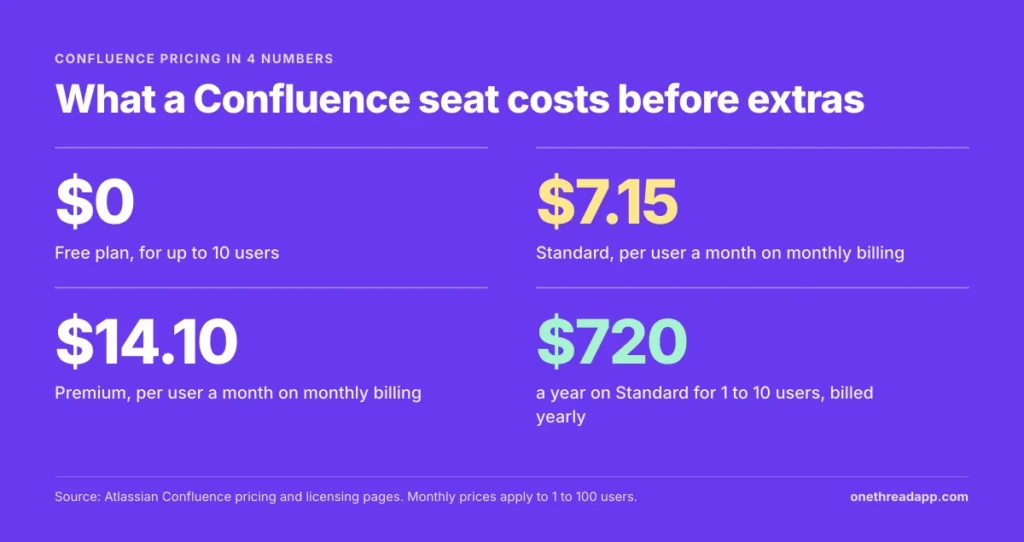
Confluence pricing runs from $0 on Free (up to 10 users) to $7.15 per user a month on Standard and $14.10 on Premium, billed monthly. Paid yearly, 10 users cost $720 on Standard or $1,400 on Premium. Enterprise is sold by quote.
Annual billing promises up to 17% off. But you only see that saving when your team sits near the top of its user tier.
We checked Atlassian’s live calculator at 20 team sizes, its licensing tables and 7 top-ranking pricing pages.
Here’s what each plan includes, what your team will pay, and when monthly beats annual.
Key Points
- Confluence costs $0 on Free (up to 10 users), $7.15 per user a month on Standard and $14.10 on Premium, billed monthly. Annual plans are sold by tier, from $720 a year on Standard or $1,400 on Premium for 1 to 10 users. Enterprise is quote only.
- Check your tier before you pay yearly. From 26 to 41 users, monthly billing beats the 26 to 50 user annual tier.
- Pick Standard unless you need unlimited storage, 24/7 critical support or a 99.9% uptime SLA, which is what Premium’s price buys.
- Budget extras on their own line: extra Rovo AI credits cost $0.01 each, Atlassian Guard is sold separately below Enterprise, and Marketplace apps bill on top.
What Is Confluence Pricing per User?
Confluence Cloud costs $0, $7.15 or $14.10 per user a month on monthly billing, for teams of up to 100 users. Yearly plans work differently. Atlassian charges one flat price per tier, such as $720 a year for 1 to 10 users on Standard.
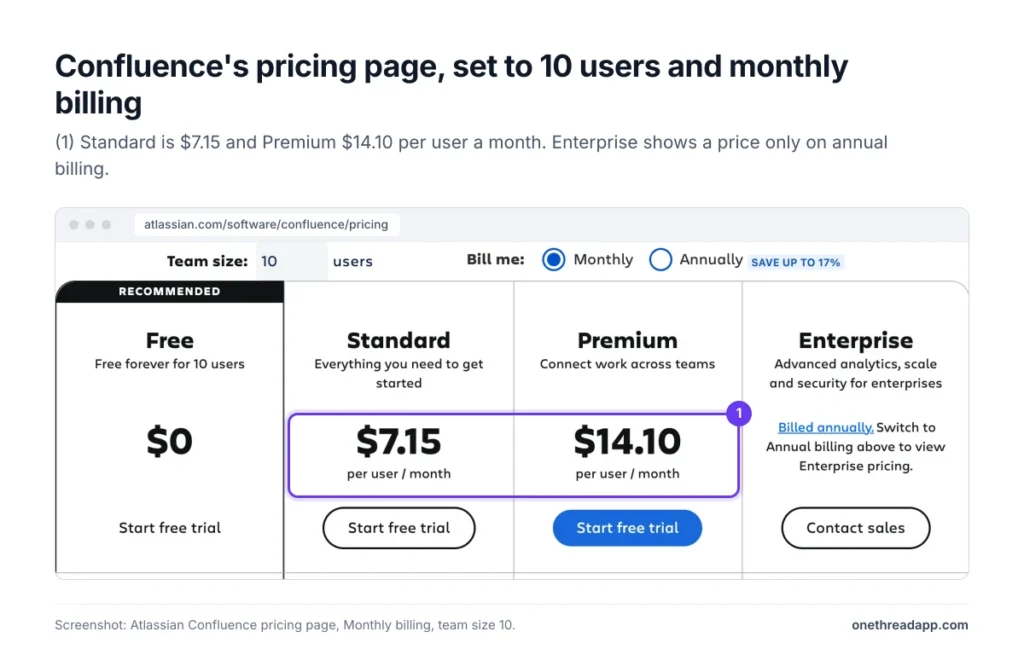
| Confluence plan | Monthly billing, per user a month (1 to 100 users) | Annual billing, 1 to 10 users | File storage | Best for |
|---|---|---|---|---|
| Free | $0 | $0 | 2 GB | Up to 10 users trying a wiki |
| Standard | $7.15 | $720 a year | 250 GB | Most teams of 11 to 100 |
| Premium | $14.10 | $1,400 a year | Unlimited | Teams that need 24/7 support and an SLA |
| Enterprise | Not offered | Sales quote | Unlimited | Large companies with many sites |
Monthly prices drop past 100 users. Each user is priced at the rate of their band, so users 101 to 250 cost $5.45 on Standard and $10.20 on Premium. That’s why a 300-person team sees a blended $5.78 on the calculator.
Anyone who can log in to your site counts as a user. The “Best for” labels are our own reading of the limits.
Sources: Confluence pricing, Confluence licensing, Rovo licensing, Data Center end of life.
What Does the Confluence Free Plan Include?
The Confluence Free plan costs $0 for up to 10 users. It includes pages, spaces, databases, the template library and support for apps and integrations, with 2 GB of file storage.
The limits are tight but honest. You get 3 active whiteboards per user and 50 automation steps a month for the whole subscription, not per user. Help comes from the Atlassian Community only, and Rovo AI credits start on Standard, so there’s no Rovo here.
Say you run a five-person agency and want one home for client briefs and meeting notes. Free covers that, as long as you stay at 10 users and under 2 GB of files.
The catch comes with person number 11. Atlassian moves a Free site that passes the user limit into a 7-day trial of Standard. After that, you’re paying. So plan the switch, and the budget, before you invite them.
Pricing: $0 for up to 10 users.
Best For
- Teams of up to 10 people starting a shared wiki.
Pros
- No card needed and no time limit.
- Pages, spaces, databases and templates included.
- Apps and integrations supported.
Cons
- Hard cap of 10 users per site.
- 2 GB of file storage fills fast with PDFs and images.
- Community support only.
What Does the Confluence Standard Plan Include?
Confluence Standard costs $7.15 per user a month on monthly billing, or $720 a year for up to 10 users on annual billing. Most teams land here, because it lifts the user cap to 250,000 per site.
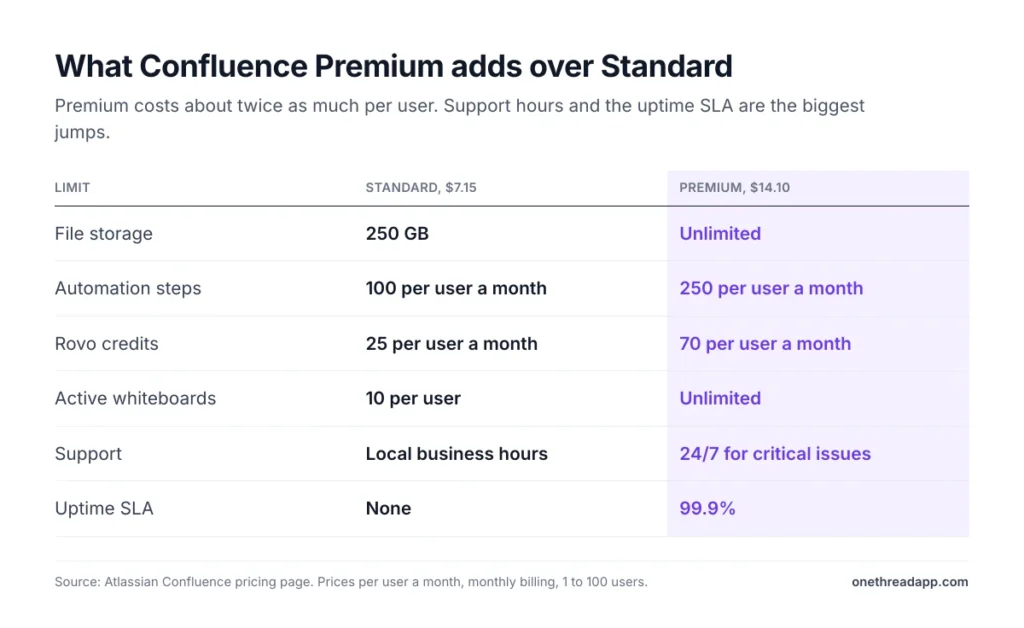
Standard adds Rovo search, chat and agents with 25 Rovo credits per user a month. It also adds free guest access and advanced permissions. Storage jumps to 250 GB, automation rises to 100 steps per user, and you get 10 active whiteboards each.
Picture a 25-person product team keeping specs and onboarding docs in one place. Standard handles that for $1,800 a year, paid yearly.
Support runs during local business hours, and there’s no uptime SLA. Fine for most teams, less so when your docs are the product.
Pricing: $7.15 per user a month (monthly, 1 to 100 users), or $720 a year for 1 to 10 users.
Best For
- Teams of 11 to 100 who need a shared knowledge base.
Pros
- Free guest access for clients and contractors.
- 250 GB of file storage.
- Rovo AI included, with 25 credits per user a month.
- Page and space permissions you can lock down.
Cons
- No uptime SLA.
- Support only in local business hours.
- 25 Rovo credits go fast, since a basic AI chat uses 10.
What Does the Confluence Premium Plan Include?
Confluence Premium costs $14.10 per user a month on monthly billing, or $1,400 a year for up to 10 users. That’s about double Standard.
You get unlimited storage, unlimited whiteboards and 250 automation steps per user a month. Rovo credits rise to 70 per user. Admins get usage analytics, extra controls and a dynamic intranet.
The support upgrade is the real reason teams pay. Premium includes 24/7 support with 1-hour response times for critical issues and a 99.9% uptime SLA backed by service credits.
Say your support team publishes help docs from Confluence. An outage at 2 a.m. matters, and Premium is the first plan that puts a number on uptime. You can upgrade from Standard any time on the Manage Subscriptions page.
Pricing: $14.10 per user a month (monthly, 1 to 100 users), or $1,400 a year for 1 to 10 users.
Best For
- Teams whose docs must stay up around the clock, or admins running a large site.
Pros
- Unlimited storage and whiteboards.
- 24/7 support with 1-hour response for critical issues.
- 99.9% uptime SLA with service credits.
- 70 Rovo credits per user a month.
Cons
- Twice the Standard price per user.
- Atlassian Guard still billed separately.
- Small teams rarely use the admin analytics.
What Does the Confluence Enterprise Plan Include?
Confluence Enterprise is sold on annual contracts only, and Atlassian quotes it through sales. The calculator shows a price once you enter 801 or more users: $137,000 a year for 801 to 1,000 users.
Enterprise adds up to 150 sites, 500 automation steps per user a month and 150 Rovo credits per user. You also get advanced data analysis and enterprise identity controls. Atlassian Guard Standard (SSO, SCIM and mobile app management) comes included. Support runs 24/7 for all issues, with a 99.95% uptime SLA.
This plan suits companies that run many business units or regions on Confluence, each with its own site. Say you run one site with 500 people. Ask sales to price Premium plus Guard next to Enterprise, because you may never use the extra sites.
Pricing: Annual only, by quote. Atlassian lists $137,000 a year for 801 to 1,000 users.
Best For
- Large companies that need many sites and strict identity controls.
Pros
- Up to 150 sites under one plan.
- Atlassian Guard Standard included.
- 24/7 support for all issues and a 99.95% uptime SLA.
- 150 Rovo credits per user a month.
Cons
- No monthly billing option.
- No public price below 801 users.
- Atlassian Guard Premium is still a separate subscription.
When Does Annual Billing Make Confluence Cheaper?
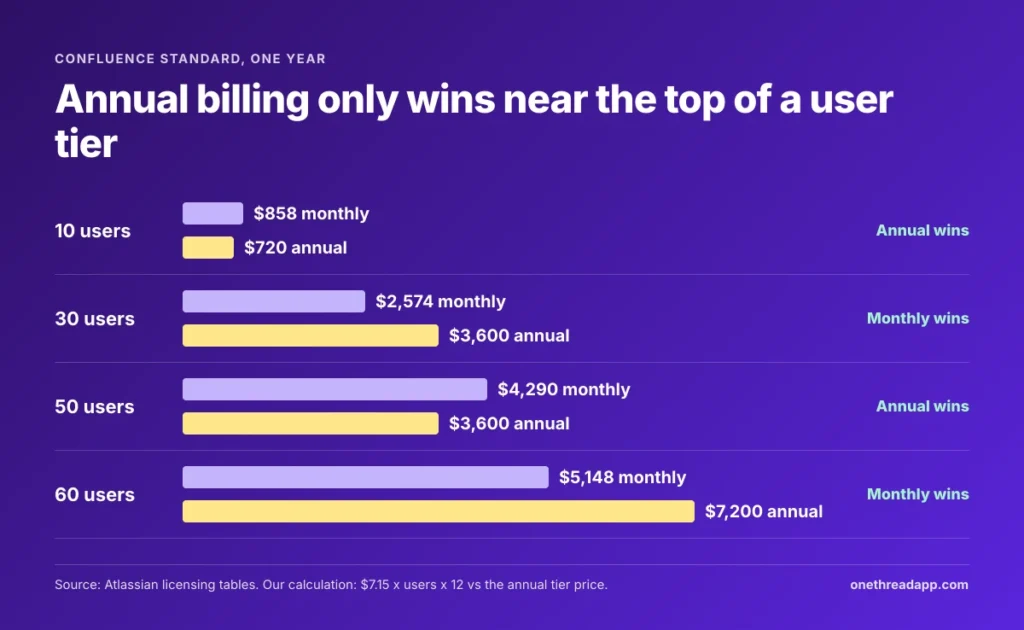
Annual billing makes Confluence cheaper only when your headcount sits near the top of its user tier. Annual plans charge for the tier that matches your user count, while monthly billing charges for your exact number of users.
| Team size | Standard, monthly billing for 12 months | Standard, annual tier price | Cheaper option |
|---|---|---|---|
| 10 users | $858 | $720 | Annual, saves $138 |
| 11 users | $943.80 | $1,050 | Monthly, saves $106.20 |
| 25 users | $2,145 | $1,800 | Annual, saves $345 |
| 30 users | $2,574 | $3,600 | Monthly, saves $1,026 |
| 50 users | $4,290 | $3,600 | Annual, saves $690 |
| 60 users | $5,148 | $7,200 | Monthly, saves $2,052 |
| 100 users | $8,580 | $7,200 | Annual, saves $1,380 |
Example: A 30-person team on Standard pays 30 × $7.15 × 12 = $2,574 a year on monthly billing. The annual tier for 26 to 50 users costs $3,600, so annual billing costs that team $1,026 more.
The break-even in that tier sits at 42 users, and Premium follows the same pattern. Monthly billing has its own catch. Atlassian uses Maximum Quantity Billing, so each bill counts the most seats you held during the cycle. Removing someone mid-month doesn’t lower it.
Top Tip: Count your active users and find your tier in Atlassian’s annual price table. Go annual only if you’re a few seats from the top.
What Hidden Costs Sit Outside Confluence Pricing?
Confluence’s plan price covers the seats, not everything around them. As provalida managing director Attila Mozes puts it, “In the beginning it’s cheap”. Four costs explain why the bill climbs:
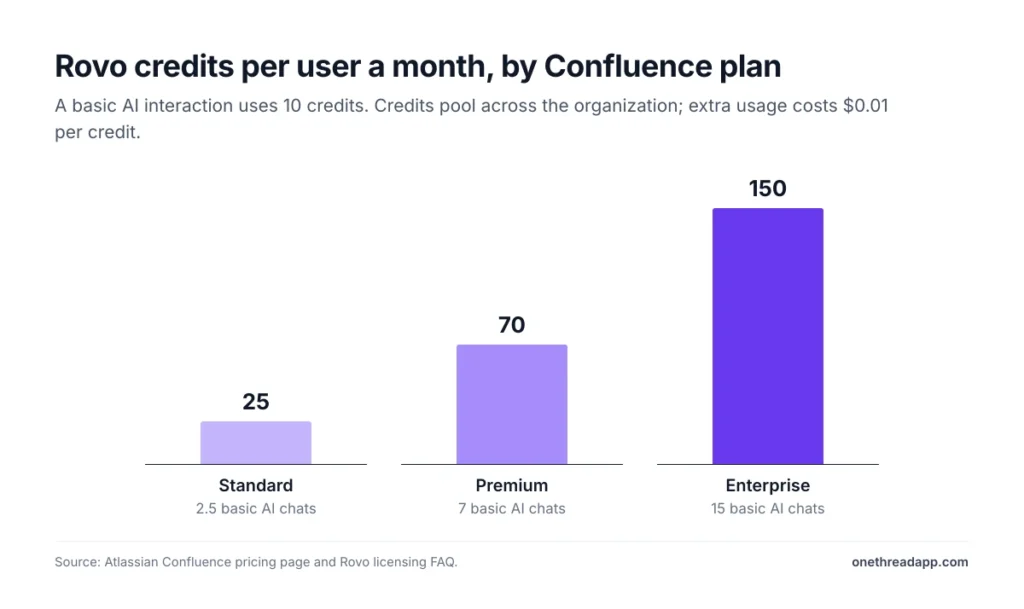
- Rovo AI credits: Standard includes 25 credits per user a month, Premium 70 and Enterprise 150, pooled across your organization. A basic AI chat uses 10. Extra usage is on by default at $0.01 per credit.
- Atlassian Guard: SSO, SCIM and mobile app management need an Atlassian Guard Standard subscription on Free, Standard and Premium. Only Enterprise includes it.
- Marketplace apps: Third-party apps bill on their own. Agile consultant Neill-Walker notes that on app licenses “you pay for all the total users”.
- Price rises: Cotiviti administrator Vasanth Pithani reports “yearly price increases of approximately five to twenty percent” across Atlassian products.
Example: A 10-person Standard team shares 250 Rovo credits a month, enough for 25 basic AI chats. If the team runs 100 chats, it uses 1,000 credits and pays 750 × $0.01 = $7.50 extra that month. Admins get alerts at 80% and 100% of the allowance, so the bill never arrives as a total surprise.
Top Tip: Set a spending limit on extra Rovo usage in Atlassian Administration before you roll AI out to the whole team.
Which Confluence Pricing Plan Fits Your Team?
The right Confluence plan depends on your headcount first and your support needs second.
| If this is you | Pick | What to budget |
|---|---|---|
| Up to 10 users and light files | Free | $0 |
| 11 to 100 users, business-hours support is fine | Standard | $7.15 per user a month, or the annual tier |
| Docs must stay up 24/7, or you need unlimited storage | Premium | $14.10 per user a month, or the annual tier |
| 801 or more users, many sites, SSO for everyone | Enterprise | Sales quote |
Is Confluence good value? For a team that lives in docs, Standard is fair. Premium, Guard and apps are harder to defend for a team that writes a page a week.
Unsure Confluence is the right wiki? Our list of Confluence alternatives compares 8 options. The Notion pricing breakdown shows how a docs-first rival charges for AI, and smaller wikis sit in our Slite alternatives roundup.
Atlassian also sells the Teamwork Collection, which bundles Jira, Confluence, Loom and Rovo. Its Premium tier costs $2,900 a year for 1 to 10 users. If you already pay for Loom, check our Loom pricing guide first. And if your docs sit next to tasks and budgets, Onethread keeps them in one workspace with its project management features.
What Should You Do Next With Confluence?
Confluence pricing gets simple once you stop reading it as a flat per-user price. Monthly billing charges for every user you have. Annual billing charges for the tier you sit in, and that gap decides whether the 17% saving is real. Most teams only need Standard, and Premium earns its double price through support and uptime.
This week, export your user list, count your active Confluence users and find your tier on Atlassian’s licensing page. If you sit near the top of it, go annual. If not, stay monthly and check again at renewal.
FAQs
Is Confluence the Same as Jira?
No. Confluence is Atlassian’s wiki for pages, docs and knowledge bases, while Jira tracks issues, tasks and sprints. They link closely, so a Jira issue can point to the Confluence page that specs it. But Atlassian sells each one on its own, so Confluence pricing covers only your Confluence users.
Can You Still Buy Confluence Data Center?
Only if you’re already a Data Center customer. Atlassian stopped selling Data Center subscriptions to new customers on March 30, 2026. Existing customers can still buy subscriptions and expansions until March 30, 2028. Confluence Data Center reaches end of life on March 28, 2029, when it turns read-only, and its pricing comes from Atlassian’s sales team.
Does Atlassian Offer Confluence Discounts for Nonprofits and Schools?
Yes. Atlassian lists Confluence Cloud at 75% off for eligible Community customers, which covers nonprofits, and 75% off for eligible Academic customers. The discount applies to the normal Confluence pricing tiers. You need to qualify first, so apply before you buy seats.
Can You Get a Refund on a Confluence Subscription?
Yes, within a short window. Monthly subscriptions qualify within your first paid month after the trial ends. Annual subscriptions qualify within 30 days of payment. The 7-day free trial on Standard and Premium needs no payment details, so test first.
How Can You Pay for Confluence?
Monthly subscriptions take a credit card or PayPal. Annual subscriptions take a credit card, bank transfer or check, and big annual quotes can use Net-30 terms. The minimum term is one month. So you can start monthly and switch to annual once your team settles.