Supabase looks free right up to launch day. Then the first invoice lists a base fee, compute and egress.
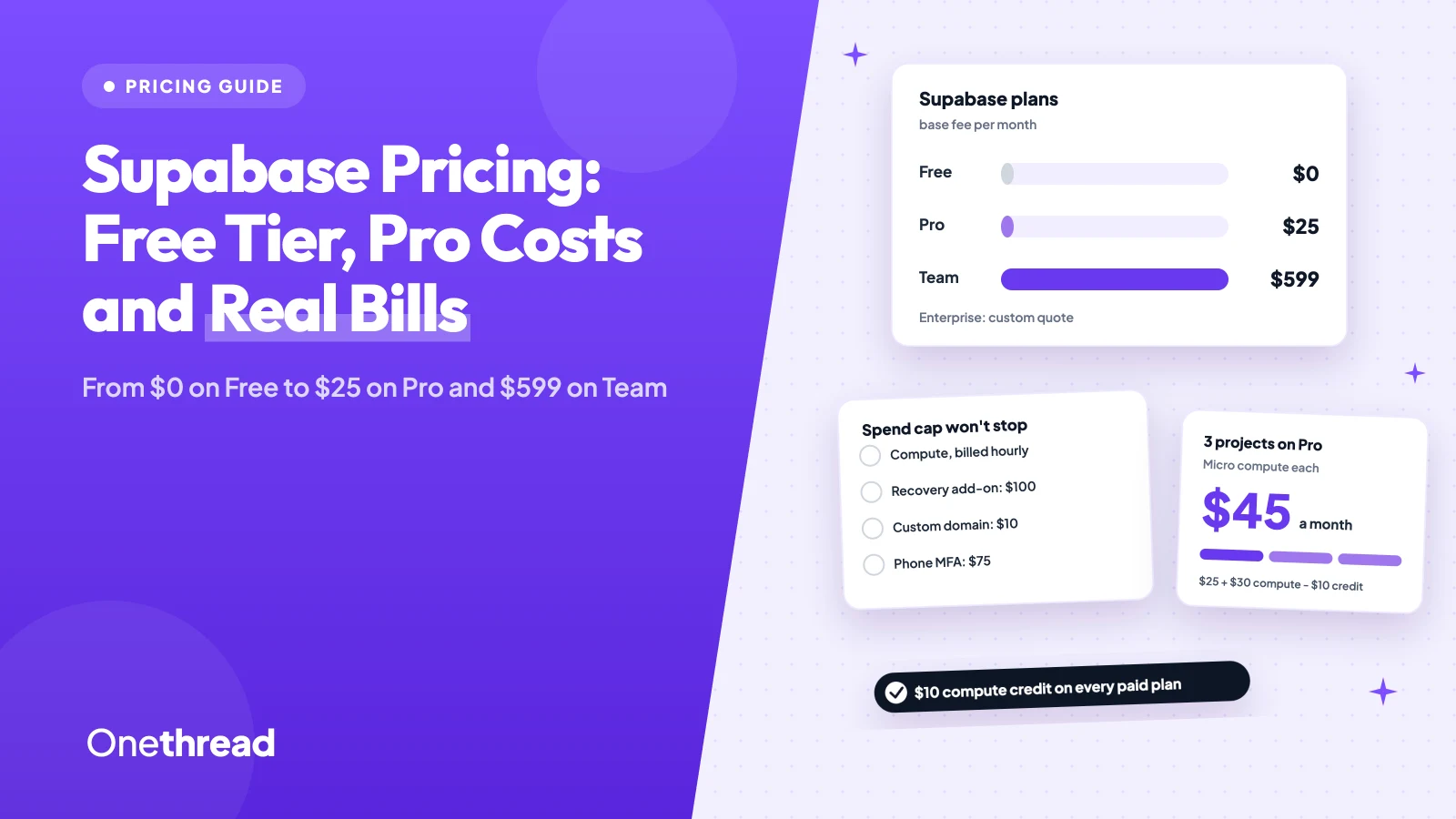
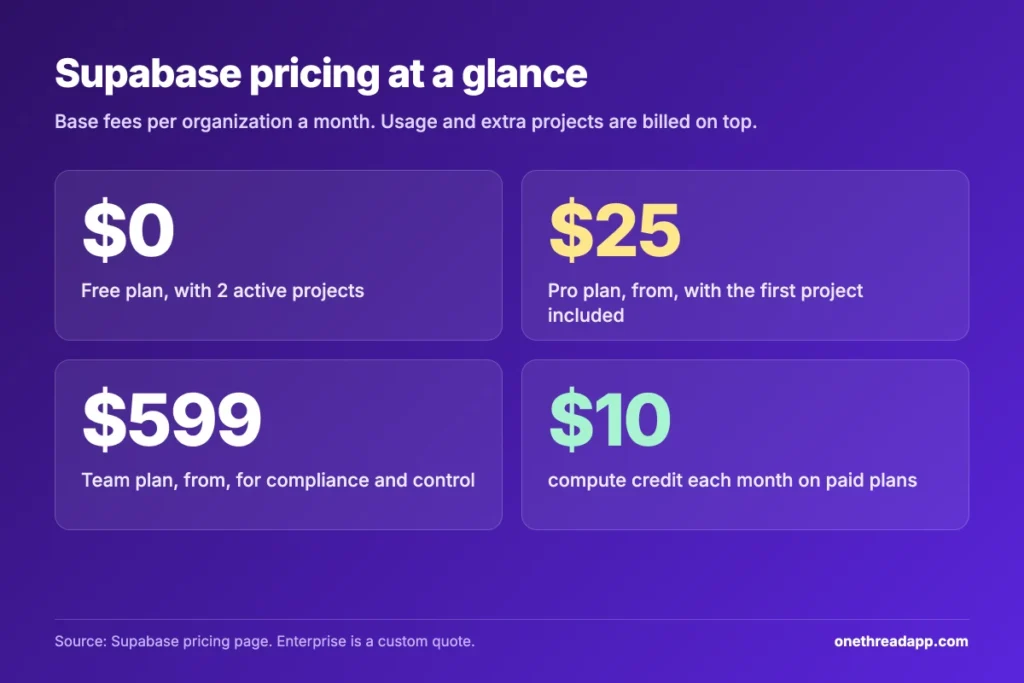
Supabase pricing starts at $0 on the Free plan, $25 a month on Pro and $599 a month on Team. Enterprise is a custom quote. Paid plans add usage charges, and each extra project adds compute from about $10 a month.
Here’s the catch. The $25 covers one small project, not your whole account.
We checked the Supabase pricing page, its billing docs and six top-ranking pricing guides. You’ll get each plan’s limits, the overage rates and real monthly bills you can copy.
Key Points
- Supabase pricing in one line: Free costs $0 for 2 active projects, a 500 MB database and 50,000 monthly active users. Pro starts at $25 a month, Team at $599 a month, and Enterprise is a custom quote.
- Compute is billed per project: paid plans include $10 a month in compute credits, enough for one Micro project. Three Micro projects on Pro come to $45 a month.
- The spend cap stops overages, not every charge: compute, point-in-time recovery, custom domains and phone MFA are still billed with the cap on, and the cap only exists on Pro.
- Use Free for prototypes and Pro for anything live: Free projects pause after a week of inactivity and get no backups. Pro projects never pause and keep daily backups for 7 days.
How Much Does Supabase Cost Per Month?
Supabase costs $0 a month on Free, from $25 on Pro, from $599 on Team, and a custom price on Enterprise. Those are base fees per organization. Usage above each plan’s quota is billed on top, and so is compute for every extra project.
The four plans side by side:
| Plan | Base price per month | Monthly active users | Database size | Egress | File storage | Backups |
|---|---|---|---|---|---|---|
| Free | $0 | 50,000 | 500 MB per project | 5 GB | 1 GB | None |
| Pro | From $25 | 100,000 | 8 GB per project | 250 GB | 100 GB | Daily, kept 7 days |
| Team | From $599 | 100,000 | 8 GB per project | 250 GB | 100 GB | Daily, kept 14 days |
| Enterprise | Custom quote | Custom | Custom | Custom | Custom | Custom |
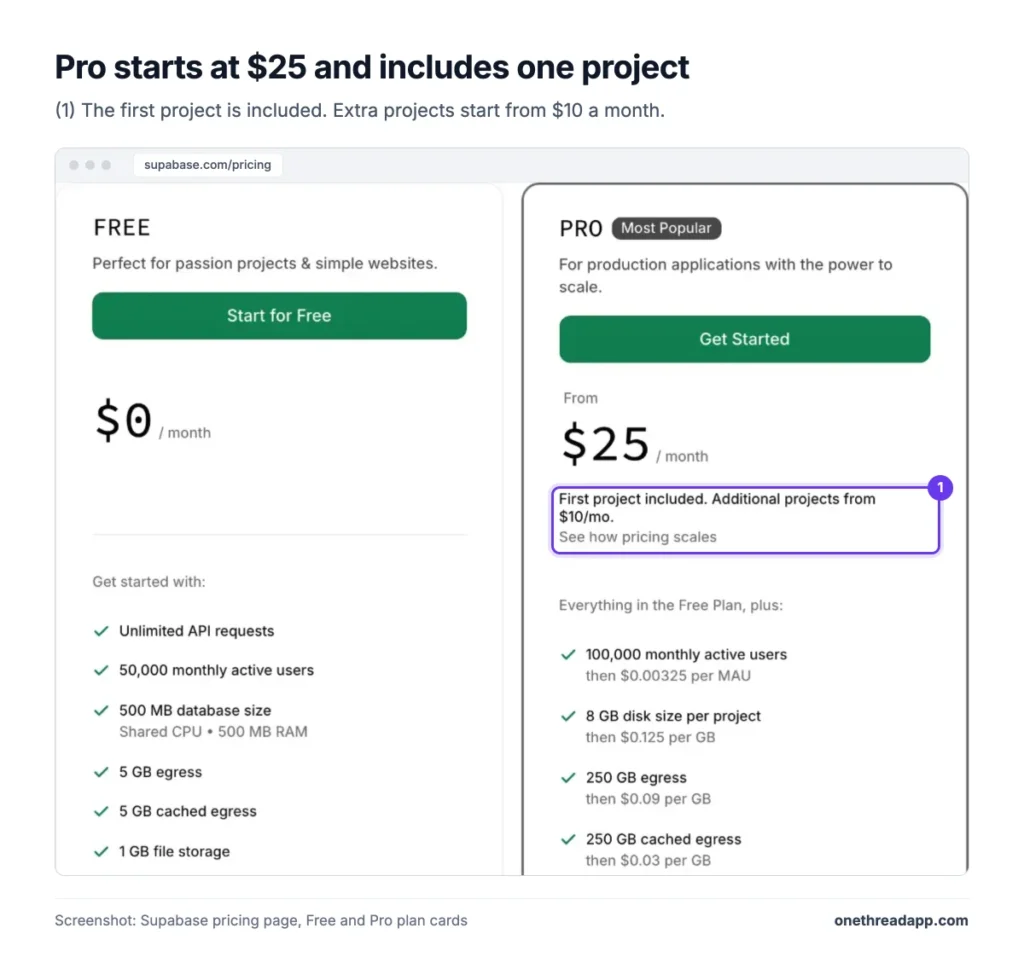
Example: one Pro project on the default Micro size costs $25 + $10 compute, minus the $10 credit. That’s $25 a month, or $300 a year.
Supabase charges the Pro fee up front and bills extra usage at month end.
Quotas apply to the whole organization and add up across its projects. You can’t mix plans inside one organization, so a Free side project and a Pro client app need two organizations.
What Does the Supabase Free Plan Include?
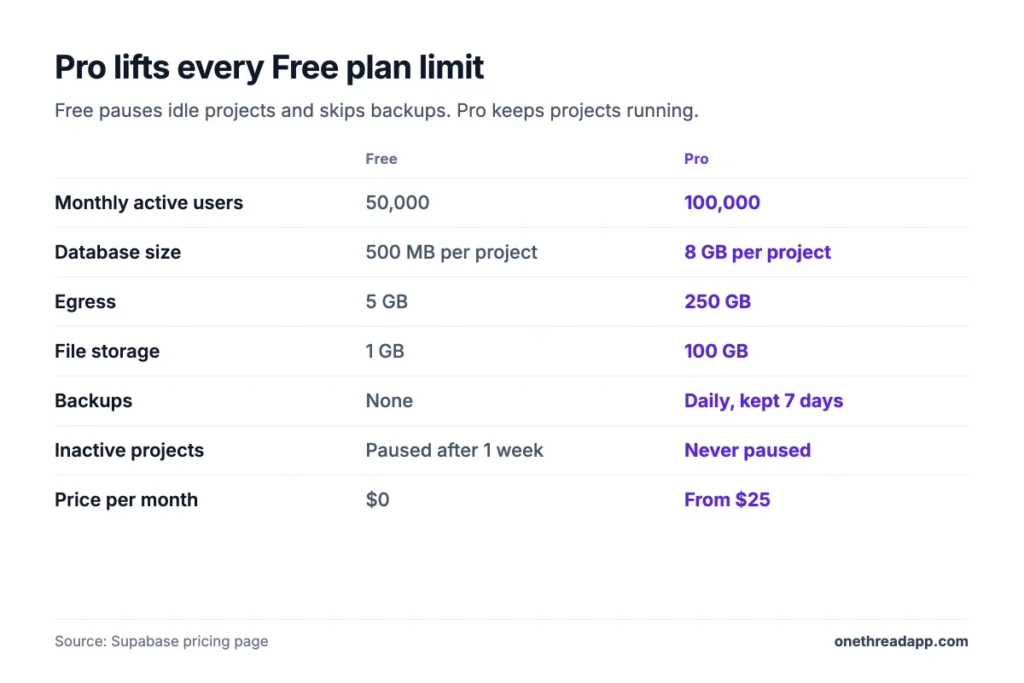
The Supabase Free plan gives you 2 active projects at no cost. Each one gets a 500 MB database, a shared CPU and 500 MB of RAM. The free tier also covers 50,000 monthly active users, 5 GB of egress and 1 GB of file storage.
The limit is counted across every organization where you’re an Owner or Administrator. Paused projects don’t count toward it. You won’t be charged on Free, because usage simply stops at the quota.
Say you build a weekend side project and forget it for ten days. Supabase pauses it after one week of inactivity. You can restore it, but your users see an offline app until you do.
The free tier also skips automatic backups, keeps logs for 1 day and runs on community support. Edge Functions get 500,000 invocations, and Realtime gets 200 concurrent connections and 2 million messages a month.
Pricing: $0 a month for up to 2 projects.
Best For
- Prototypes, class projects and side apps with no paying users yet.
Pros
- Covers 50,000 monthly active users, enough Auth headroom for most early apps.
- Blocks overage charges, since usage stops at the quota.
- Paused projects don’t count toward the 2-project limit.
Cons
- Projects pause after one week of inactivity.
- No automatic backups and no point-in-time recovery.
- Only a 500 MB database and 5 GB of egress a month.
- Community support and 1 day of logs.
What Does the Supabase Pro Plan Include?
The Supabase Pro plan costs from $25 a month and is built for apps with real users. It includes 100,000 monthly active users, an 8 GB database per project, 250 GB of egress and 100 GB of file storage.
It also grants 2 million Edge Function invocations, 5 million Realtime messages and 500 concurrent Realtime connections. Backups run daily and stay for 7 days. Logs stay for 7 days, and support moves to email.
Pro projects never pause.
Say your app just signed its first 200 paying users. A paused database on a Monday morning would hurt more than $25 a month. Pro removes that risk.
The plan includes $10 a month in compute credits, which covers one project on the Micro size. Every project after that adds its own compute line. Pro also turns on the spend cap by default, so you pay nothing past the quota until you switch it off.
Pricing: from $25 a month per organization, plus about $10 a month of compute for each extra Micro project.
Best For
- Live apps and small SaaS products that need backups and no pausing.
Pros
- Projects never pause for inactivity.
- Daily backups kept for 7 days.
- Spend cap on by default blocks surprise overages.
- $10 compute credit covers the first Micro project.
Cons
- Each extra project adds about $10 a month in compute.
- No SOC2 report and no HIPAA option.
- Point-in-time recovery costs $100 a month extra.
- Email support, with SLAs only on Team and up.
What Does the Supabase Team Plan Add?
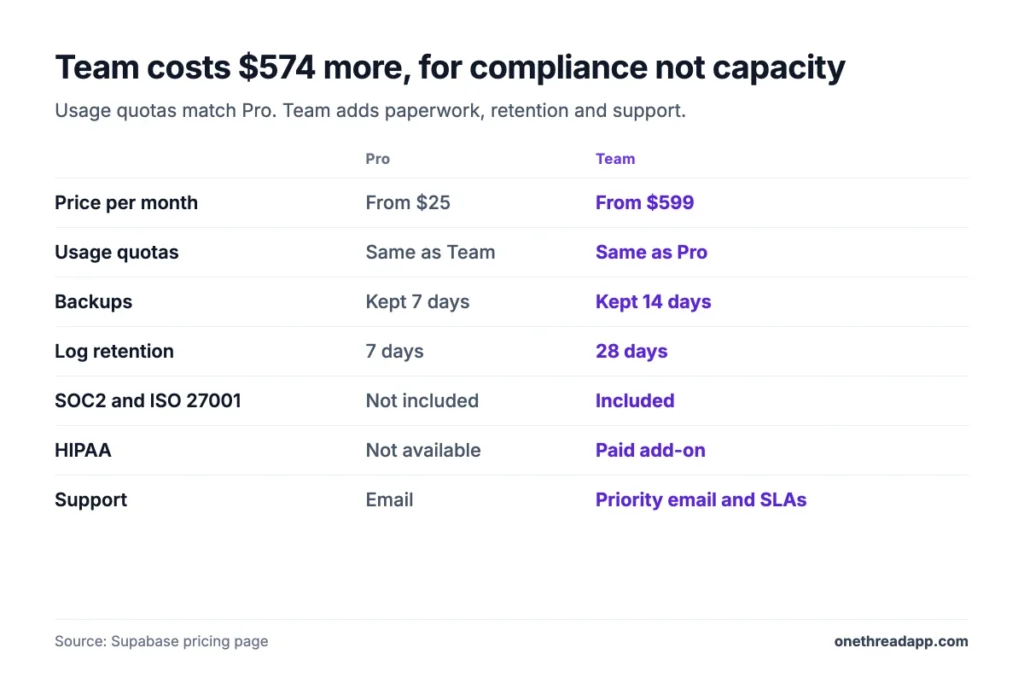
The Supabase Team plan costs from $599 a month and adds compliance, not capacity. Its usage quotas match Pro: 100,000 monthly active users, 8 GB of database per project and 250 GB of egress.
What you buy is paperwork and control. Team adds SOC2 and ISO 27001, HIPAA as a paid add-on, and platform audit logs. You also get read-only and project-scoped roles, backups kept 14 days, logs kept 28 days, and priority email support with SLAs.
Say a hospital client sends a security questionnaire. Pro can’t answer the SOC2 line. Team can, and the HIPAA add-on covers health data.
Watch one detail. Supabase’s cost control docs say the spend cap is available only with the Pro plan, so don’t assume it protects a Team bill. Check the usage page each week.
Pricing: from $599 a month per organization, plus compute and usage.
Best For
- Companies that must pass a SOC2 review or store health data.
Pros
- SOC2 and ISO 27001 compliance included.
- HIPAA available as a paid add-on.
- 28-day log retention and platform audit logs.
- Read-only and project-scoped access roles.
Cons
- $574 a month more than Pro for the same usage quotas.
- HIPAA add-on price isn’t published.
- Supabase’s cost control docs describe the spend cap for Pro only.
What Does Supabase Enterprise Cost?
Supabase Enterprise has no public price. You get a custom quote from the sales team, and every usage line on the pricing page reads “Custom.”
Enterprise adds 24x7x365 premium support, a technical account manager, uptime SLAs and a private Slack channel. Logs stay for 90 days. Designated support, onboarding help and a customer success team come with it. One custom domain is included, and extra ones cost $10 a month each.
Say your app handles payments for thousands of stores. A two-hour outage with email-only support would hurt more than any invoice. Enterprise buys you a named person to call and an uptime promise in writing.
Realtime connections and messages also get volume discounts on this plan. But Supabase doesn’t publish the rates, so ask for them in writing. Ask for the compute rates too, since every project still runs its own instance.
Pricing: custom quote from Supabase sales.
Best For
- Large teams that need uptime SLAs and around-the-clock support.
Pros
- 24x7x365 support with a technical account manager.
- Uptime SLAs and 90-day log retention.
- Volume discounts on Realtime usage.
Cons
- No published price, so budgeting needs a sales call.
- Point-in-time recovery still costs extra, from $100 a month.
- Overkill for apps under the Pro quotas.
How Does Supabase Compute Pricing Work?
Supabase compute is billed by the hour for each project, separate from your database usage. If a project runs for part of an hour, you pay for the full hour. Paid plans include $10 a month in compute credits, which covers one project on the Micro size.
The credits only apply to compute. They don’t cover read replicas or branching compute, and they reset each month without rolling over. In paid organizations, the free Nano size is billed at the Micro price.
| Compute size | Price per hour | About per month | Memory | CPU |
|---|---|---|---|---|
| Micro | $0.01344 | $10 | 1 GB | Shared |
| Small | $0.0206 | $15 | 2 GB | Shared |
| Medium | $0.0822 | $60 | 4 GB | Shared |
| Large | $0.1517 | $110 | 8 GB | 2 vCPUs |
| XL | $0.2877 | $210 | 16 GB | 4 vCPUs |
| 2XL | $0.562 | $410 | 32 GB | 8 vCPUs |
| 4XL | $1.32 | $960 | 64 GB | 16 vCPUs |
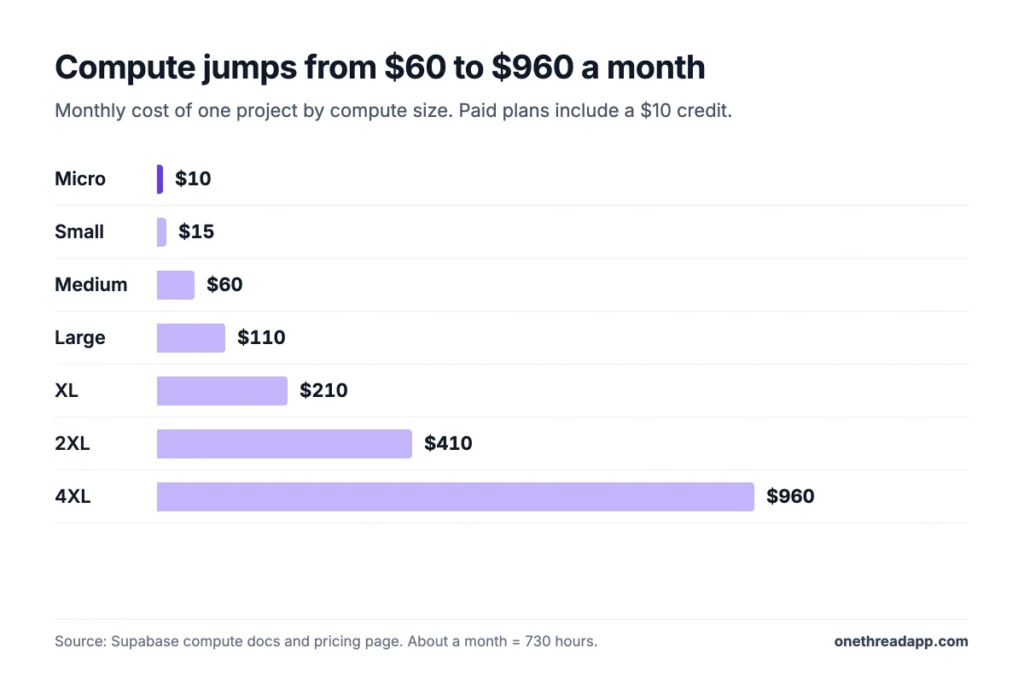
Example: Supabase’s compute docs price Pro with three Small projects at $25 + 3 x $15 – $10 = $60 a month. One Small project comes to $25 + $15 – $10 = $30.
Sizes go up to 16XL at about $3,730 a month. Supabase never upgrades a size on its own, because a change means downtime.
Top Tip: Pause projects you aren’t using. Supabase charges no compute for paused projects, so a staging copy you only need on Fridays costs a fraction of $10.
Which Supabase Usage Charges Add Up Fastest?
Supabase usage charges start once you pass a plan’s quota. On Pro and Team, egress and monthly active users tend to grow first, because both rise with every new user. The table lists each rate from the pricing page, so you can price your own traffic.
| Usage item | Free | Included on Pro and Team | Price after that |
|---|---|---|---|
| Egress | 5 GB | 250 GB | $0.09 per GB |
| Cached egress | 5 GB | 250 GB | $0.03 per GB |
| Database size | 500 MB | 8 GB per project | $0.125 per GB |
| File storage | 1 GB | 100 GB | $0.0213 per GB |
| Monthly active users | 50,000 | 100,000 | $0.00325 per user |
| Edge Function invocations | 500,000 | 2 million | $2 per million |
| Realtime messages | 2 million | 5 million | $2.50 per million |
| Realtime peak connections | 200 | 500 | $10 per 1,000 |
Egress Fees Grow With Traffic
Egress is the data your app sends out to users. Pro includes 250 GB a month, then charges $0.09 per GB. Cached egress, served from Supabase’s CDN, costs $0.03 per GB after its own 250 GB.
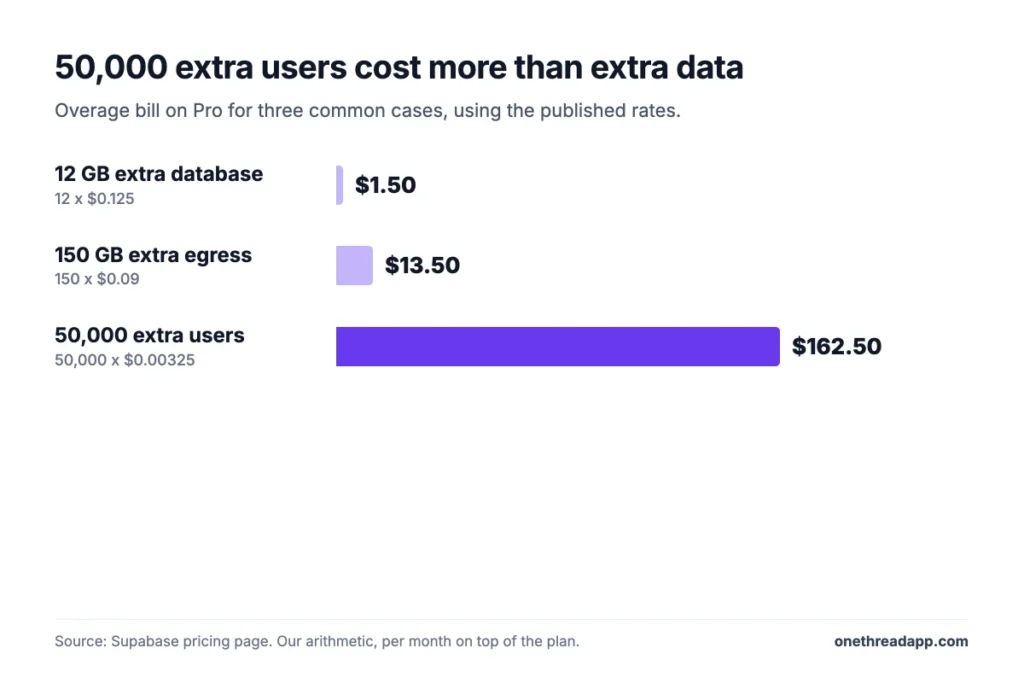
Example: an app that sends 400 GB a month pays for 150 GB of overage. That’s 150 x $0.09 = $13.50 a month on top of the plan.
Images and video drive most egress. Serve them through the cache, since cached data costs a third of the normal rate.
Database Size and Storage Costs
Database size is the disk your Postgres data uses. Pro includes 8 GB per project, then charges $0.125 per GB a month. File storage is separate: 100 GB included, then $0.0213 per GB.
Example: a 20 GB database pays for 12 extra GB. That’s 12 x $0.125 = $1.50 a month.
Storage rarely hurts, since 100 GB holds a lot of avatars and PDFs. Image resizing is the storage line to watch: 100 origin images are included, then it costs $5 per 1,000.
Monthly Active Users Drive Auth Costs
Monthly active users are the people who sign in during a billing month. Pro includes 100,000, then charges $0.00325 per extra user. Single sign-on users are counted apart: 50 included, then $0.015 each.
Example: an app with 150,000 monthly active users pays for 50,000 extra. That’s 50,000 x $0.00325 = $162.50 a month.
That one line can cost six times the Pro fee. If many of your users sign in once and leave, count them before you launch a big campaign.
Which Supabase Add-Ons Cost Extra?
Supabase add-ons are optional extras with their own monthly prices. None of them are covered by the spend cap or the compute credits. The pricing page lists these rates:
| Add-on | Price | Plans |
|---|---|---|
| Point-in-time recovery | $100 a month per 7 days of retention | Pro, Team, Enterprise |
| Custom domain | $10 a month per domain | Pro, Team; 1 included on Enterprise |
| Advanced MFA by phone | $75 a month for the first project, then $10 each | Pro and up |
| Log drains | $60 per drain a month, plus $0.20 per million events | Pro and up |
| Branching | $0.01344 per branch an hour | Pro and up |
| HIPAA | Paid add-on, price not published | Team, Enterprise |
Example: a Pro app with 7 days of point-in-time recovery and one custom domain costs $25 + $100 + $10 = $135 a month.
Daily backups are already included on Pro. Point-in-time recovery only pays off when losing a day of data is not an option.
Branching makes a copy of your project for each pull request. At $0.01344 an hour, a branch left open all month costs about $10. Close branches when the review is done.
What Does the Supabase Spend Cap Cover?
The Supabase spend cap protects you from usage overages, but not from every charge. It’s available only on Pro and is on by default. When a usage item hits its quota, further use is blocked until the next billing cycle, and you pay nothing extra for it.
The cap covers database size, egress, Edge Function invocations, logs, monthly active users, Realtime messages and connections, image resizing and file storage.
It does not cover compute, branching or read replica compute, or custom domains. Extra disk IOPS and throughput, IPv4 addresses, log drains, phone MFA and point-in-time recovery are left out too. Supabase excludes these because you opt into them on purpose.
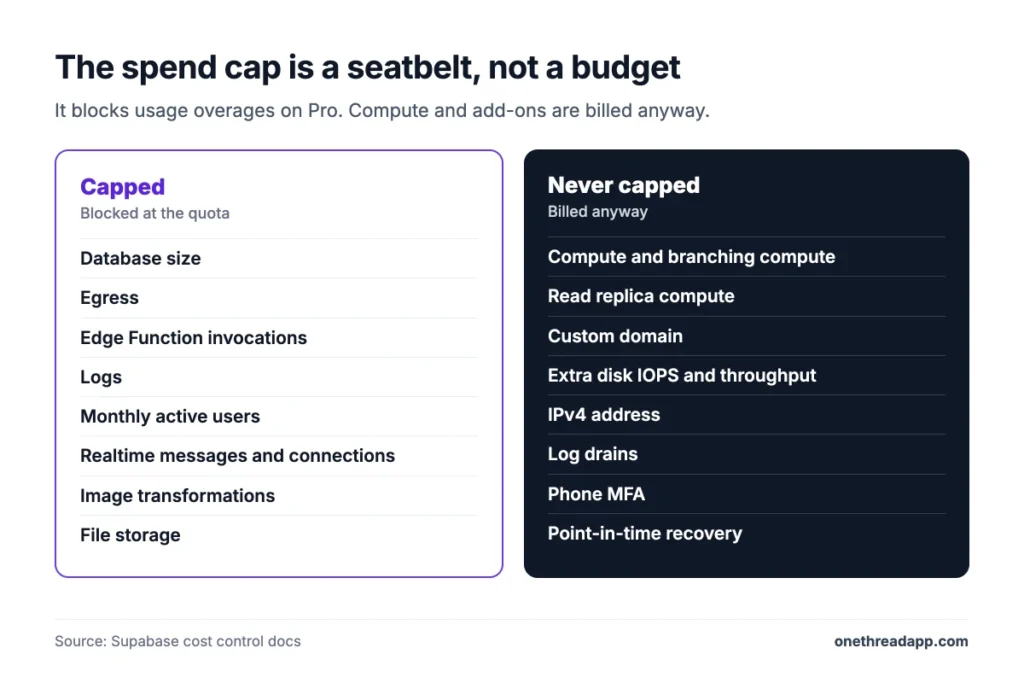
So the cap is a seatbelt, not a budget. Three projects on Medium compute still cost $180 a month in compute alone, cap or no cap. Add a 7-day recovery window and that’s $280.
The cap also has no fine-grained controls. You can’t set per-item budgets or spending alerts. With the cap off, watch the usage page and the Upcoming Invoice section on your billing page.
Top Tip: Keep the spend cap on until you’ve seen two full invoices. Then you’ll know which line grows first before you let it run past the quota.
How Much Does Supabase Cost for a Real App?
A real Supabase bill runs from $0 for a hobby app to a few hundred dollars a month for a growing app. The table uses only published rates and our own arithmetic, so treat each line as a floor. The frontend host is a separate line, and our Vercel pricing guide prices that part.
| Setup | Monthly cost |
|---|---|
| One side project on Free | $0 |
| One live app on Pro, Micro compute | $25 |
| One live app on Pro, Small compute | $30 |
| Production, staging and one client app on Pro, Micro each | $45 |
| Pro, Micro, 7-day point-in-time recovery and a custom domain | $135 |
| Pro, Small compute, 150,000 monthly active users | $192.50 |
| Team, one Micro project | $599 |
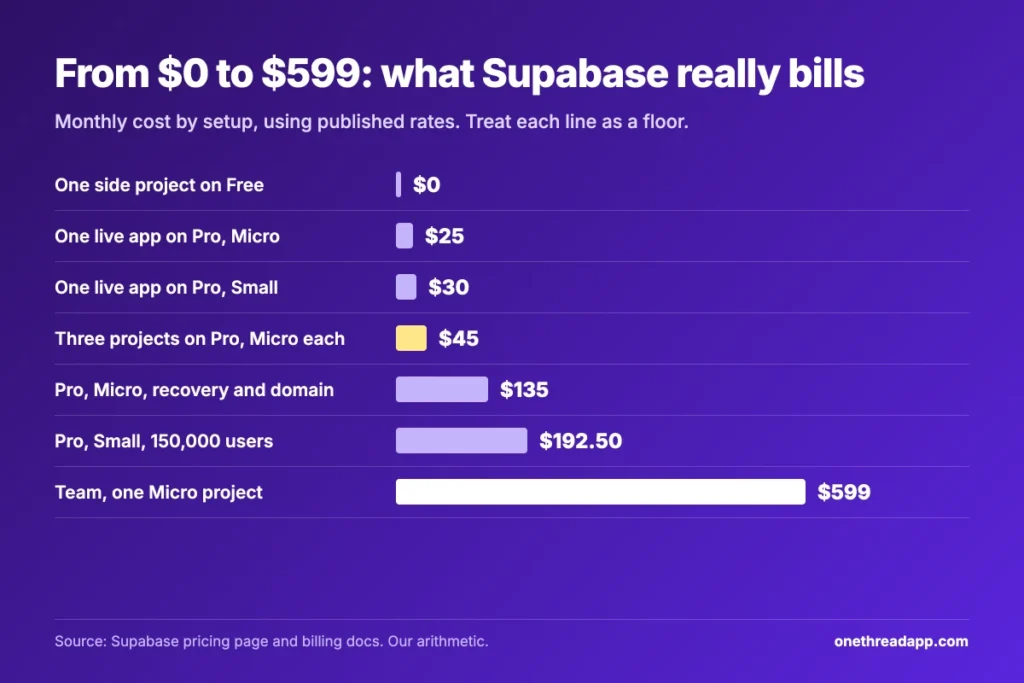
Example: three Micro projects on Pro cost $25 + 3 x $10 compute = $55, minus the $10 credit. Supabase’s billing FAQ lands on the same $45 a month.
Agencies feel the per-project rule most. Ten client apps on Micro cost $25 + $100 – $10 = $115 a month before any usage. If you’re quoting a client build, add these lines to our free project estimate calculator.
How Does Supabase Pricing Compare With Firebase and AWS?
Supabase pricing is easier to predict than Firebase or AWS, but not always cheaper. Supabase charges a base fee plus resources. Firebase and AWS charge mostly for what you use, so a tiny app can cost less and a busy one can cost more.
| Option | Pricing model | Entry point | Cost control |
|---|---|---|---|
| Supabase | Base fee plus usage | $25 a month on Pro | Spend cap on Pro |
| Firebase | Pay as you go on Blaze | No-cost Spark plan | Budget alerts don’t cap charges |
| AWS RDS | Per instance plus storage | $11.68 a month for an on-demand t4g.micro | Reserved pricing lowers the rate |
| Self-hosted Supabase | Your own servers | $0 for the software | Whatever your host offers |
Firebase’s own billing docs say budget alerts notify you but don’t limit spending. That’s the main gap against Supabase’s spend cap.
On AWS, Bytebase’s Supabase vs AWS RDS comparison puts Supabase Large at $110 a month against $130 for an on-demand RDS m5.large. RDS is only the database, so Auth, file storage and APIs are yours to build.
Self-hosting Supabase is free, but you trade the fee for server bills and on-call time. The same trade-off shows up in our n8n pricing guide.
Which Supabase Pricing Plan Fits Your Project?
The right Supabase plan depends on three things: whether users pay you, whether a client audits you, and how many projects you run.
| Signal | Plan |
|---|---|
| You’re testing an idea with no paying users | Free |
| Your app has paying users or needs backups | Pro |
| You run several client or staging projects | Pro, with about $10 per extra Micro project |
| A client asks for SOC2, ISO 27001 or HIPAA | Team |
| You need uptime SLAs and 24×7 support | Enterprise |
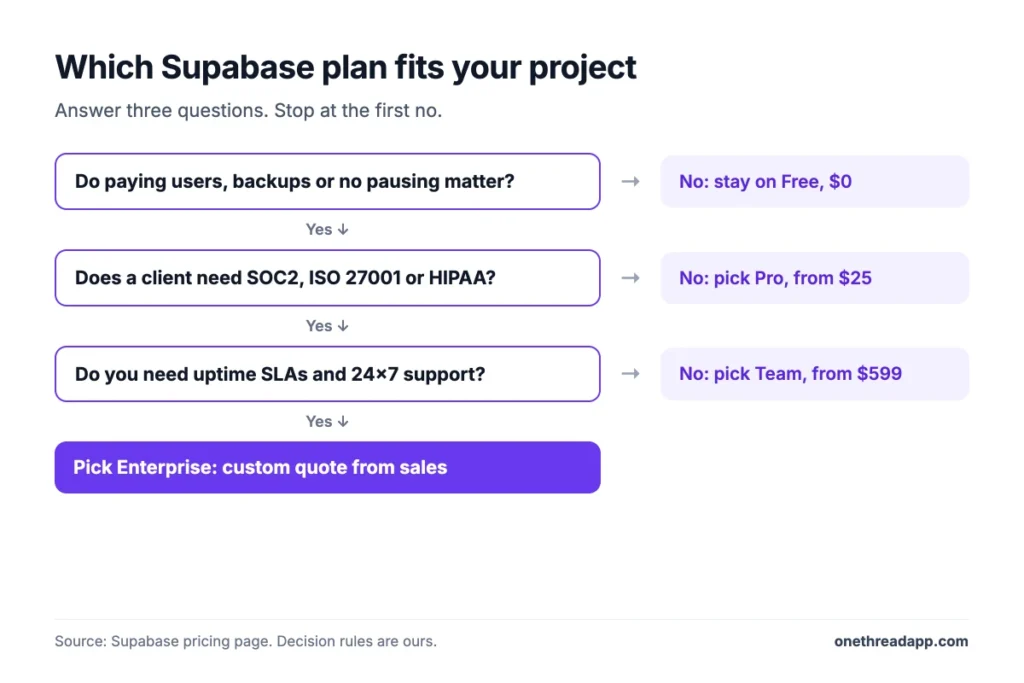
Still validating the idea? Stay on Free and follow our guide to MVP development for startup ideas. Move to Pro the week your first customer pays.
Projects drive your Supabase bill, so the build plan matters as much as the backend. Our list of project management software for developers covers tools that track sprints, environments and releases. For a wider view, see our pick of the best project management software.
Onethread is one of them. Its Basic plan is free, and Onethread’s paid plans start at $3 a user a month on yearly billing. Its limits are real too: custom workflows, milestones and advanced reports sit on Scale at $5.
What Should You Do Next With Supabase?
Supabase pricing is simple at the top and detailed underneath. The $25 Pro fee is only the start, because compute is billed per project and the spend cap never covers compute or add-ons. Once you count projects, users and egress, the real monthly bill stops being a surprise to anyone.
This week, open your Supabase usage page and list every active project with its compute size. Multiply the extras by their compute price, add the Pro fee, and you’ll have next month’s floor before the invoice shows it to you.
FAQs
Is Supabase 100% Free?
Yes, if your app fits the Free plan limits or you self-host it. The hosted Free plan costs $0 for 2 projects with a 500 MB database, 5 GB of egress and 50,000 monthly active users. Self-hosting is free software you run with Docker, but you pay for your own servers.
Does Supabase Offer Annual Billing or Discounts?
No, Supabase doesn’t offer annual plans, so there’s no yearly discount. Its billing FAQ suggests a credit top-up if you’d rather not pay monthly. Supabase pricing is charged in USD, by credit card only, at the start of each billing cycle. Larger upfront payments can be arranged through a support ticket.
Is Supabase HIPAA Compliant?
Yes, on the Team and Enterprise plans with the paid HIPAA add-on. HIPAA isn’t offered on Free or Pro. Supabase doesn’t publish the add-on price, so ask sales for a quote before you build. Team also includes SOC2 and ISO 27001, which most health clients ask about first.
What Costs More on Supabase: Storage or Monthly Active Users?
Monthly active users usually cost more. Each user above 100,000 costs $0.00325, so 50,000 extra users add $162.50 a month. Extra file storage costs $0.0213 per GB, and extra database size costs $0.125 per GB. In Supabase pricing, a big user spike moves the bill far more than a growing database.
Does Supabase Charge for Paused Projects?
No, paused projects incur no compute charges on Supabase. They also don’t count toward the Free plan’s 2-project limit. On Free, a project pauses on its own after one week of inactivity. On paid plans, nothing pauses unless you pause it yourself, so idle projects keep billing compute every hour.
Can You Get a Refund From Supabase?
No, Supabase doesn’t give refunds. When you cancel, unused time in the billing month turns into credits that never expire. You can use them on other projects later. If an organization was upgraded by mistake, support can move the amount as credits to another organization.
Sources: Supabase pricing, Supabase billing FAQ, Supabase billing overview, Supabase compute usage, Supabase cost control.