Notion is quick to start and slow to keep tidy.
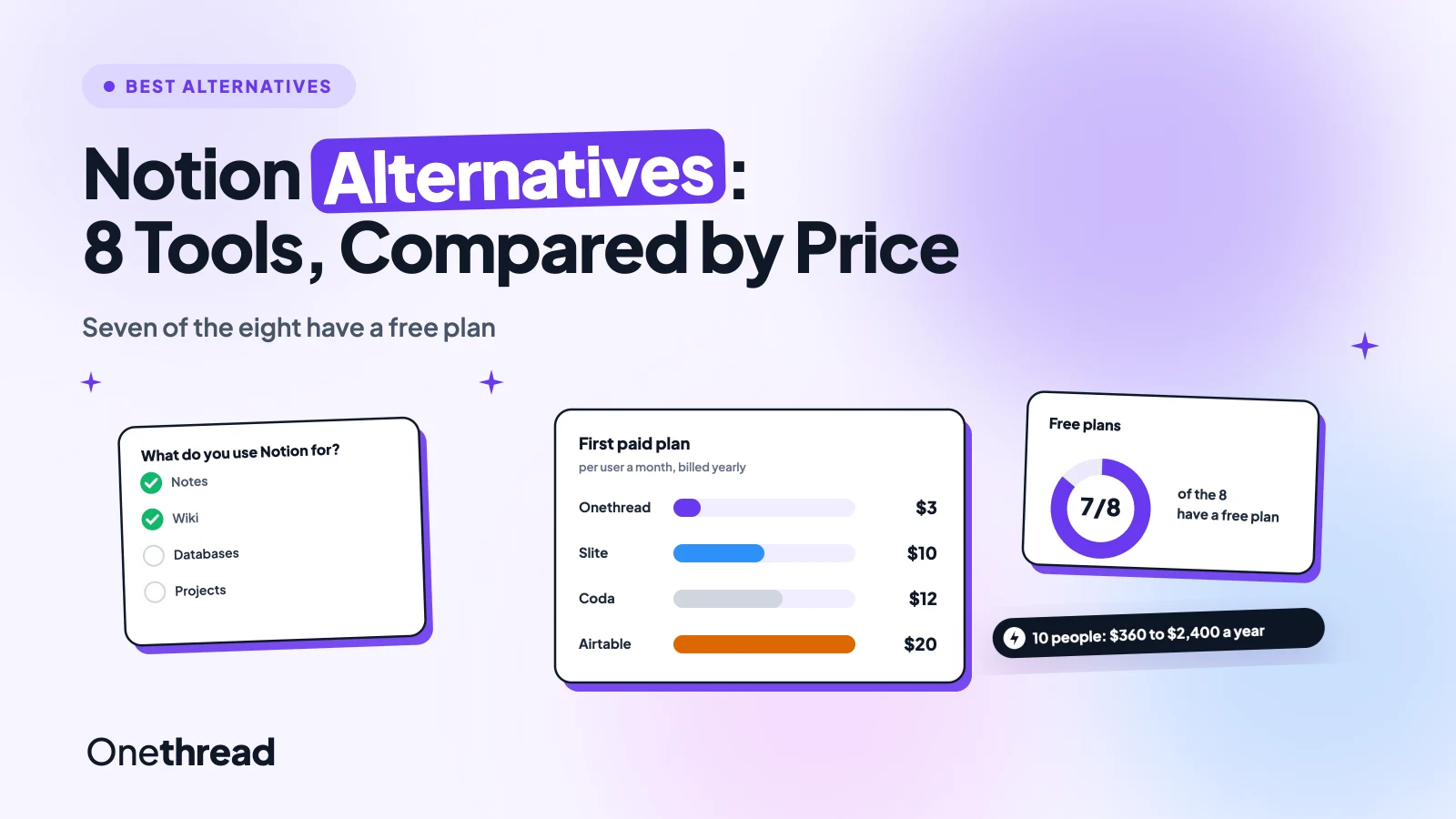
The best Notion alternatives are Coda for formulas, Obsidian for private notes, AppFlowy and Anytype for open code, and Slite for team wikis. ClickUp and Onethread handle projects, and Airtable handles data. Seven of the eight have a free plan.
Slow databases, a setup that eats your week and patchy offline use push people out.
We compared eight pricing pages and six top-ranking guides, then priced a team of ten so you can see the real bill.
You'll see what each tool replaces, what it costs and what you give up.
Key Points
- The best Notion alternatives are Coda, Obsidian, AppFlowy, Anytype, Slite, ClickUp, Airtable and Onethread. Seven have a free plan, and first paid plans run from $3 to $20 a user a month on yearly billing, against $10 for Notion Plus.
- A 10-person team pays $360 (Onethread Growth) to $2,400 (Airtable Team) a year on those plans, against $1,200 on Notion Plus.
- Pick by the job Notion does for you: Obsidian or Anytype for private notes, Slite for a wiki, Coda or Airtable for databases, ClickUp or Onethread for projects.
- Export before you commit. Notion exports a database one view at a time, so test one section first.
Which Notion Alternative Fits Which Job?
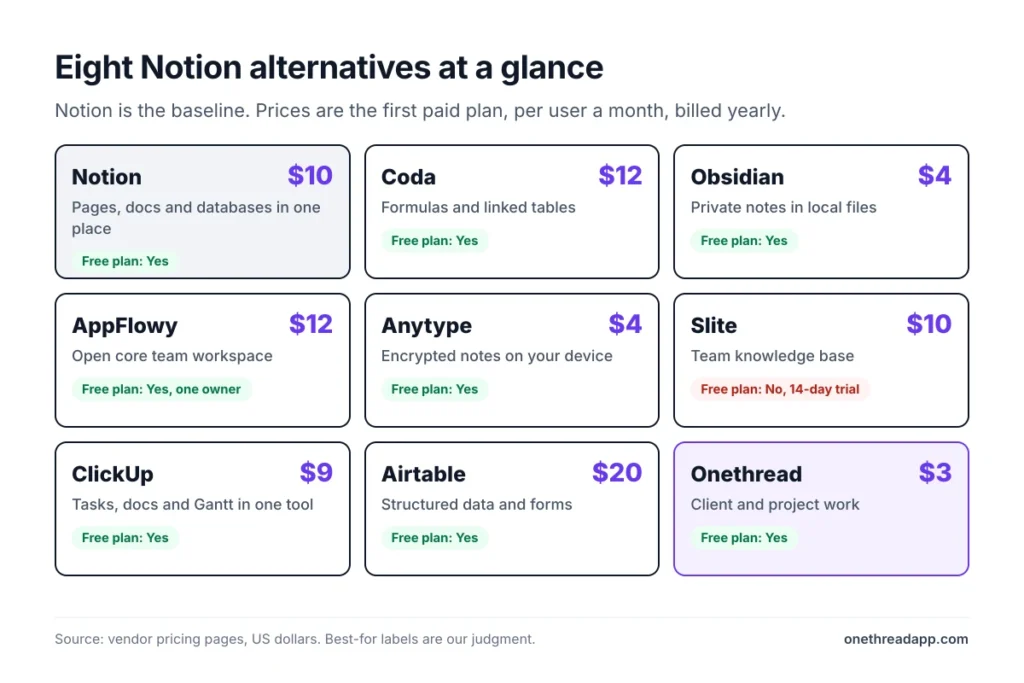
Each tool takes over one job from Notion, and none replaces all of them. Notion sits first in the table as the baseline.
| Tool | Best for | Free plan | First paid plan, per user a month | 10 people, one year |
|---|---|---|---|---|
| Notion | Pages, docs and databases in one place | Yes | $10 | $1,200 |
| Coda | Formulas and linked tables | Yes | $12 | $1,440 |
| Obsidian | Private notes in local files | Yes | $4 | $480 |
| AppFlowy | Open core team workspace | Yes, one owner | $12 | $1,440 |
| Anytype | Encrypted notes on your device | Yes | $4 | $480 |
| Slite | Team knowledge base | No, 14-day trial | $10 | $1,200 |
| ClickUp | Tasks, docs and Gantt in one tool | Yes | $9 | $1,080 |
| Airtable | Structured data and forms | Yes | $20 | $2,400 |
| Onethread | Client and project work | Yes | $3 | $360 |
Sources: the pricing pages of each tool, yearly billing, US dollars. Obsidian and Anytype charge per person for sync and storage, not per workspace seat. The 10-person column is our arithmetic (price × 10 × 12), and the Best for column is our judgment.
Why Do Teams Look for Notion Alternatives?
Teams leave Notion for three repeat reasons: it slows down as it grows, it demands upkeep, and it falls short away from a desk. They're the price of an all-in-one workspace that can be anything.
Size is the first one. Fabric's write-up says large databases and pages with many views lag, and search struggles in big workspaces. Upkeep is the second. MeisterTask's guide lists endless features, a crowded task tool, a weak mobile app and no offline use among its seven reasons.
Community threads show the same pattern. An r/productivity thread asks who's still using Notion and who found a replacement. A MacPowerUsers thread is titled "Notion is just too slow to use".
The third reason is cost per seat once a team passes a handful of people. That's why we weighed price as hard as features.
We picked the eight tools with four checks:
- Job taken over: The one thing it does better than Notion's all-purpose pages, such as notes, a wiki, databases or projects.
- Free plan: Whether a small team can start without paying.
- First paid price: What one user costs a month on yearly billing.
- What you lose: The gap you'll feel after you switch, such as missing databases.
Why Choose Coda for Formulas and Databases?
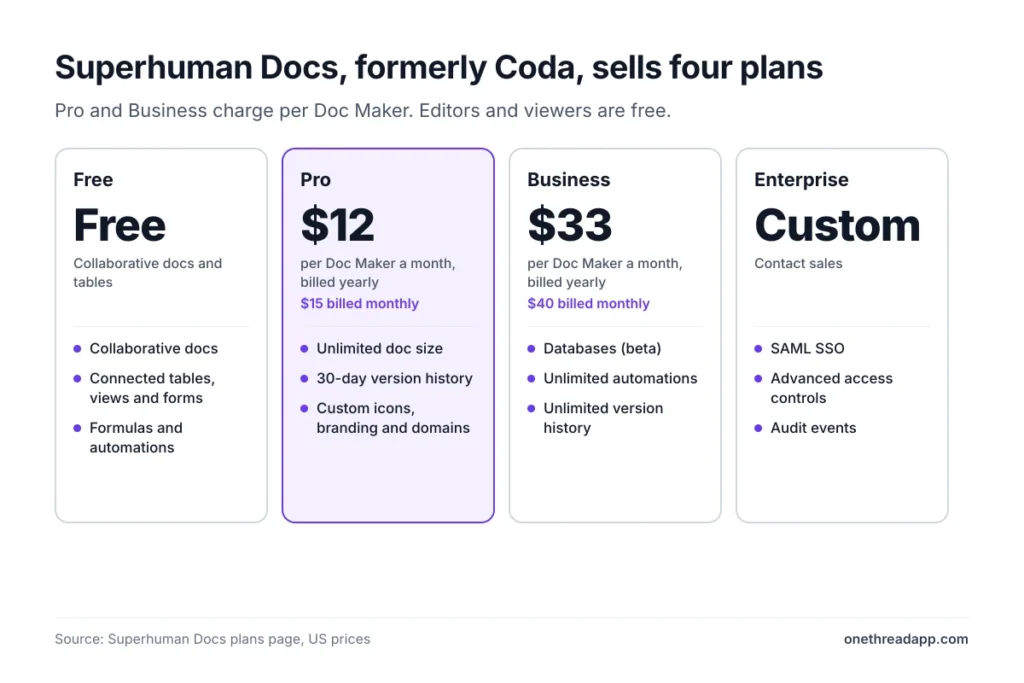
Coda suits people who like building systems out of linked tables and formulas. The Free plan includes collaborative docs, connected tables, views and forms, plus formulas and automations. Coda now sells under the name Superhuman Docs, so you'll find its plans there.
Pro adds unlimited doc size, 30-day version history and custom branding and domains.
Say an operations lead tracks client onboarding across three tables that update each other. Coda treats that as ordinary work.
Billing works in your favor. Only Doc Makers, the people who create docs and pages, cost money. Editors and viewers are free, so a team with two builders and twenty readers pays for two seats.
Weighing Coda against other tools? Our Coda alternatives list covers the field.
Pricing: Free. Pro costs $12 per Doc Maker a month billed yearly, or $15 billed monthly. Business costs $33 yearly or $40 monthly.
Best For
- Teams that build trackers, dashboards and workflows from linked tables.
Pros
- The Free plan includes formulas and automations.
- Editors and viewers cost nothing.
- Pro removes the doc size cap and adds 30-day version history.
Cons
- Pro costs $12 for every Doc Maker.
- Databases appear as a Business feature, in beta, at $33 a month.
- Docs AI is in beta on the pricing page.
Why Choose Obsidian for Private Notes?
Obsidian calls itself "The free and flexible app for your private thoughts." Notes live as Markdown files on your device in open formats, they open without a connection, and links between notes feed a graph view. Canvas and thousands of plugins cover the rest.
Say you keep research notes and want them to outlast any vendor. A folder of plain files does that. Coming from Microsoft's app instead? Our OneNote alternatives guide compares ten note apps by price.
The app costs nothing. Sync, Publish and a commercial license are optional extras.
Pricing: The app is free. Sync costs $4 per user a month billed yearly, or $5 monthly. Publish costs $8 per site a month yearly, or $10 monthly. A commercial license is optional at $50 per user a year.
Best For
- Solo writers and researchers who want private notes as plain files.
Pros
- The core app is free, and notes stay on your device.
- Open file formats mean you aren't locked in, and Sync supports selective sync by file type and device.
- Paid Sync adds end-to-end encryption and version history.
Cons
- Team collaboration depends on paid Sync shared vaults.
- Sync and Publish bill separately, per user and per site.
- Plugins carry much of the extra functionality, so setup takes tinkering.
Why Choose AppFlowy for an Open Source Workspace?
AppFlowy is the closest open source alternative to Notion in this list, and it describes itself as "open core." You can run it on your own servers or air-gapped, and it supports local AI. Its AI covers search, a writing assistant, a chatbot, research and meeting notes. Apps cover macOS, Windows, Linux, iOS, Android and the web.
In an XDA test of four tools, AppFlowy was the one that gets databases right, with Kanban, calendar views and linked databases.
Say your security lead won't put client notes on someone else's servers. Hosting it yourself answers that. AppFlowy also offers help migrating from Notion.
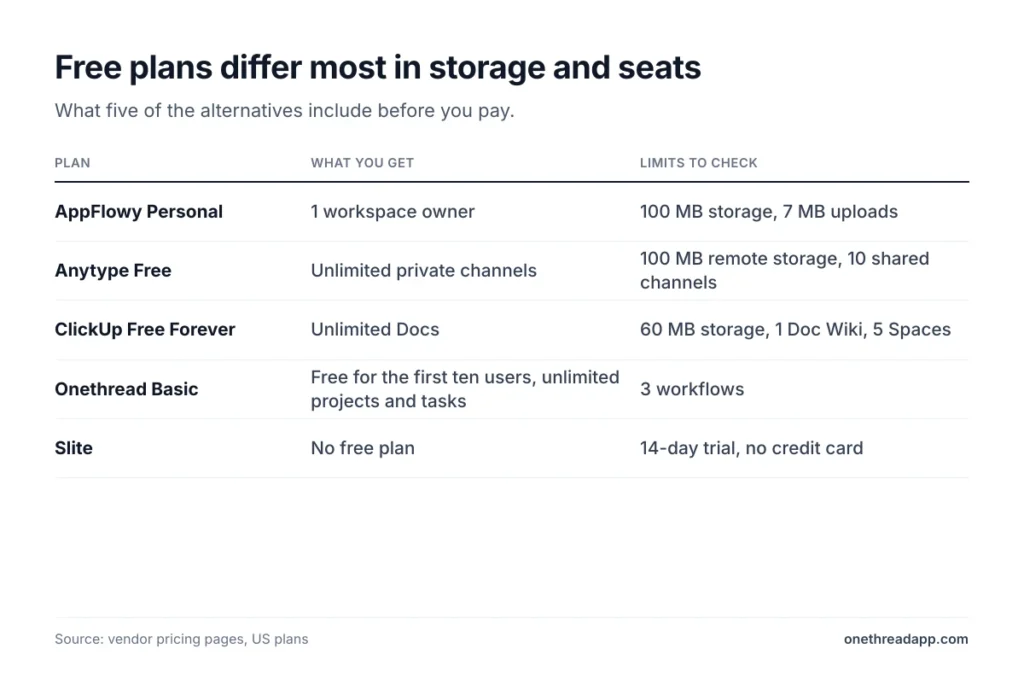
Pricing: Personal is free for one workspace owner, with 100 MB of storage and 7 MB uploads. Pro costs $12 per member a month billed yearly, or $16 monthly, with unlimited storage and free guest editors.
Best For
- Teams that want open code, self-hosting and a Notion-style interface.
Pros
- Running it yourself and using local AI keep data in your environment.
- Pro includes unlimited storage and free guest editors.
- Version history stretches to 90 days on Pro.
Cons
- Personal has no extra members.
- AppFlowy publishes no pricing or limits for hosting it yourself.
- Pro costs $12 a member, the same as Coda Pro.
Why Choose Anytype for Local-First Privacy?
Anytype calls itself a "Local-first, peer-to-peer & end-to-end-encrypted knowledge OS" on GitHub. Pages, tasks, databases, Kanban and calendar views sit on your device and sync across devices with zero-knowledge encryption.
One caveat on the code: it ships under the Any Source Available License, which is source-available, not a standard open license.
Say you want your second brain encrypted before it leaves the laptop. Anytype does that by design. Memberships sell storage per person, and a separate Business plan adds SSO, an admin panel and hosting on your own servers.
Pricing: Free includes 100 MB of remote storage, 10 shared channels and unlimited private channels. Plus costs $4 a month for 1 GB, Pro $8 for 10 GB and Ultra $16 for 100 GB. All three include unlimited shared channels. Business pricing isn't published.
Best For
- Privacy-minded people and small groups who want notes on their own device with light databases and Kanban views.
Pros
- Data stays on your device with end-to-end encryption.
- Databases, Kanban and calendar views are built in.
- The Free plan allows unlimited private channels.
Cons
- Memberships are per person and priced by storage.
- Business pricing isn't published, and Free allows 10 shared channels.
- The license is source-available, not a standard open license.
Why Choose Slite for a Team Knowledge Base?
Slite is the pick when Notion mostly serves as your team wiki, one place where everyone looks things up. It calls itself an AI knowledge base, and its Ask feature returns one cited answer, ranked by trust, from Slite and connected sources. Docs can be verified and reviewed on a schedule with owner sign-off.
The Slite Agent flags outdated pages and drafts rewrites for the owner to approve.
Say a new hire asks where the refund policy lives. Ask returns one answer with its source instead of ten search results. Slite connects to Slack, Jira, GitHub and Google Drive, among others.
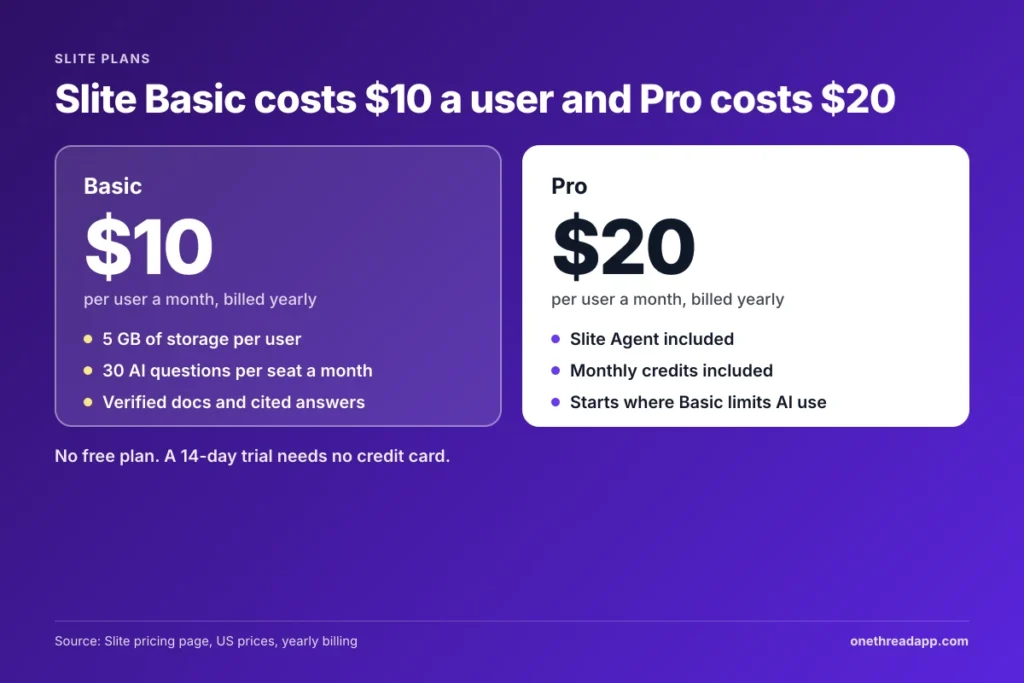
Pricing: No free plan, only a 14-day trial with no credit card. Basic costs $10 per user a month billed yearly and Pro costs $20. Enterprise is custom, and a monthly price isn't listed.
Best For
- Teams that use Notion as a wiki and need answers to stay trustworthy.
Pros
- Verification keeps old docs from passing as fact.
- Answers cite their sources and respect each user's permissions.
- Basic starts at $10 and includes 5 GB of storage per user.
Cons
- There is no free plan.
- Basic caps AI questions at 30 per seat a month.
- The Slite Agent and monthly credits start on Pro at $20.
Why Choose ClickUp When Projects Outgrow Notion?
ClickUp calls itself "the everything app for work," built around Tasks, Docs, Goals and Chat. Tasks come in List, Board and Gantt views, and Docs & Wikis, whiteboards and dashboards sit beside them.
Say a launch needs a Gantt view, a plan and a dashboard for your boss. ClickUp holds all three. For a closer look at task tools against Notion, read our Asana vs Notion comparison.
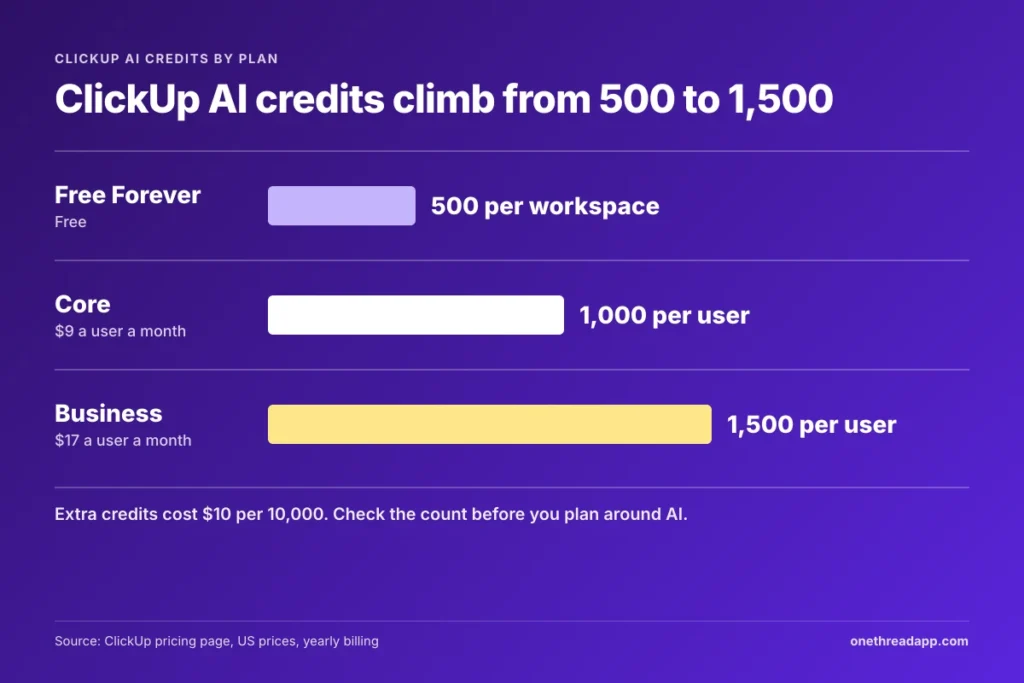
Top Tip: Check AI credits before you plan around them. Free holds 500 per workspace, Core 1,000 per user and Business 1,500 per user, and extra credits cost $10 per 10,000.
Pricing: Free Forever has 60 MB of storage, unlimited Docs but one Doc Wiki, 5 Spaces, 2 Teams and 1 Form. Core costs $9 per user a month billed yearly, listed against a regular $12. Business costs $17 against a regular $25. Max costs $100 against $120, and Enterprise is custom.
Best For
- Teams whose Notion boards became a task system and need Gantt and dashboards.
Pros
- Free Forever allows unlimited Docs.
- List, Board and Gantt views come in one tool.
- Core starts at $9 per user on yearly billing.
Cons
- Free storage is 60 MB.
- Free allows one Doc Wiki.
- AI credits are metered, and plan prices show a discount, so check the regular price.
Why Choose Airtable for Structured Data?
Airtable describes itself as an app-building platform where teams connect data, interfaces and automations without code. It also lists Airtable AI, reporting, governance and security controls, and portals for external guest users.
Say a content team needs a submission form, a pipeline of records and a client-facing view. Airtable builds all three on one database.
Billing counts editors only. Team and Business plans charge users with edit permission on at least one base. Read-only collaborators, form submissions and share links stay free, and charges are prorated when you add editors. Hitting a record or attachment limit blocks new entries, but Airtable doesn't remove your data.
Pricing: Free, with every user free. Team costs $20 per user a month billed yearly, and Business costs $45. Enterprise Scale is custom and includes unlimited org units, workspaces and bases.
Best For
- Teams whose Notion databases became the product and need forms and interfaces.
Pros
- Only editors cost money.
- Forms, shared links and read-only access are free.
- Automations, interfaces and AI sit on the same data.
Cons
- Team's $20 is the highest first paid price in this list.
- The pricing page lists no numeric limits for Free.
- Record and attachment caps block new entries until you upgrade, though your data stays.
Why Choose Onethread for Project Work?
We build Onethread, so weigh this section accordingly. It's project management software, not a notes app. Work follows a Phase, Milestone, Task and Subtask structure with dependencies and a critical path. The features page also lists Calendar view, Gantt chart, sprint planning, issue management, custom workflows and dashboards.
Chat rooms per project, timesheets, a wiki and role permissions come with it. Say a client project has phases, milestones and a deadline. Onethread tracks that structure directly, where a Notion database tracks whatever you build into it. See the Onethread features page for the full list, or our guide to the best project management software for other options.
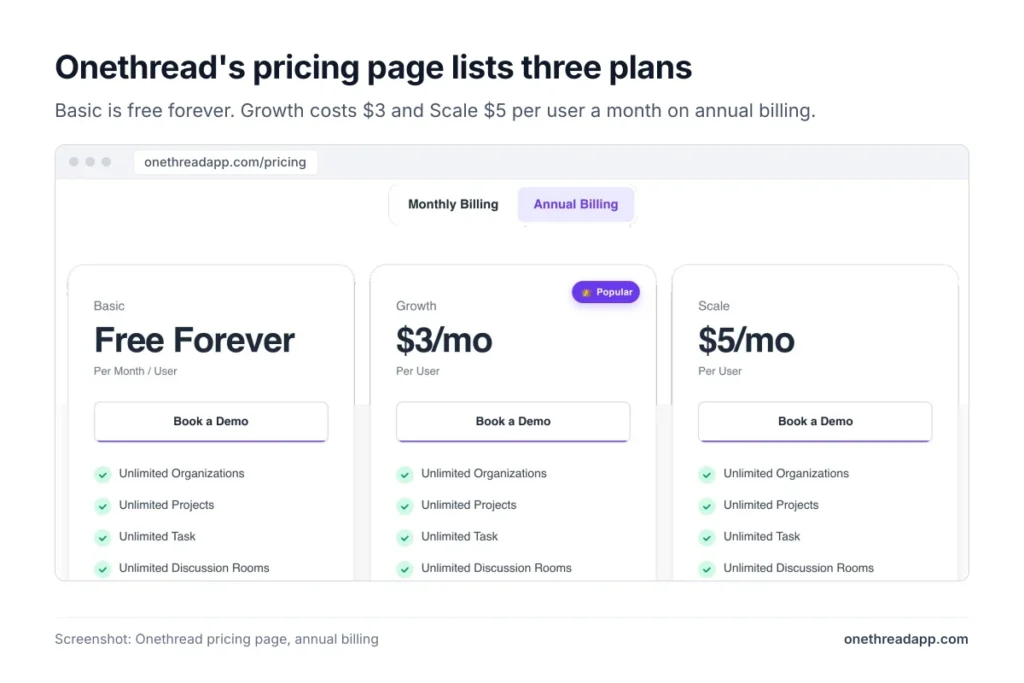
Pricing: Basic is free forever, free for the first ten users, with three workflows. Growth costs $3 per user a month billed yearly, or $3.60 monthly. Scale costs $5 yearly or $6 monthly, and adds custom workflows, issue management, phases and milestones, advanced reports and custom roles.
Best For
- Agencies and small teams running client projects with phases, milestones and deadlines.
Pros
- Growth at $3 is the lowest first paid price in this list.
- Basic is free forever, with unlimited projects and tasks.
- Gantt, calendar, timesheets and a wiki come in one tool.
Cons
- It isn't a notes app or a free-form database like Notion.
- Phases and milestones start on Scale at $5.
- Basic limits workflows to three, and the pricing page lists no AI features.
Which Other Notion Alternatives Are Worth a Look?
Six more tools show up in other guides, and each fits a narrower job than the eight above. XDA tested Docmost, Outline, Memos and AppFlowy over a month. We haven't priced these tools, so check each vendor's page before you plan around one.
- Docmost: XDA found it strong for team wikis and collaboration, but short on advanced databases, tasks and calendars.
- Outline: XDA praises its writing experience and clean docs, but says it offers little beyond documents.
- Memos: A simple, self-hosted timeline for quick notes, with no databases or structured project views, per XDA.
- AFFiNE, Logseq and Joplin: XDA calls AFFiNE fast and reliable, Logseq a unique approach and Joplin a great plain-text editor.
- Microsoft Loop: Full Loop access requires Microsoft 365 Business Standard or Premium, per Microsoft's support page. Copilot in Loop needs a Copilot for Microsoft 365 plan.
Most of these run on your own servers or your own device, so they suit the same readers as AppFlowy and Anytype. Loop suits teams already paying for Microsoft 365, and its components also work inside Teams, Outlook and SharePoint.
Start with one tool for one job, then add a second tool only when a second job truly needs it.
What Does a 10-Person Team Pay for Each Notion Alternative?
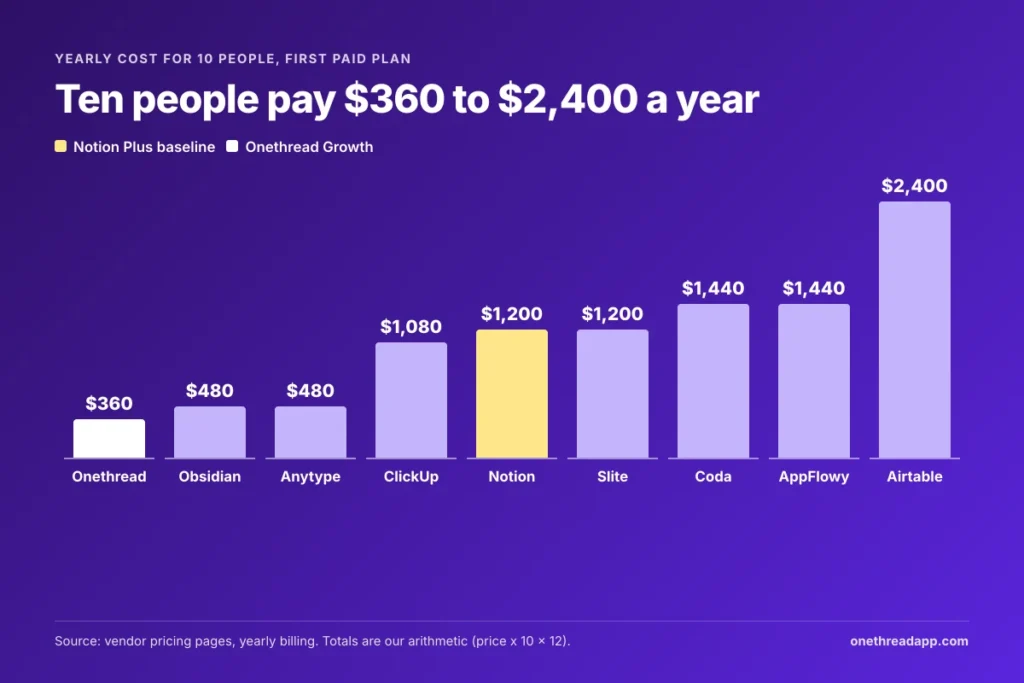
A 10-person team pays $360 to $2,400 a year on the first paid plan of each tool, against $1,200 on Notion Plus. The cheapest is Onethread Growth at $3 per user, and the dearest is Airtable Team at $20.
Example: Ten people on Slite Basic pay $10 × 10 × 12 = $1,200 a year, the same as Notion Plus. Ten on Airtable Team pay $20 × 10 × 12 = $2,400, which is $2,040 more than Onethread Growth at $360.
Several bills move with seat counts:
- ClickUp promotion: Core at the listed $9 costs $1,080 a year. At the regular $12 it costs $1,440.
- Obsidian license: The commercial license is optional at $50 per user, so ten people add $500 a year.
- Coda and Airtable: Only Doc Makers and editors count, so a mostly read-only team pays far less than ten seats. Count who creates and edits before you count heads.
- Free routes: Obsidian, Coda, ClickUp, Airtable and Onethread Basic cost nothing to start, so they're the free alternatives to Notion worth a trial.
For Notion's own side of the bill, see our Notion pricing guide.
Sources: the pricing pages of Notion, Coda, Obsidian, AppFlowy, Anytype, Slite, ClickUp, Airtable and Onethread, yearly billing. Totals are our arithmetic.
Which Notion Alternative Should You Pick?
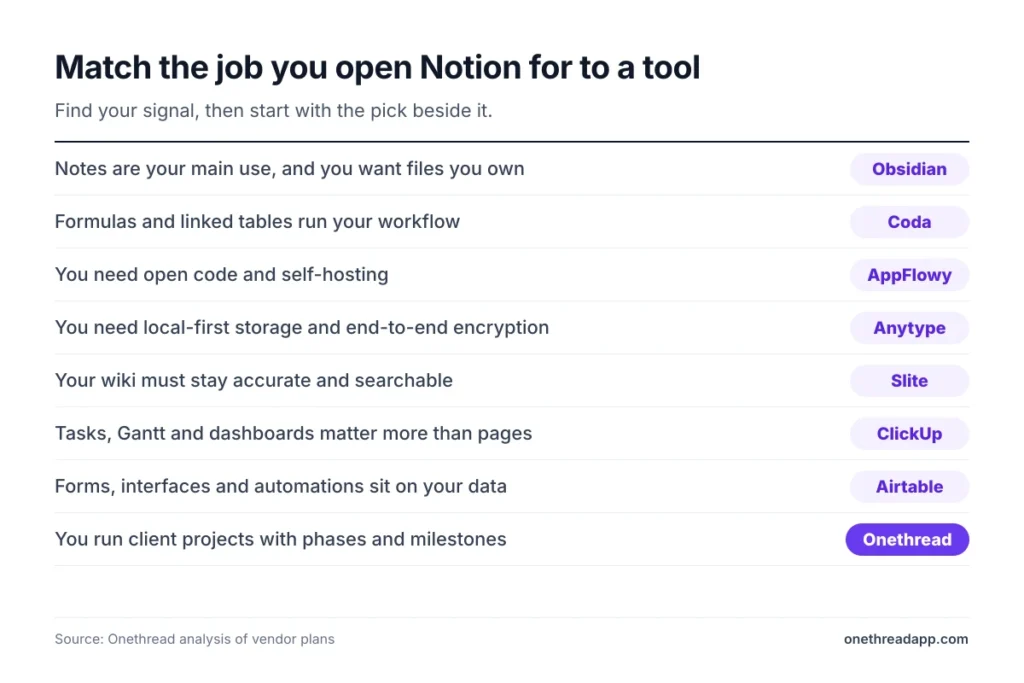
Pick the tool that takes over the job you open Notion for most.
| Signal | Pick |
|---|---|
| Notes are your main use, and you want files you own | Obsidian |
| Formulas and linked tables run your workflow | Coda |
| You need open code and self-hosting | AppFlowy |
| You need local-first storage and end-to-end encryption | Anytype |
| Your wiki must stay accurate and searchable | Slite |
| Tasks, Gantt and dashboards matter more than pages | ClickUp |
| Forms, interfaces and automations sit on your data | Airtable |
| You run client projects with phases and milestones | Onethread |
Boards are a different question. If a Kanban board is all you need, our Trello vs Notion comparison shows where each fits.
How Do You Move From Notion to Another Tool?
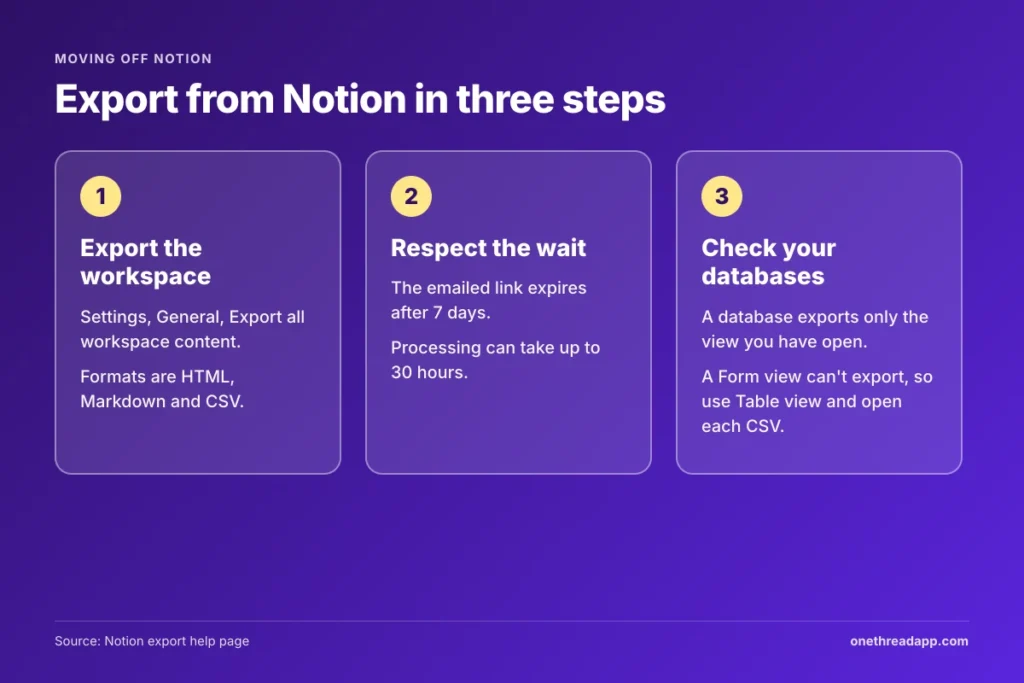
Moving takes three steps, and the export is the part to test first. Notion's export guide lists the limits, and a Notion workspace export arrives by email as a download link.
- Export the workspace: Go to Settings, then General, then Export all workspace content. Formats are HTML, Markdown and CSV, plus uploaded files.
- Respect the wait: The link expires after 7 days, and processing can take up to 30 hours. Workspace exports run only on desktop or web and skip pages you can't access, and teamspace settings may exclude more.
- Check your databases: A database exports only the view you have open or its default view, and a Form view can't export. Export from Table view instead, then confirm each CSV opens with the columns you expect.
Pages export as Markdown and full-page databases as CSV, with Markdown files for each subpage. Callout blocks export as HTML. Obsidian reads Markdown natively, and AppFlowy offers migration help.
Two snags: on Windows, ZIP files with paths over 260 characters may fail to open, so unzip with 7-Zip. And guests need Full access to export, while Enterprise owners can disable exporting altogether.
Top Tip: Export one small teamspace first and open the files in your new tool before you move the rest.
What Should You Do Next With Notion?
One complaint usually points to one replacement. Notes point to Obsidian or Anytype, a wiki to Slite, tables to Coda or Airtable, and projects to ClickUp or Onethread. The bill for ten people now sits next to each name, so the choice comes down to the job you can't give up.
This week, list the five pages your team opens most in Notion. Export one section and open it in the free plan of your top pick. If it holds up, you've found your tool, and free plans make the test cost nothing.
FAQs
Is Notion Overkill for a Small Team?
It can be. If your team only needs notes and a task list, a lighter Notion alternative with a free plan may fit better. Onethread Basic and ClickUp Free Forever cost nothing, while Notion Plus costs $10 per member a month.
Is There a Free Alternative to Notion?
Yes, several Notion alternatives have free plans. Obsidian's core app is free, Coda and Airtable have free plans, and ClickUp offers Free Forever. Anytype includes 100 MB of remote storage, and Onethread Basic is free for ten users. AppFlowy's Personal plan covers one owner.
Which Notion Alternative Works Without Internet?
Obsidian stores notes on your device in open file formats, so they open without a connection. Anytype keeps your data on your device and syncs it across devices. Their pricing pages don't document offline use for the other tools, so check before you commit.
Is There an Open Source Alternative to Notion?
AppFlowy is the closest match among Notion alternatives, with an open core, hosting on your own servers and local AI. Anytype publishes its code, but under a source-available license rather than a standard open one. Obsidian's core app is free, and its notes are plain Markdown files you own.
Is Notion Still Worth Using?
Yes, if it still does the jobs you hired it for. Notion Plus costs $10 per member a month, and moving costs time. Switch when one pain, such as speed or a wiki that goes stale, outweighs the cost of relearning.