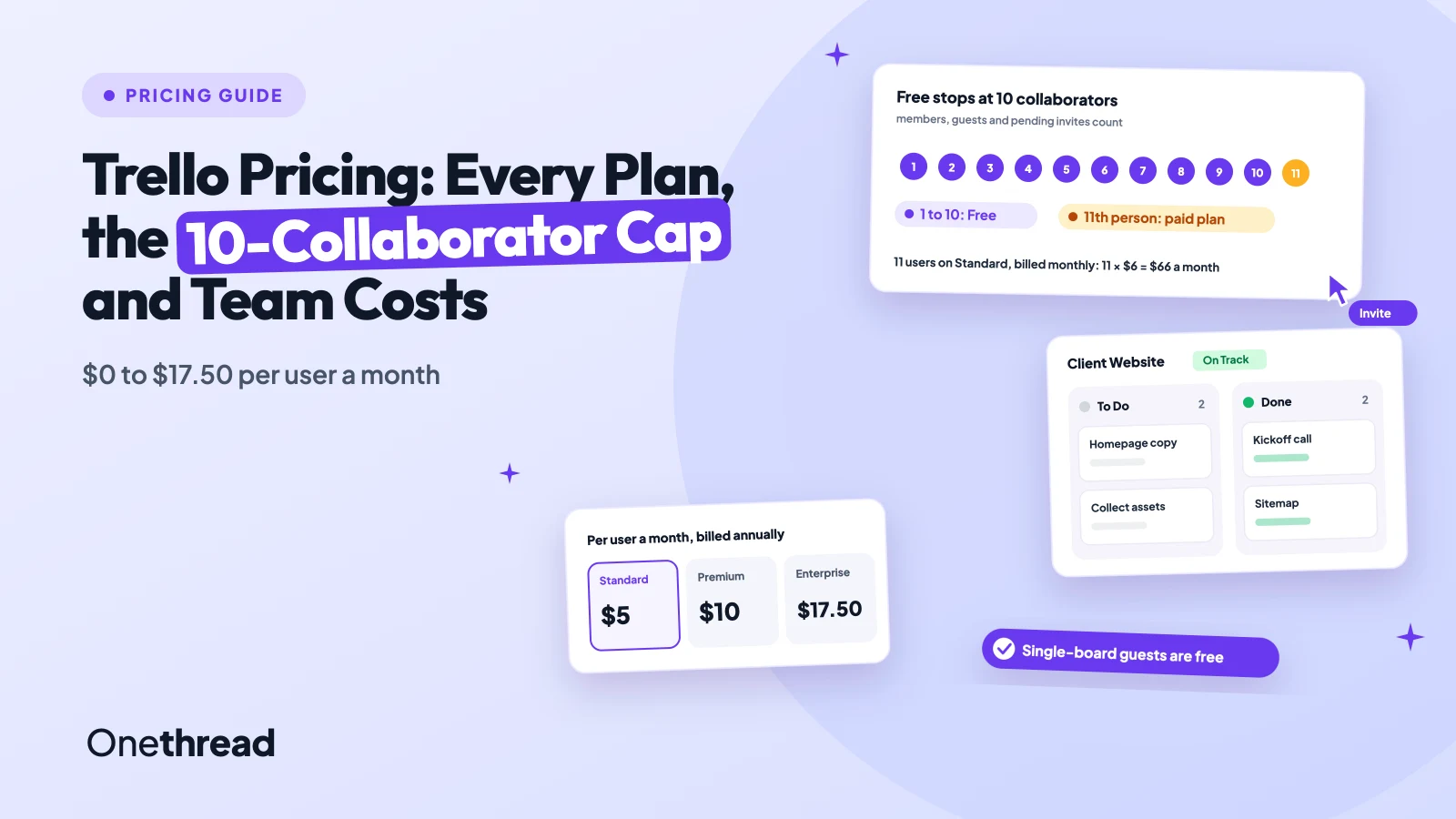
Trello stays free right up until the eleventh person joins your Workspace.
Trello pricing runs from $0 to $17.50 per user a month. Free covers up to 10 collaborators. Standard costs $5 and Premium costs $10 per user a month, billed annually, or $6 and $12.50 billed monthly. Enterprise starts at $17.50 per user.
The jump catches teams off guard. One forum poster asked if an 11th person meant paying $66 a month. Another called it being “surprise billed”.
We read the live pricing page, ran the Enterprise estimator from 50 to 5,000 users, and checked Atlassian’s billing docs. Here’s what your team will pay, and which plan fits.
Key Points
- Trello costs $0 (Free), $5 (Standard), $10 (Premium) and $17.50 (Enterprise) per user a month, billed annually. Monthly billing raises Standard to $6 and Premium to $12.50.
- Count collaborators, not just staff. Free stops at 10 per Workspace, and guests and pending invites count toward that cap.
- Pick Standard for unlimited boards and 1,000 command runs, and Premium only if you need Timeline, Calendar, Dashboard or Table views.
- Keep clients on one board each. Single-board guests are free, but a multi-board guest is billed like a full member.
How Much Does Trello Cost per User?
Trello costs $0 to $17.50 per user a month on its four published plans. Annual billing is cheaper on both mid-tier plans, and Enterprise is sold on yearly terms only.
| Plan | Billed annually (per user a month) | Billed monthly (per user a month) | Per user a year, annual billing |
|---|---|---|---|
| Free | $0 | $0 | $0 |
| Standard | $5 | $6 | $60 |
| Premium | $10 | $12.50 | $120 |
| Enterprise | $17.50 | Not offered | $210 |
Annual billing saves $12 per user a year on Standard and $30 on Premium. That’s about 17% and 20% off.
The Enterprise figure holds from 50 to 250 users in Trello’s own estimator. Above that, the per-user price drops, which we cover in the Enterprise section.
What Does the Trello Free Plan Include?
The Trello Free plan costs $0 for up to 10 collaborators per Workspace. That covers most of the basics: unlimited cards, up to 10 boards per Workspace, and unlimited Power-Ups per board.
You also get 250 Workspace command runs a month for Butler automation, 10MB per file, and mobile and desktop apps. Support comes from the community.
Here’s the catch. The 10-collaborator count includes Workspace members, guests and pending invites. Once a Workspace goes over, boards turn view-only and automations stop running.
Say you run a five-person studio and share boards with four clients. That’s nine. One more invite and you’re at the free plan limit.
And a pending invite counts before anyone accepts it. So clean out old invites before you assume you have room. Free also caps you at 10 boards, which a busy team can fill in a month.
Pricing: $0 for up to 10 collaborators per Workspace.
Best For
- Solo users and teams of up to 10 people, guests included.
- Personal to-do boards and side projects.
Pros
- Unlimited cards and Power-Ups at no cost.
- Mobile and desktop apps included.
- Two-factor authentication on every account.
Cons
- Hard cap of 10 collaborators per Workspace.
- Only 10 boards per Workspace.
- Only 250 command runs a month.
What Does Trello Standard Include?
Trello Standard costs $5 per user a month billed annually, or $6 billed monthly. It’s the first plan with unlimited boards, and it’s where most small teams land.
Standard adds Trello’s AI features, Custom Fields, advanced checklists, card mirroring and collapsible lists. File uploads rise to 250MB, and command runs rise to 1,000 a month.
It also allows guests on a single board. That matters for agencies that share one board per client, since a single-board guest isn’t a paid seat.
Support moves from the community forum to Trello’s team during local business hours. That’s slower than Premium, but fine for most small teams.
Say an 11-person team moves off Free. On monthly billing, that’s 11 × $6, or $66 a month.
Pricing: $5 per user a month billed annually, or $6 billed monthly.
Best For
- Teams of 11 to 50 who live on Kanban boards and need more than 10 boards.
- Agencies that share one board per client.
Pros
- Unlimited boards for $60 per user a year.
- Custom Fields and card mirroring for structured work.
- 1,000 command runs a month for automation.
Cons
- No Timeline, Calendar, Dashboard, Table or Map views.
- Command runs still capped each month.
- Every Workspace member is a paid seat.
What Does Trello Premium Include?
Trello Premium costs $10 per user a month billed annually, or $12.50 billed monthly. It’s the plan for teams that need more than the board view.
Premium adds Calendar, Timeline, Table, Dashboard and Map views, plus Workspace views across boards. Command runs become unlimited. You also get admin and security controls, observers, collections and a simple data export.
Trello lets any Workspace start a free trial of Premium. That’s a good way to test Timeline before you pay double.
Say your team plans launches with dates and owners. Premium’s Timeline and Dashboard views do that job. Standard can’t.
But the price doubles for every seat, not just the planners. A 20-person team pays $1,200 more a year on Premium than on Standard, so check how many people will open those views.
Pricing: $10 per user a month billed annually, or $12.50 billed monthly.
Best For
- Teams that plan by date and report progress across boards.
- Managers who need one Workspace view of every card.
Pros
- Five extra views, including Timeline and Dashboard.
- Unlimited Workspace command runs.
- 24/5 support and admin controls.
Cons
- Twice the Standard price per user.
- SSO still needs a separate Atlassian Guard plan.
- Monthly billing adds $30 per user a year.
What Does Trello Enterprise Cost at Scale?
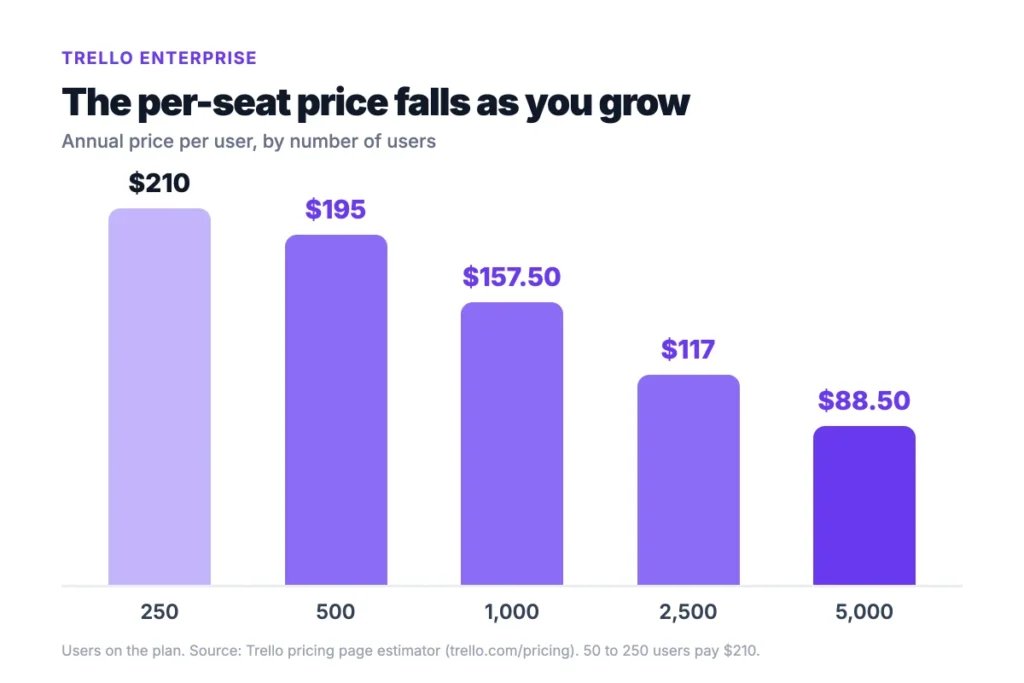
Trello Enterprise costs $17.50 per user a month, billed annually, for 50 to 250 users. Past that, the price per user falls as the team grows.
We ran Trello’s estimator at several team sizes. A seat costs $195 a year at 500 users, $157.50 at 1,000, and $88.50 at 5,000.
Enterprise includes Atlassian Guard Standard, so SSO and user provisioning come built in. It adds unlimited Workspaces, organization-wide permissions, Power-Up administration and 24/7 admin support. Multi-board guests aren’t billed on Enterprise at all.
The price curve is steep. At 1,000 users, a seat costs 25% less than at 250. At 5,000 users, it costs less than Premium’s $120 a year. Enterprise starts to look cheap only at a size most teams never reach.
Example: 50 users on Enterprise cost 50 × $210, or $10,500 a year. The same 50 people on Premium cost $6,000.
Pricing: $17.50 per user a month billed annually for up to 250 users, with lower rates above that.
Best For
- Companies with 50 or more users that need SSO and central admin.
Pros
- Atlassian Guard Standard included.
- Per-user price drops past 250 users.
- Free multi-board guests.
Cons
- Yearly billing only.
- Costs $4,500 a year more than Premium at 50 users.
- The estimator starts at 50 users.
What Will Your Team Pay for Trello per Year?
Your yearly Trello bill depends on headcount, plan and billing cycle. Here’s what four team sizes pay on annual billing.
| Team size | Free | Standard | Premium | Enterprise |
|---|---|---|---|---|
| 5 people | $0 | $300 | $600 | Starts at 50 users |
| 11 people | Not allowed | $660 | $1,320 | Starts at 50 users |
| 25 people | Not allowed | $1,500 | $3,000 | Starts at 50 users |
| 50 people | Not allowed | $3,000 | $6,000 | $10,500 |
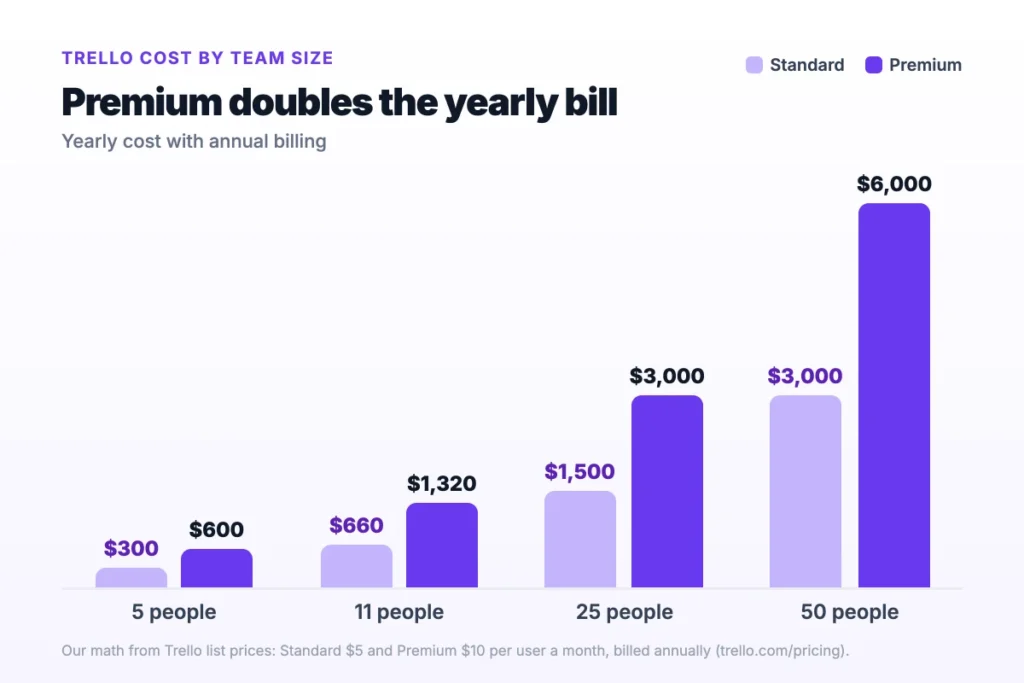
Example: 25 people on Premium pay 25 × $10 × 12, or $3,000 a year. On monthly billing, that’s 25 × $12.50 × 12, or $3,750.
You can’t pay for only some members. Trello bills every Workspace member, and adding someone mid-cycle is prorated.
Top Tip: Remove inactive members before renewal. Trello doesn’t charge for empty seats when the plan renews.
Which Trello Pricing Traps Do Teams Miss?
The sticker price is only part of the Trello bill. These hidden costs change what you actually pay:
- Guests: A multi-board guest is billed at the same rate as a member on Standard and Premium. Single-board guests aren’t billed on any plan.
- SSO: Atlassian Guard costs from $4 per user a month on top of Free, Standard or Premium.
- Power-Ups: Some partner Power-Ups charge their own subscription fee on top of Trello.
- Automation: Free includes 250 command runs a month and Standard 1,000. Premium removes the cap.
- Billing cycle: Moving from annual to monthly means canceling first, then signing up again on Free.
Guests are where small agencies get stung. Invite one freelancer to three client boards and they become a paid seat. Five freelancers like that on a 20-person Standard plan add $300 a year.
Top Tip: Give each client their own board. One board per guest keeps them free.
Discounts exist, but Trello doesn’t publish the amounts. It lists a nonprofit discount and an education discount, so ask before you buy.
Automation is the quiet one. Standard’s 1,000 command runs a month are shared by the whole Workspace, so a few busy Butler rules can hit the cap.
How Does Trello Pricing Compare to Asana, ClickUp, monday.com and Notion?
Trello pricing is the lowest of the five on the first paid plan. A 10-person team pays $600 a year on Trello Standard.
| Tool | First paid plan, per user a month (annual) | 10 people, per year | Best for |
|---|---|---|---|
| Trello | $5 | $600 | Simple Kanban boards |
| ClickUp | $7 | $840 | All-in-one task tracking |
| monday.com | $9 | $1,080 | Visual work boards |
| Notion | $10 | $1,200 | Docs plus projects |
| Asana | $10.99 | $1,318.80 | Cross-team projects |
The “Best for” labels are ours. Prices come from our pricing guides for ClickUp pricing, monday.com pricing, Notion pricing and Asana pricing. Check each vendor’s page, since plans change.
Cheaper isn’t always cheaper. monday.com sells seats in buckets, so 6 people pay for 10. If you’re torn between two tools, our Trello vs Notion comparison runs the numbers for a 12-person team.
Which Trello Plan Should Your Team Pick?
To choose the right Trello plan, pick the cheapest one that covers your headcount and the one view you can’t live without.
| Signal | Decision |
|---|---|
| 10 or fewer people, guests included | Stay on Free |
| More than 10 people, or more than 10 boards | Move to Standard |
| You plan by dates or report across boards | Move to Premium |
| 50 or more users and you need SSO | Price Enterprise |
| Your team size changes month to month | Pay monthly until it settles |
Is Trello worth it at $5 a user? For board-based teams, yes. If you need time tracking or budgets, you’ll pay for extra Power-Ups or a second tool.
Sources: Trello pricing, Collaborator limit for free Workspaces, Multi-board guests, How centralized billing works, Atlassian Community question on the 11th collaborator.
What Should You Do Next About Trello Pricing?
Trello’s prices are low, but the free tier ends at 10 people, and guests and invites count toward that cap. So the plan you need comes down to two things: how many people touch your boards, and whether you plan by cards or by dates. Most small teams will be fine on Standard.
This week, open your Workspace’s Members page and count every member, guest and pending invite. Then run that number through the team cost table and see which plan survives. It takes five minutes and might save a few hundred dollars.
FAQs
Does Trello Offer a Free Trial?
Yes. Any Workspace can start a free trial of Trello Premium. The trial opens up unlimited boards, automation, and the Timeline and Dashboard views. It’s the easiest test of whether Premium’s views justify the jump in Trello pricing from $5 to $10 a user.
Is There a Trello Nonprofit Discount?
Yes. Trello lists a nonprofit community discount and an education discount on its pricing page. It doesn’t publish the percentage, so you’ll need to apply and ask. If you run a charity or a school, check the discount before you compare Trello pricing with other tools.
What Happens When You Downgrade Trello?
You keep your Standard or Premium features until the prepaid period ends. After that, the Workspace becomes a free Workspace that can hold 10 boards. The 10-collaborator limit also applies again, so boards may turn view-only if you have more than 10 people.
Can You Pay for Trello Monthly?
Yes. Standard costs $6 and Premium costs $12.50 a user each month on monthly billing, while annual billing drops those to $5 and $10. Trello pricing for Enterprise is annual only. Switching from annual to monthly means canceling first, so pick the cycle with care.