InVideo AI looks cheap at first glance. Then the credits run out halfway through your second video.
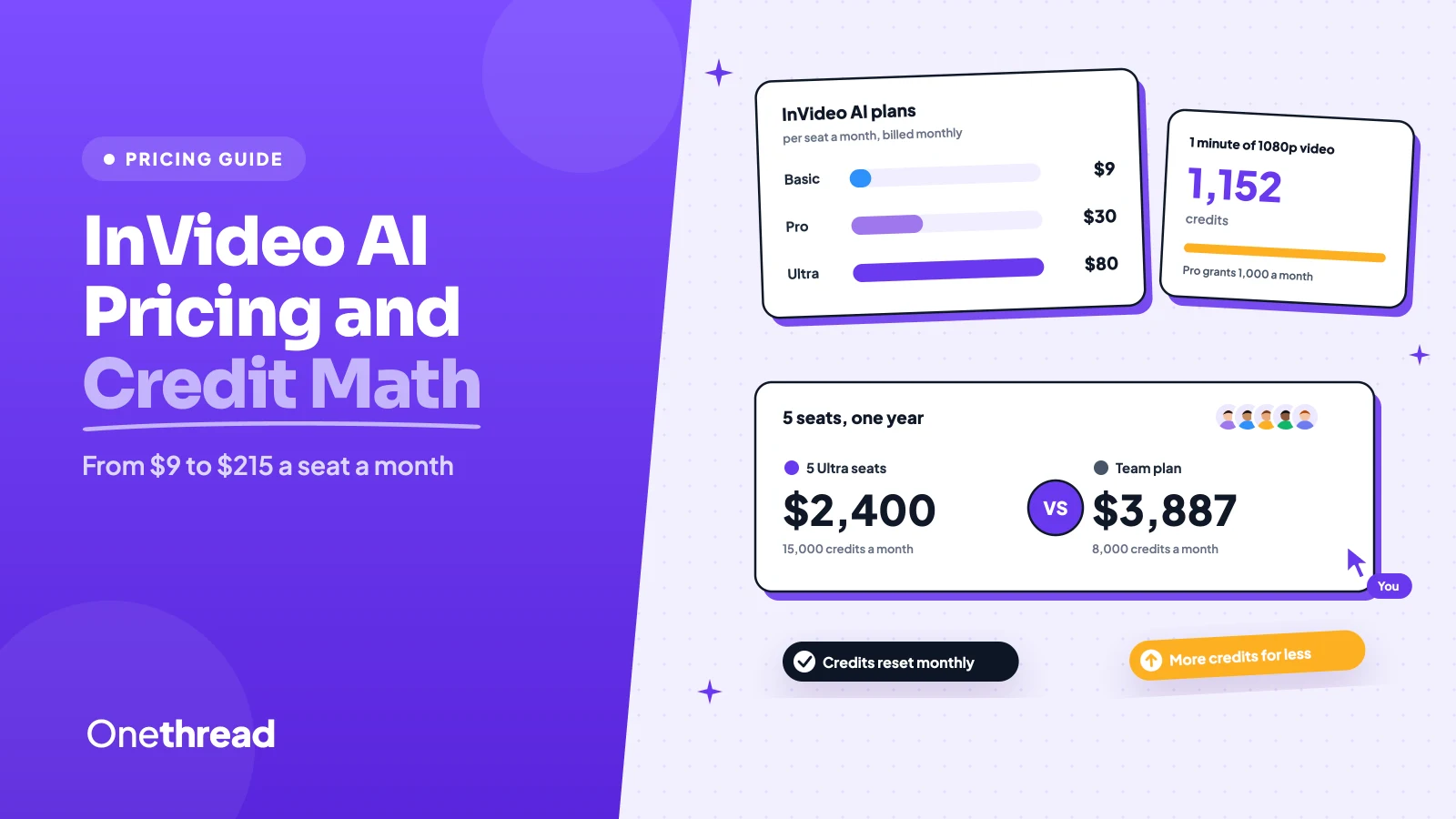
InVideo AI pricing runs from $9 to $80 a seat a month on Basic, Pro and Ultra. Yearly billing cuts that to $54 to $480 a seat a year. The Team and Scale business plans cost $79 and $215 a seat a month.
But the seat price is only half of what you pay. Every clip, image and AI edit spends credits, and unused credits vanish each month.
We read InVideo’s pricing page, its help center and 6 top-ranking guides, then priced real team setups.
Here’s what each plan costs you, and which one fits your team.
Key Points
- InVideo AI costs $9 (Basic), $30 (Pro) or $80 (Ultra) a seat a month, or $54, $180 and $480 a seat a year. Team costs $79 and Scale $215 a seat a month, for 5 to 30 seats.
- Budget in credits, not videos. One minute of Seedance 2.5 video at 1080p burns about 1,152 credits, more than Pro’s 1,000 a month.
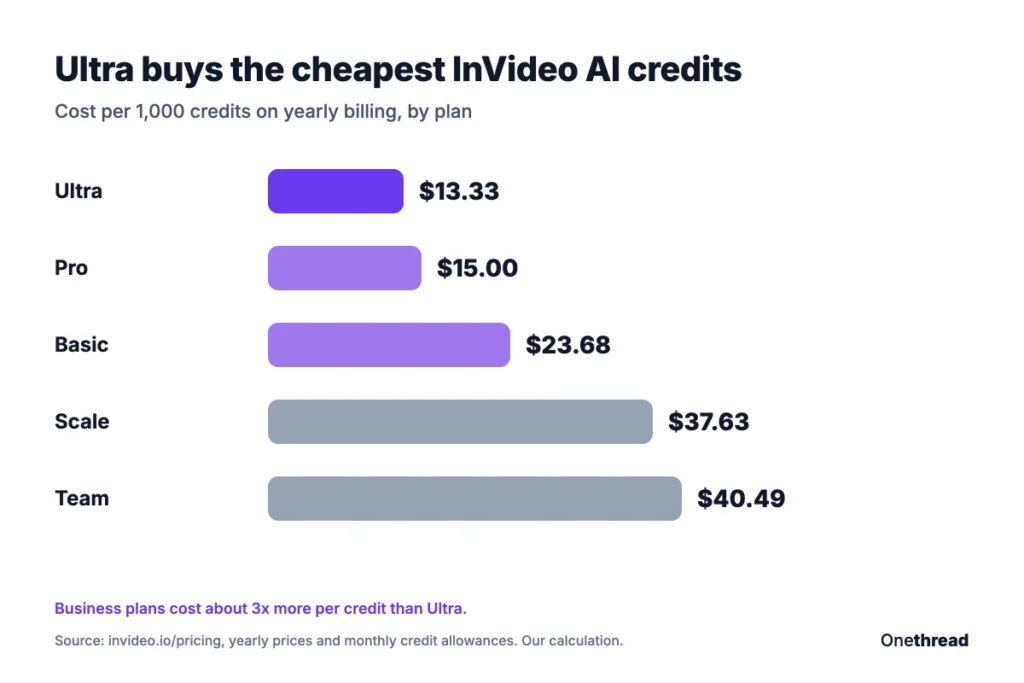
- Ultra on yearly billing gives the cheapest credits, about $13 per 1,000, roughly a third of the business plan rate.
- For a five-person team, five Ultra seats at $2,400 a year beat the Team plan at $3,887 a year on credits. Pick Team only for client workspaces, round-the-clock support and its data terms.
How Much Does InVideo AI Cost?
InVideo AI sells five paid plans, priced per seat, plus a free tier and a custom Enterprise deal. Every seat gets its own monthly credit allowance.
| Plan | Monthly billing (per seat a month) | Yearly billing (per seat a year) | Credits per seat a month | Seats |
|---|---|---|---|---|
| Basic | $9 | $54 | 190 | Up to 5 |
| Pro | $30 | $180 | 1,000 | Up to 10, plus 10 guests |
| Ultra | $80 | $480 | 3,000 | Up to 20, plus 20 guests |
| Team | $79 | $777 | 1,600 | 5 to 30 |
| Scale | $215 | $1,806 | 4,000 | 5 to 30 |
| Enterprise | Custom quote | Custom quote | Custom | Unlimited |
We read these prices on InVideo’s pricing page with both billing toggles. The yearly Team and Scale figures are the page’s five-seat totals of $3,887 and $9,030, divided by five.
The plans changed fast this autumn. InVideo retired its Plus, Max, Generative and Elite plans in September 2026, per UsagePricing’s tracker. Many guides still quote those old names, so check the plan name before you trust a price.
Top Tip: Pro and Ultra also sell bigger credit tiers. Pro doubles to 2,000 credits for $360 a year, and Ultra climbs to 6,000 or 9,000 credits for $960 or $1,440 a year.
Sources: InVideo AI pricing page, InVideo help center: free plan, InVideo AI credits and limits.
What Does the InVideo AI Free Tier Include?
The InVideo AI free tier includes a small credit allowance and no card requirement. It’s built for trying the tool, not for running a channel.
InVideo describes it as “limited credits to explore the platform” and doesn’t publish the number. The allowance resets every week, on Monday at 12 a.m. UTC, according to InVideo’s help center. Paid plans reset monthly instead.
Here’s the catch most free users hit. Previews carry a watermark, and InVideo removes it only when you export on a paid plan. A video exported while free keeps its watermark, so you export it again after you subscribe.
That makes the free plan a test drive. Generate one short clip and watch how fast the credits drop. If one video eats the week’s allowance, you’ve learned what you need before paying.
The free tier also matters after you cancel. When a paid plan ends, the account drops back to free, and unused paid credits expire. InVideo’s pricing page doesn’t even show a free card, so treat its limits as subject to change.
InVideo’s help article says free users can still use and share their videos on social media. Just expect the watermark on anything you export from the free tier.
What Does the InVideo AI Basic Plan Include?
The InVideo AI Basic plan is the entry ticket for first-time AI creators. It grants 190 credits a seat a month and room for up to five seats.
Basic includes the full timeline editor and 4K export of your own footage. It adds color, audio and 3D tools, 45 premium stock clips and 100 GB of storage. But it limits the AI side: Agent Two Lite only, and no Seedance 2.5 or Seedance 2.0. Seedance 2.0 Fast and Mini still work.
Say you mostly edit your own clips and add AI images now and then. Basic’s 190 credits cover about 76 Nano Banana Pro images a month. That’s plenty for thumbnails, but thin for generated video.
Pricing: $9 a seat a month, or $54 a seat a year on annual billing.
Best For
- Solo creators who edit their own footage and use AI for images.
- Small teams testing InVideo before they commit to Pro.
Pros
- Lowest entry price of any plan.
- Full timeline editor and 4K export of your own footage.
- Up to five seats for multiplayer editing.
Cons
- No access to Seedance 2.5 or Seedance 2.0.
- Only 190 credits, about 7 Seedance 2 Fast videos a month.
- No free guests, unlike Pro and Ultra.
What Does the InVideo AI Pro Plan Include?
The InVideo AI Pro plan is where the generative video models open up. It grants 1,000 credits a seat a month, with an option to double that to 2,000.
Pro includes Seedance 2.5 at 1080p, Seedance 2.0 at 4K, and every frontier agent tier (Lite, Pro and Ultra). Storage rises to 300 GB, and the stock library rises to 150 premium clips. Each paid seat can bring 10 free guest seats, and every guest gets 190 credits a month.
Here’s what that looks like for a weekly social clip. Pro’s 1,000 credits buy about 10 five-second Seedance 2.5 clips at 1080p. That’s under a minute of finished AI video, before any retakes. Images stretch much further, at about 400 Nano Banana Pro images a month.
Pricing: $30 a seat a month, or $180 a seat a year. The 2,000-credit version costs $360 a seat a year.
Best For
- Creators who publish short AI video clips every week.
- Small teams that invite clients or reviewers as guests.
Pros
- Full access to Seedance and every agent tier.
- Ten free guests per seat, each with 190 credits.
- Yearly billing halves the monthly price.
Cons
- 1,000 credits cover under a minute of 1080p video.
- Credits cost more than on Ultra.
- Up to 10 paid seats only.
What Does the InVideo AI Ultra Plan Include?
The InVideo AI Ultra plan is the volume tier for people who generate video most days. It grants 3,000 credits a seat a month, with 6,000 and 9,000 options.
Ultra includes everything in Pro, plus 800 GB of storage, 180 premium stock clips and room for 20 seats and 20 guests. It’s also the only individual plan InVideo labels “lowest cost per credit.”
Monthly billing showed a $72 first month that renews at $80. Yearly billing costs $480 a seat, about $13 per 1,000 credits. That’s the lowest rate before you reach an Enterprise contract.
Example: A 60-second Seedance 2.5 video at 1080p takes 12 five-second clips at about 96 credits each, so 12 × 96 = 1,152 credits. On yearly Ultra, that’s about $15 of credit.
Pricing: $80 a seat a month, or $480 a seat a year. The 9,000-credit version costs $1,440 a seat a year.
Best For
- Daily creators and small studios that make AI video at volume.
Pros
- Cheapest credits on any self-serve plan.
- Up to 20 seats and 20 free guests.
- 800 GB of storage for raw footage and renders.
Cons
- The monthly price adds up to $960 a seat a year.
- Credits still expire at each monthly reset.
- The $72 first month renews at $80 on monthly billing.
What Does the InVideo Team Plan Include?
The InVideo Team plan is the first business tier, built for agencies and small teams. It grants 1,600 credits a seat a month. You need 5 to 30 members.
Team includes the Pro models, plus multiple workspaces, 800 GB of storage and 200 premium stock clips per seat. It adds premium support around the clock and a promise of no training on your data. It doesn’t include SSO, SOC 2 or admin spend control.
Here’s the odd part. Team charges $79 a seat a month, about the same as Ultra, but grants about half of Ultra’s credits. You pay for the workspace and support layer, not for generation.
Say you run four client brands. Separate workspaces keep each client’s assets, stock footage picks and drafts apart, which Ultra seats can’t do. That alone can justify the higher seat price for an agency.
Pricing: $79 a seat a month, or $3,887 a year for five seats (about $65 a seat a month).
Best For
- Agencies that need separate client workspaces.
Pros
- Multiple workspaces for clients or brands.
- Round-the-clock premium support.
- No training on your data.
Cons
- Five-seat minimum, so solo creators can’t buy it.
- Fewer credits a seat than Ultra at a similar price.
- No free guests.
What Does the InVideo Scale Plan Include?
The InVideo Scale plan is the bigger business tier for growing creative teams. It grants 4,000 credits a seat a month. It also needs 5 to 30 members.
Scale includes everything in Team, doubles storage to 1,600 GB and raises the stock library to 400 clips per seat. It adds basic SSO, basic indemnification, basic analytics and priority support. The priority generation queue, SOC 2 and admin spend control stay on Enterprise.
For five seats, Scale costs $9,030 a year and grants 20,000 credits a month. It fits a team that needs volume and some security paperwork, but isn’t ready for an Enterprise contract.
Enterprise is a custom quote. It adds unlimited seats, a shared credit pool and volume rollover credits. Scale is the last stop before you have to talk to sales.
Pricing: $215 a seat a month, or $9,030 a year for five seats (about $151 a seat a month).
Best For
- Creative teams of 5 to 30 that need SSO and indemnification.
Pros
- 4,000 credits per seat, the most of any listed plan.
- Basic SSO and basic indemnification.
- 1,600 GB of storage.
Cons
- About $38 per 1,000 credits, nearly triple yearly Ultra.
- Five-seat minimum, so the entry bill is $9,030 a year.
- No admin spend control.
How Do InVideo AI Credits Work?
InVideo AI credits work like a shared currency for every AI action. Video, image, voice and agent tasks all spend from the same monthly pot, and each model charges its own rate. That’s why two videos of the same length can cost wildly different amounts.
What One Credit Buys
Video costs the most, because InVideo prices it per second. Resolution, audio and video inputs change the rate, so a draft render costs a fraction of a final one.
| Model | Credits | Unit |
|---|---|---|
| Seedance 2.5 Draft | about 24.5 | per 5 seconds |
| Seedance 2.5 at 720p | about 56 | per 5 seconds |
| Seedance 2.5 at 1080p | about 96 | per 5 seconds |
| Nano Banana Pro image | about 2.5 | per image |
| Nano Banana Pro 4K image | about 4 | per image |
| GPT Image 2.5 Sunburst | about 0.4 | per image |
So 1,000 credits buy roughly 400 Nano Banana Pro images, or about 52 seconds of 1080p video. Images are cheap. Video eats the plan, and InVideo says it can change credit rates without notice. Check the rate card on the pricing page before you start a big project, because Seedance rates have risen twice this autumn.
What Happens When Credits Run Out
Your AI tools stop until the next reset, unless you upgrade or buy extra credits. On Team and Scale, the whole workspace stops at once, per InVideo’s credit limits page. Downloads never cost credits.
Unused monthly credits don’t roll over, even on yearly plans. If you upgrade mid-cycle, InVideo moves your unused credits to the new plan.
Reviewers flag fast burn as a top complaint. One Trustpilot reviewer said a second video “burned 5,000 credits in a single day” (Trustpilot reviews).
Top Tip: Draft each scene with Seedance 2.5 Draft first. At about 24.5 credits per five seconds, it costs a quarter of a 1080p render.
How Much Does InVideo AI Cost for a Team?
InVideo AI costs a five-person team between $900 and $9,030 a year on yearly billing. The business plan isn’t the cheapest way to get credits.
| Setup for 5 people | Yearly cost | Credits a month (whole team) | Cost per 1,000 credits |
|---|---|---|---|
| 5 Pro seats | $900 | 5,000 | $15.00 |
| 5 Ultra seats | $2,400 | 15,000 | $13.33 |
| Team plan, 5 seats | $3,887 | 8,000 | $40.49 |
| Scale plan, 5 seats | $9,030 | 20,000 | $37.63 |
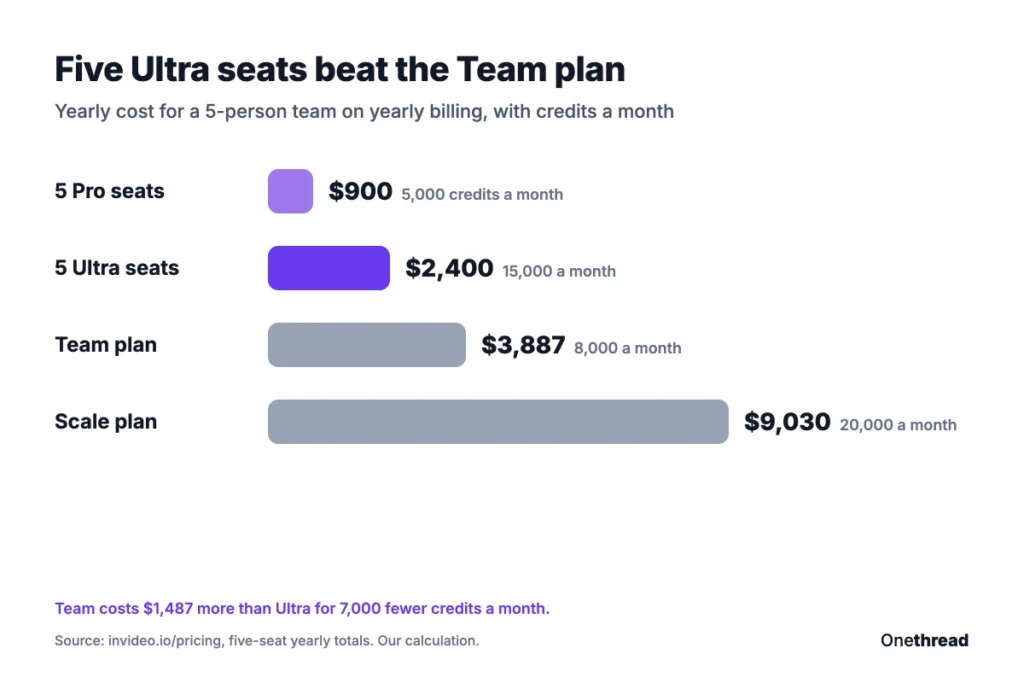
Example: Five Ultra seats cost 5 × $480 = $2,400 a year and grant 15,000 credits a month. The Team plan costs $3,887 for 8,000 credits, so it charges $1,487 more for 7,000 fewer credits.
Monthly billing doubles most of these bills. Five Pro seats cost $1,800 a year on monthly billing, and five Ultra seats cost $4,800.
So why buy Team at all? It’s the cheapest way to get client workspaces, premium support and the no-training promise. If your clients don’t ask for those, Ultra seats stretch further.
A seat counts as any teammate you add to the workspace, while guests on Pro and Ultra stay free. And if your team also juggles briefs and approvals, a project management tool for video production keeps that work out of the editor.
Which InVideo AI Plan Should You Choose?
The right InVideo AI plan depends on how much generated video you make, not how many people edit. Match your monthly output to the credits first, then add seats.
| If you… | Pick |
|---|---|
| Edit your own footage and add AI images | Basic |
| Make under a minute of AI video a month | Pro |
| Make one to three minutes of AI video a month | Ultra |
| Need client workspaces and round-the-clock support | Team |
| Need SSO and indemnification for 5 to 30 people | Scale |
| Need SOC 2, spend controls or rollover credits | Enterprise |
These fit labels are our judgment from the plan limits, not InVideo’s.
Three checks help you decide:
- Count seconds, not videos: Multiply your monthly seconds of 1080p video by about 19 credits a second.
- Price yearly against monthly: Yearly billing halves Basic, Pro and Ultra, but you lose the exit if InVideo changes plans again.
- Check guests before seats: Pro and Ultra include free guests, so reviewers may not need paid seats.
Not sure yet? Start on monthly Pro for one cycle and watch the usage page, then switch to yearly once you know your burn rate.
How Does InVideo AI Pricing Compare to Pictory, Synthesia and HeyGen?
InVideo AI pricing starts lower than Pictory, Synthesia and HeyGen, but those tools count usage differently. Here’s the first paid plan for one user on yearly billing:
| Tool | First paid plan, one user, per year | Best for |
|---|---|---|
| InVideo AI | $54 | Generated clips and editing your own footage |
| Synthesia | $168 | Avatar training videos |
| HeyGen | $288 | Avatar marketing videos |
| Pictory | $300 | Turning scripts and blog posts into videos |
Prices come from our own guides, and the Best for labels are ours. Check each vendor’s page before you buy.
The low entry price doesn’t make InVideo the cheapest per video. Basic’s 190 credits won’t cover much generated footage, while Synthesia’s plans include set video minutes. Our Synthesia pricing guide and HeyGen pricing guide break down avatar minutes. For script-to-video work, our Pictory pricing breakdown prices it per finished minute.
What Should You Do Next With InVideo AI?
InVideo AI’s seat prices are clear, but the credits decide your real bill. A minute of 1080p video can outrun Pro. Ultra on yearly billing buys the cheapest credits, even for teams. The business plans make sense only when you need what sits around the credits.
This week, run one real project on the free tier or a monthly Pro seat and check the usage page after each render. Multiply that burn by your monthly output, and you’ll know which plan you need before you commit to a full year.
FAQs
Can You Cancel InVideo AI Anytime?
Yes, you can cancel InVideo AI at any time, but the plan stays active until the end of the billing cycle. After that, the account drops to the free tier and unused paid credits expire. On yearly billing, you keep access for the rest of the year you paid for, so plan big projects before the end date.
Does InVideo AI Give Refunds?
InVideo AI doesn’t publish a refund amount on its pricing page, so ask support before you buy a year. Several Trustpilot reviewers report refund requests declined once credits were spent. InVideo has replied that failed generations aren’t charged credits and that support reviews specific cases. Test on a monthly plan first to limit the risk.
What Payment Methods Does InVideo AI Accept?
InVideo AI accepts credit cards, Apple Pay and Google Pay. Subscriptions bill monthly or yearly, starting from the day you subscribe, and credits reset on that same day each month. Yearly plans still hand out credits monthly, so a yearly subscriber can’t spend a full year of credits in the first week.
Do Unused Credits Carry Over When You Upgrade InVideo AI?
Yes, when you upgrade to a higher InVideo AI plan, your unused credits move to the new plan. That’s the only time they carry over on self-serve plans. If you stay on the same plan, unused credits expire at each monthly reset. Enterprise is the only tier that lists volume rollover credits.
Does InVideo AI Offer an Enterprise Plan?
Yes, InVideo AI sells a custom Enterprise plan through its sales team. It adds unlimited seats, custom credits per seat, a shared credit pool, volume rollover credits, SOC 2, custom SSO and a priority generation queue. Pricing isn’t published, so you’ll need a quote. It suits large teams that need spend controls and security reviews.